1. Giriş
Thank you for choosing the Ewent EW3295 Backlit Wireless Keyboard. This full-size keyboard offers versatile connectivity options, including Bluetooth 5.0 and 2.4GHz wireless, allowing you to connect up to three devices simultaneously. Its slim design, silent keys, and adjustable backlight provide a comfortable and efficient typing experience. This manual provides detailed instructions for setup, operation, and maintenance to ensure optimal performance of your keyboard.

Figure 1.1: Slim and sturdy design of the EW3295 keyboard.
2. Əsas Xüsusiyyətlər
- Wireless Multi-Device Connection: Connect up to 3 devices simultaneously via Bluetooth 5.0 (x2) or wireless 2.4 GHz. Easily switch between devices with just one button.
- Tənzimlənən arxa işıq: The keyboard's backlight is dimmable and can be turned off completely, ideal for various lighting conditions.
- Flat & Quiet Design: Flat, silent keys ensure a comfortable and low-noise typing experience, suitable for quiet environments.
- 12 Multimedia düymələri: Quick access to functions like volume control, email, and other operations.
- Uzunömürlü təkrar doldurulan batareya: Equipped with a 300mAh lithium battery and intelligent energy-saving function for extended use.
- Geniş Uyğunluq: Compatible with Windows (XP, 7, 8.1, 10, 11) and Android, suitable for PCs, laptops, and tablets.
- Möhkəm və Davamlı Dizayn: Made of high-density polycarbonate, lightweight yet durable, with a compact design.
- Italian Layout: Features an Italian QWERTY keyboard layout.
3. Paketin məzmunu
Lütfən, qutudan çıxararkən paketin məzmununu yoxlayın:
- Ewent EW3295 Backlit Wireless Keyboard
- USB-A 2.4GHz Wireless Receiver
- USB-C-USB-A Şarj Kabeli
- İstifadəçi Təlimatı (bu sənəd)
4. Quraşdırma Bələdçisi
4.1 Klaviaturanın doldurulması
The EW3295 keyboard is equipped with a built-in rechargeable 300mAh lithium battery. Before first use, it is recommended to fully charge the keyboard.
- Locate the USB Type-C charging port on the rear panel of the keyboard.
- Connect one end of the provided USB-C charging cable to the keyboard's USB-C port.
- Connect the other end of the USB-A cable to a USB power source (e.g., computer USB port, USB wall adapter).
- The charging indicator light (if present) will illuminate during charging and turn off when fully charged. A full charge takes less than 1 hour and provides over 1 month of use.

Figure 4.1: Rear panel of the keyboard with charging port and receiver compartment.
4.2 Klaviaturanın qoşulması
The EW3295 keyboard supports three connection modes: 2.4GHz wireless and two Bluetooth 5.0 channels (BT1, BT2). You can connect up to three devices and switch between them.
4.2.1 2.4GHz Simsiz Bağlantı
- Locate the USB-A wireless receiver, typically stored in a compartment on the rear panel of the keyboard.
- Plug the USB-A receiver into an available USB port on your computer or device.
- düyməsini basın fn+1 keys on the keyboard to switch to 2.4GHz mode. The indicator light for channel 1 will illuminate.
- Klaviatura avtomatik olaraq cihazınıza qoşulmalıdır.

Figure 4.2: Ewent EW3295 keyboard and its USB wireless receiver.
4.2.2 Bluetooth Connection (BT1 / BT2)
- düyməsini basın fn+2 keys to select Bluetooth channel 1 (BT1) or fn+3 keys to select Bluetooth channel 2 (BT2). The corresponding indicator light will flash, indicating pairing mode.
- Cihazınızda (kompüter, noutbuk, planşet) Bluetooth-u aktivləşdirin və yeni cihazlar axtarın.
- Select "EW3295" or a similar name from the list of available Bluetooth devices.
- Follow any on-screen prompts to complete the pairing process. Once connected, the indicator light will stop flashing and remain solid.
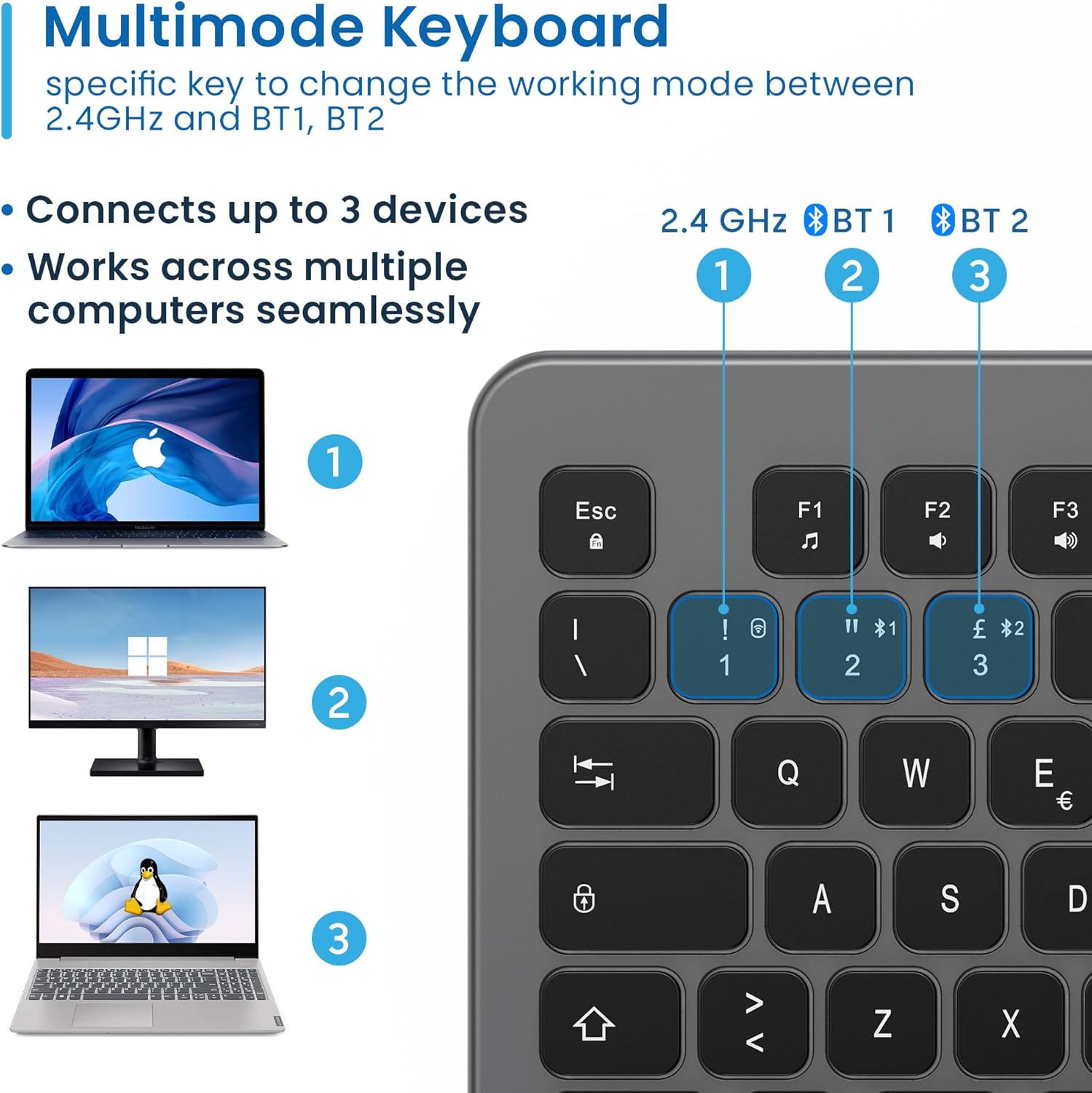
Figure 4.3: Multi-device connectivity options for the EW3295 keyboard.
4.2.3 Qoşulmuş Cihazlar arasında keçid
Once multiple devices are paired, you can easily switch between them:
- basın fn+1 to switch to the 2.4GHz connected device.
- basın fn+2 to switch to the Bluetooth 1 connected device.
- basın fn+3 to switch to the Bluetooth 2 connected device.
5. Əməliyyat Təlimatları
5.1 Əsas Yazma
The EW3295 features a full-size Italian QWERTY layout. Its flat and silent keys provide a comfortable and precise typing experience, reducing noise in quiet environments.

Figure 5.1: Illuminated Italian QWERTY Keyboard Layout.

Figure 5.2: Silent keys for reduced noise.
5.2 Arxa İşığa Nəzarət
The keyboard features an adjustable backlight for improved visibility in low-light conditions.
- Arxa işığı ON/OFF: düyməsini basın Blok Skorr key (often labeled with a lightbulb icon) to toggle the backlight on or off.
- Backlight Brightness Up: basın Fn + Pag ↑ to increase backlight brightness.
- Backlight Brightness Down: basın Fn + Pag ↓ to decrease backlight brightness.
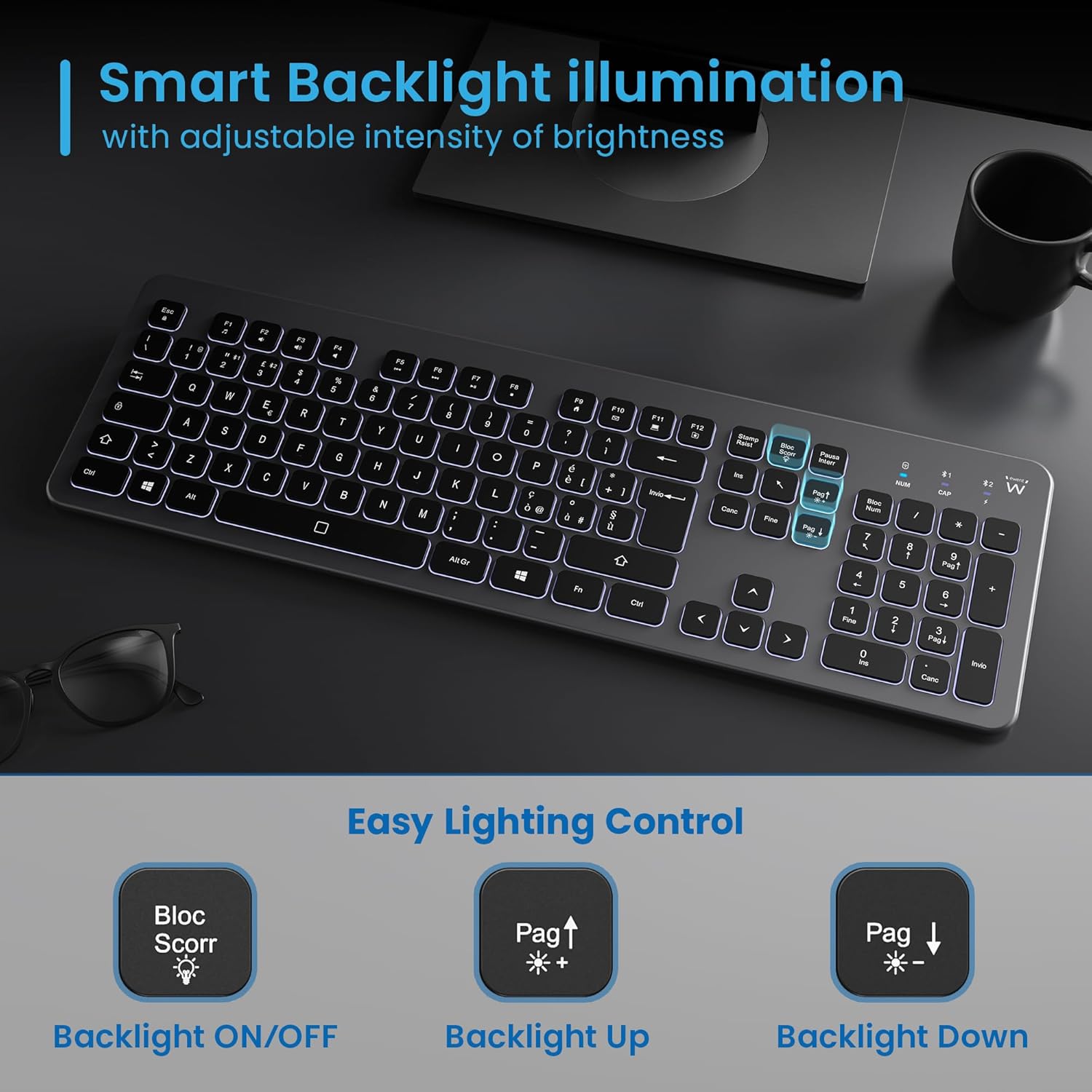
Figure 5.3: Backlight control keys.
5.3 Multimediya Açarları
The keyboard includes 12 dedicated multimedia keys (F1-F12) that provide quick access to various functions. To use these functions, press the Fn düyməni istədiyiniz F düyməsi ilə eyni vaxtda basın.
| Açar birləşməsi | Funksiya |
|---|---|
| Fn + F1 | Media pleyer |
| Fn + F2 | Səsi azaldın |
| Fn + F3 | Səs artır |
| Fn + F4 | Səssiz |
| Fn + F5 | Əvvəlki Track |
| Fn + F6 | Növbəti Track |
| Fn + F7 | Oynat/Pause |
| Fn + F8 | Dayan |
| Fn + F9 | Əsas Səhifə |
| Fn + F10 | E-poçt |
| Fn + F11 | Mənim Kompüterim |
| Fn + F12 | Kalkulyator |
6. Baxım və qulluq
Düzgün qulluq klaviaturanızın uzunömürlülüyünü və optimal işləməsini təmin edir.
- Təmizləmə: Use a soft, dry, lint-free cloth to clean the keyboard surface. For stubborn dirt, slightly dampparçanı su və ya yumşaq, aşındırıcı olmayan təmizləyici ilə yuyun. Həddindən artıq nəmdən çəkinin.
- Mayelərdən çəkinin: Do not spill liquids on the keyboard. In case of accidental spills, immediately disconnect the keyboard and allow it to dry completely before re-using.
- Yaddaş: Uzun müddət istifadə edilmədikdə, klaviaturanı birbaşa günəş işığından və həddindən artıq temperaturdan uzaq, sərin, quru yerdə saxlayın.
- Batareyaya qulluq: To prolong battery life, avoid fully discharging the battery frequently. Charge the keyboard when the low battery indicator appears.
- Qəbuledici Saxlama: When transporting the keyboard, store the USB wireless receiver in its dedicated compartment on the rear panel to prevent loss.
7. Giderme
If you encounter issues with your EW3295 keyboard, please refer to the following common solutions:
| Problem | Mümkün Səbəb | Həll |
|---|---|---|
| Keyboard not responding (2.4GHz) | Low battery; Receiver not plugged in; Incorrect channel selected. | Charge the keyboard; Ensure USB receiver is securely plugged in; Press fn+1 to select 2.4GHz mode. |
| Klaviatura cavab vermir (Bluetooth) | Low battery; Bluetooth not enabled on device; Not paired; Incorrect channel selected. | Charge the keyboard; Enable Bluetooth on your device; Re-pair the keyboard (see Section 4.2.2); Press fn+2 or fn+3 to select the correct Bluetooth channel. |
| Arxa işıq işləmir | arxa işıq söndürüldü; Aşağı batareya. | basın Blok Skorr to turn on/off; Increase brightness with Fn + Pag ↑; Charge the keyboard. |
| Açarlar yapışqandır və ya reaksiya vermir | Dirt or debris under keys; Physical damage. | Clean the keyboard (see Section 6); If physical damage, contact support. |
| Qısa batareya ömrü | Frequent backlight use; Battery degradation over time. | Reduce backlight brightness or turn it off when not needed; Ensure full charge cycles. |
8. Spesifikasiyalar
| Xüsusiyyət | Detal |
|---|---|
| Model Adı | Tastiera Wireless Retroilluminata EW3295 |
| Element Model nömrəsi | EW3295 |
| Brend | Event |
| Bağlantı texnologiyası | Bluetooth 5.0 (x2), 2.4GHz Wireless |
| Klaviatura Təsviri | Multimedia, Full-size, Italian Layout |
| Uyğun Cihazlar | PC (Windows XP, 7, 8.1, 10, 11), Android |
| Batareya növü | Yenidən doldurula bilən 300mAh Lityum Batareya |
| Arxa işıq | Tənzimlənən intensivlik |
| Ölçülər (U x G x Y) | təqribən. 432mm x 122mm x 22mm |
| Çəki | təqribən. 390q |
| Material | High-density Polycarbonate |

Figure 8.1: Keyboard dimensions and weight.
9. Zəmanət Məlumatı
Ewent products are designed and manufactured to the highest quality standards. This product is covered by a limited warranty from the date of purchase. Please refer to the warranty card included with your product or visit the official Ewent webBölgəniz üçün xüsusi olan ətraflı zəmanət şərtləri və qaydaları üçün sayta daxil olun. Zəmanət adətən normal istifadə zamanı materiallarda və işçilikdə yaranan qüsurları əhatə edir.
10. Müştəri dəstəyi
For technical support, troubleshooting assistance, or any questions regarding your Ewent EW3295 keyboard, please contact Ewent customer support. You can typically find contact information (phone, email, support portal) on the official Ewent websaytda və ya məhsulun qablaşdırmasında.
Please have your product model number (EW3295) and purchase details ready when contacting support.


