Giriş
This manual provides comprehensive instructions for the OMAIC EN2Q36H replacement remote control, designed for Hisense Smart TVs. It covers essential information regarding setup, operation, and maintenance to ensure optimal performance and user experience. This remote offers a direct replacement solution without the need for complex programming.
Quraşdırma
The OMAIC EN2Q36H remote control is designed for immediate use with compatible Hisense Smart TVs. No programming or pairing is required.
Batareyanın quraşdırılması
- Pultun arxasındakı batareya bölməsini tapın.
- Batareyanın qapağını açmaq üçün aşağı və ya ox ilə göstərilən istiqamətə sürüşdürün.
- Insert two AAA alkaline batteries (not included), ensuring the positive (+) and negative (-) terminals align correctly with the markings inside the compartment.
- Batareya qapağını etibarlı şəkildə kliklənənə qədər yerinə sürüşdürərək dəyişdirin.
Once batteries are installed, the remote is ready to operate your Hisense Smart TV.

Əməliyyat Təlimatları
This remote control utilizes infrared (IR) technology for communication with your Hisense Smart TV. Ensure a clear line of sight between the remote and the TV's IR receiver for optimal performance.
Əsas Xüsusiyyətlər
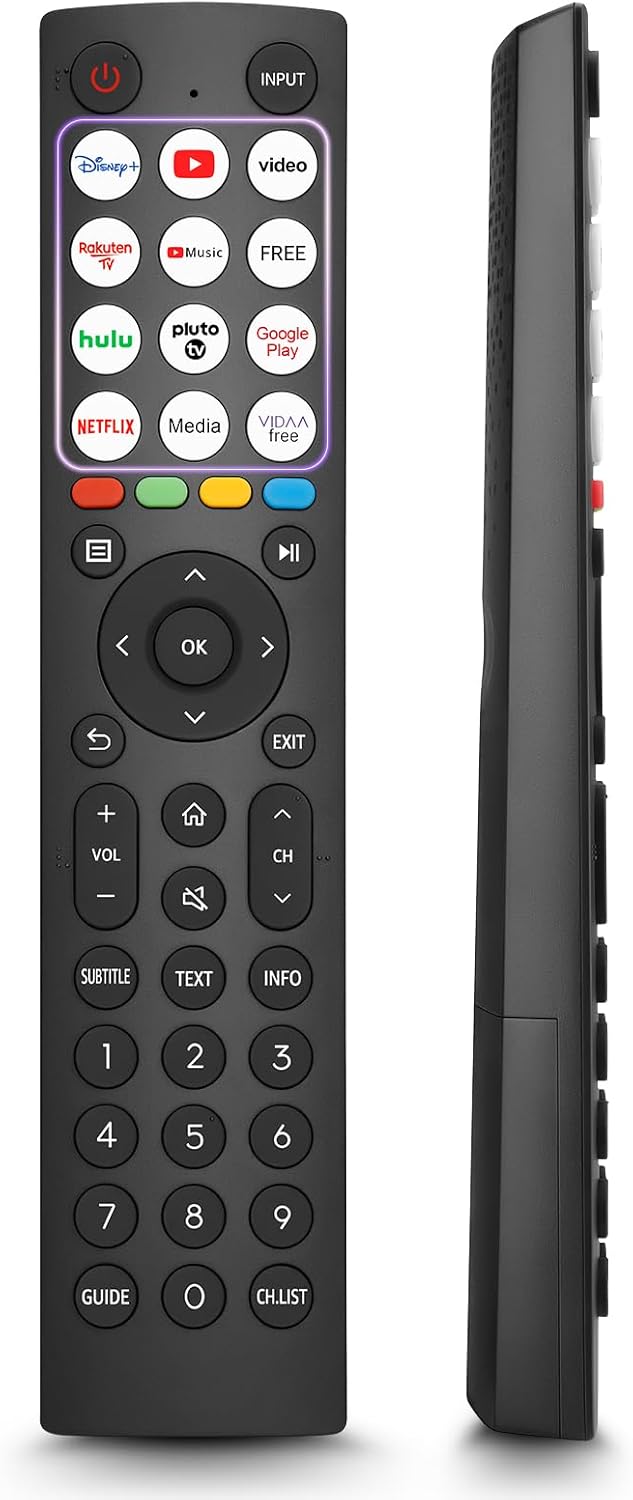
- 12 Shortcut Buttons: Quickly access popular streaming services and applications with dedicated buttons.
- Strong IR Signal: Provides a longer transmission distance and quick response without noticeable delay.
- Davamlı tikinti: Made from high-quality ABS and silicone materials for extended lifespan.

Düymə funksiyaları
Familiarize yourself with the functions of each button on your OMAIC EN2Q36H remote control:
| Düymə | Funksiya |
|---|---|
| GÜC | Switches the TV on or into standby mode. |
| GİRİŞ | Giriş mənbələrini (HDMI, AV və s.) seçir. |
| APP Buttons | Quick access buttons for specific applications (e.g., Disney+, Netflix, YouTube). |
| MENU | Displays the Quick Setup menu. |
| MEDİA İdarəsi | Buttons for Play, Pause, Stop, Fast Forward, Rewind. |
| Naviqasiya (Yuxarı/Aşağı/Sol/Sağa) | Navigates on-screen menus and adjusts system settings. |
| OK | Confirms selection in on-screen menus. |
| GERİ | Əvvəlki menyuya qayıdır. |
| EXIT | Cari menyudan çıxır. |
| VOL +/- | Səs səviyyəsini tənzimləyir. |
| EV | Enters the Home screen. |
| SƏSSİZ | TV səsini söndürür və ya bərpa edir. |
| CH ^/v | Switches channels. |
| SUBTITLE | Activates or deactivates subtitle mode. |
| MƏTN | Turns teletext function on and off. |
| MƏLUMAT | Cari proqram məlumatlarını göstərir. |
| NUMBER Buttons (0-9) | Direct channel selection or number input. |
| REHBER | Displays the Electronic Programme Guide (DTV input). |
| CH. SİYAHI | Displays the Channel List on the screen. |

Compatible Hisense TV Models
The OMAIC EN2Q36H replacement remote control is compatible with the following Hisense VIDAA 4K HDTV Smart TV series:
- 32A4K, 40A4K, 43A4K
- 32A5KQ, 40A5KQ
- 43A6K, 50A6K, 55A6K, 58A6K, 65A6K, 70A6K, 75A6K, 85A6K
- 55U6KQ, 65U6KQ
- 43A7KQ, 50A7KQ, 55A7KQ, 65A7KQ, 75A7KQ
- 43E7KQ, 50E7KQ, 55E7KQ, 65E7KQ, 75E7KQ
Baxım
Pultunuzun uzunömürlülüyünü və düzgün işləməsini təmin etmək üçün bu texniki xidmət təlimatlarına əməl edin:
- Təmizləmə: Use a soft, dry cloth to clean the remote. Avoid using liquid cleaners or abrasive materials, as they may damage the surface or internal components.
- Batareyanın dəyişdirilməsi: Replace batteries when the remote's response becomes sluggish or stops working. Always replace both batteries at the same time with new ones of the same type (AAA alkaline).
- Yaddaş: Pultu birbaşa günəş işığından, həddindən artıq temperaturdan və yüksək rütubətdən uzaq sərin, quru yerdə saxlayın.
- Damlalardan çəkinin: Pultu fiziki təsirdən qoruyun, çünki damcılar daxili dövrəni zədələyə bilər.
Problemlərin aradan qaldırılması
If you encounter issues with your remote control, refer to the following troubleshooting steps:
| Problem | Mümkün Səbəb | Həll |
|---|---|---|
| Uzaqdan cavab vermir | Ölü və ya səhv daxil edilmiş batareyalar. | Düzgün qütblüyü təmin edərək, batareyaları yeni AAA qələvi batareyaları ilə dəyişdirin. |
| Uzaqdan cavab vermir | Pult və televizor arasında maneə. | Ensure a clear line of sight to the TV's IR receiver. Remove any objects blocking the path. |
| Uzaqdan cavab vermir | Remote is too far from the TV. | Move closer to the TV. The remote has an extended range, but extreme distances may affect performance. |
| Düymələr yapışqandır və ya cavab vermir | Düymələrin altındakı kir və ya zibil. | Düymələrin ətrafını yumşaq, quru parça ilə ehmalca təmizləyin. Mayelərdən çəkinin. |
| Specific functions not working | TV model incompatibility (rare). | Verify your Hisense TV model is listed in the 'Compatible Hisense TV Models' section. |
Spesifikasiyalar
| Xüsusiyyət | Detal |
|---|---|
| Model Adı | EN2Q36H |
| Brend | OMAIC |
| Uyğun Cihazlar | Hisense Smart TVs |
| Bağlantı texnologiyası | İnfraqırmızı (IR) |
| Düymələrin sayı | 48 |
| Nəzarət növü | Düymə İdarəsi |
| Xüsusi Xüsusiyyətlər | Universal, Comfortable |
| Rəng | Qara |
| Batareyanın təsviri | AAA (Alkaline) |
| Supported Devices (Max) | 1 |
| Məhsul Ölçüləri (Təxmini) | 34.7 x 24.7 x 2.2 sm |
| Məhsulun çəkisi (təxminən) | 80 qram |

Zəmanət və Dəstək
OMAIC is committed to the quality and compatibility of its replacement remote controls. We provide professional after-sales support to ensure customer satisfaction.
If you have any questions or concerns regarding your OMAIC EN2Q36H remote control or your order, please contact us directly. Our support team aims to respond to inquiries within 12 working hours.