1. Giriş
Aldığınız üçün təşəkkür edirikasing the Supersonic Professional Stereo Amplifier AV-972SA. This amplifier is designed to provide high-fidelity audio for your home entertainment or karaoke system. With its versatile features, including USB/SD card playback, FM radio, and microphone inputs, it offers a powerful and clear sound experience. Please read this manual carefully before operating the unit to ensure proper use and to maximize its performance.
2. Əhəmiyyətli Təhlükəsizlik Təlimatları
- Enerji təchizatı: Enerji təchizatı voltage matches the requirements specified on the unit (220V~250V/50Hz).
- Havalandırma: Heç bir ventilyasiya açılışını bağlamayın. İstehsalçının göstərişlərinə uyğun olaraq quraşdırın.
- Su və nəm: Bu cihazı yağışa və ya nəmə məruz qoymayın. Vazalar kimi maye ilə doldurulmuş əşyalar cihazın üzərinə qoymayın.
- İstilik: Radiatorlar, istilik registrləri, sobalar və ya digər aparatlar (o cümlədən) kimi istilik mənbələrinin yaxınlığında quraşdırmayın. ampistilik əmələ gətirən qaldırıcılar).
- Təmizləmə: Yalnız quru parça ilə təmizləyin.
- Xidmət: Bu məhsula özünüz xidmət göstərməyə çalışmayın. Bütün xidmətlər üçün ixtisaslı xidmət personalına müraciət edin.
- Dinamik Bağlantısı: Ensure correct polarity when connecting speakers to prevent damage to the ampqaldırıcı və dinamiklər.
3. Əsas Xüsusiyyətlər
- Luxury Color Pointer Screen Display
- High-Fidelity Stereo Dynamic AmpHəyat Dizaynı
- Bass-enhancement Technology
- Güclü 3000W Çıxış
- Professional Karaoke FM Radio Tuner
- USB/SD Card Playback for MP3 files
- Low Leak Magnetic Ring type Voltage
- Optimized for use with 12", 15", and 18" loudspeakers
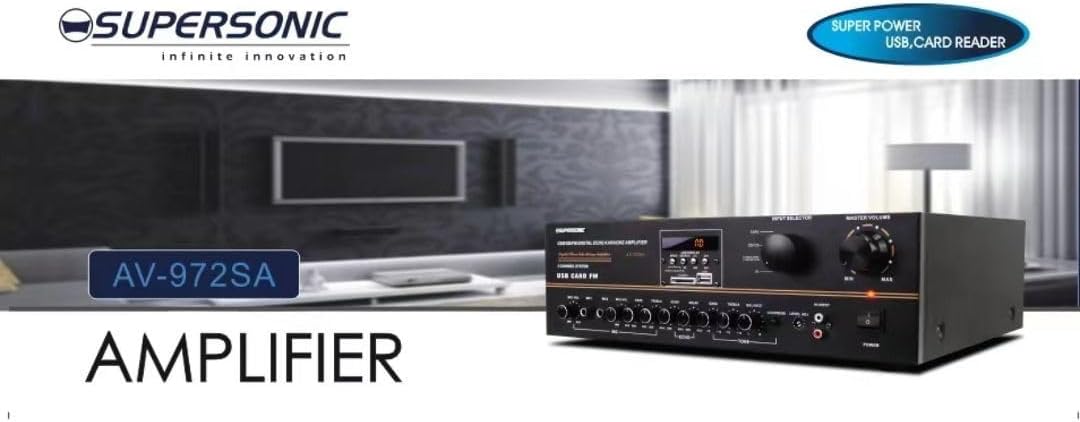
Şəkil 3.1: A visual representation of the key features of the Supersonic AV-972SA amplifier, including its display, power output, and connectivity options.
4. Məhsul bitdiview
The Supersonic AV-972SA amplifier features a user-friendly front panel for easy control and a rear panel for all necessary connections.
4.1 Ön Panel

Şəkil 4.1: Ön view of the Supersonic AV-972SA ampqaldırıcı, nümayişasing its controls, display, and input ports in a home setting.
Ön panelə daxildir:
- Güc düyməsi: çevirir ampdaha açıq və ya sönük.
- Master Səs Nəzarəti: Ümumi çıxış həcmini tənzimləyir.
- Bas/Sürətli Tezlik Nəzarətləri: Adjusts low and high frequency response.
- Giriş seçicisi: Switches between different audio sources (e.g., USB, SD, FM, AUX).
- USB/SD Kart Yuvası: Audio ifa etmək üçün files birbaşa USB sürücülərindən və ya SD kartlardan.
- FM Tuner İdarəetmələri: For radio station selection and tuning.
- Mikrofon girişləri: Karaoke və ya ictimai çıxış üçün mikrofonları birləşdirmək üçün.
- Ekran Ekranı: Cari rejimi, trek məlumatını və ya FM tezliyini göstərir.
4.2 Arxa Panel
The rear panel provides all necessary connections for speakers, power, and external audio sources.
- Dinamik terminalları: Connect your loudspeakers here. Ensure correct polarity (+ to + and - to -).
- Audio Girişi (RCA): For connecting external audio devices like CD players, DVD players, or other audio sources.
- Elektrik Kabeli Girişi: Connect the provided power cord here.
- FM Antenna Girişi: Connect the FM antenna for improved radio reception.
5. Quraşdırma Bələdçisi
Follow these steps to set up your Supersonic AV-972SA ampömürlük:
- Yerləşdirmə: yerləşdirin amplifier on a stable, flat surface with adequate ventilation around it. Avoid direct sunlight, heat sources, or areas with high humidity.
- Dinamik Bağlantısı: Connect your loudspeakers to the speaker terminals on the rear panel. Match the positive (+) terminal on the amplifier to the positive (+) terminal on your speaker, and the negative (-) to the negative (-). Ensure all connections are secure. This amplifier is designed to work best with 12", 15", or 18" loudspeakers.
- Audio Mənbə Bağlantısı:
- Xarici Cihazlar: Connect your CD player, DVD player, or other audio sources to the RCA audio input jacks on the rear panel.
- USB/SD Kart: Insert a USB flash drive or SD card into the respective slot on the front panel.
- FM Antenası: Connect the FM antenna to the designated input on the rear panel for optimal radio reception.
- Enerji bağlantısı: təmin etmək amplifier's power switch is in the OFF position. Connect the power cord to the amplifier's power input and then plug it into a suitable 220V~250V/50Hz AC power outlet.
6. Əməliyyat Təlimatları
6.1 Yandırma/Söndürmə
düyməsini basın Güc düyməsi çevirmək üçün ön paneldə amplifier ON. The display will illuminate. Press it again to turn the ampqaldırıcı OFF.
6.2 Selecting Audio Source
istifadə edin Giriş Seçicisi button or knob on the front panel to cycle through available audio sources: USB, SD, FM, or AUX (RCA input).
6.3 Səs və ton tənzimlənməsi
- Master həcmi: Döndürün Əsas həcm knob to adjust the overall sound level. Start with a low volume and gradually increase it.
- Bas/Tiz: istifadə edin Bas və Üçqat knobs to fine-tune the low and high frequencies of the audio output to your preference.
6.4 USB/SD Kart Oxutma
Once a USB drive or SD card containing MP3 audio files is inserted, the amplifier will automatically switch to USB/SD mode and begin playback. Use the control buttons (Play/Pause, Next, Previous) on the front panel to manage playback.
6.5 FM Radio Əməliyyatı
Select the FM input using the Giriş Seçicisi. Use the FM tuner controls to scan for and select radio stations. The display will show the current frequency.
6.6 Mikrofon İstifadəsi (Karaoke)
Connect your microphones to the microphone input jacks on the front panel. Adjust the microphone volume and echo effects (if available) using the dedicated controls. Ensure the main volume is set appropriately to avoid feedback.
7. Baxım
- Təmizləmə: Disconnect the power before cleaning. Use a soft, dry cloth to wipe the exterior of the amplifier. Do not use liquid cleaners or aerosol sprays.
- Havalandırma: Həddindən artıq istiləşmənin qarşısını almaq üçün havalandırma deliklərinin toz və zibildən təmizləndiyini mütəmadi olaraq yoxlayın.
- Yaddaş: Əgər saxlanılırsa amplifier for an extended period, ensure it is in a cool, dry place, away from direct sunlight and extreme temperatures.
8. Giderme
| Problem | Mümkün Səbəb | Həll |
|---|---|---|
| Güc yoxdur | Elektrik kabeli qoşulmayıb; Elektrik rozetkası nasazdır; Amplifier power switch off | Check power cord connection; Try a different outlet; Ensure power switch is ON |
| Səs çıxışı yoxdur | Volume too low; Incorrect input selected; Speaker wires loose or incorrectly connected; Faulty audio source | Increase master volume; Select correct input; Check speaker connections and polarity; Test with a different audio source |
| Zəif FM qəbulu | Antenna not connected or poorly positioned; Weak signal | Connect FM antenna securely; Adjust antenna position; Try manual tuning |
| USB/SD oynamır | Səhv file format; USB/SD card faulty or not inserted correctly; Amplifier not in USB/SD mode | təmin etmək files are MP3 format; Reinsert USB/SD card; Select USB/SD input mode |
9. Spesifikasiyalar
| Xüsusiyyət | Spesifikasiya |
|---|---|
| Brend | Supersəs |
| Model nömrəsi | AMP-AV972SA |
| Çıxış Wattage | 3000W |
| Bağlantı texnologiyası | USB |
| Xüsusi Xüsusiyyət | Kompakt Dizayn |
| Rəng | Qara |
| Məhsul Ölçüləri | 25D x 45W x 26H santimetr |
| Maddə Çəkisi | 1 kiloqram |
| Nəzarət metodu | Toxun |
| Enerji təchizatı | 220V~250V/50Hz |
10. Zəmanət və Dəstək
This Supersonic AV-972SA ampqaldırıcı a ilə gəlir 6 Ay İstehsalçı Zəmanəti from the date of purchase. This warranty covers manufacturing defects under normal use. It does not cover damage caused by misuse, accidents, unauthorized modifications, or improper installation.
For warranty claims or technical support, please contact your retailer or the Supersonic customer service department. Please have your proof of purchase and product model number (AMP-AV972SA) ready when contacting support.


