Giriş
The EROK Digital Metronome & Tuner (Model EK-AMT-600) is a versatile 3-in-1 device combining a digital metronome, chromatic tuner, and tone generator. This compact, rechargeable unit features a clear, full-color display and supports various instruments including guitar, bass, violin, ukulele, viola, cello, and wind instruments. It offers voice counting for metronome beats and comes with a contact clip-on microphone for accurate tuning.
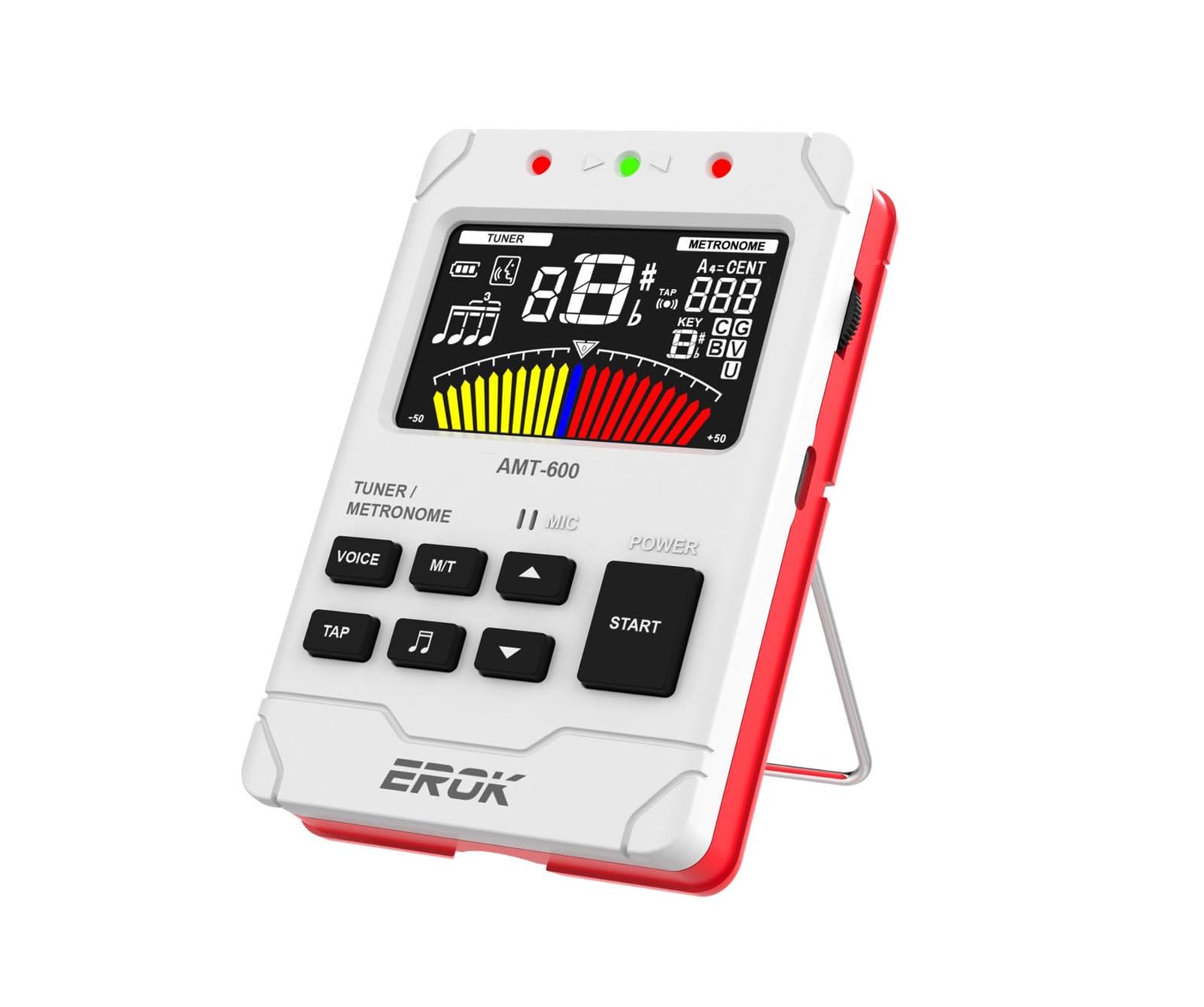
Image: The EROK Digital Metronome and Tuner (Model EK-AMT-600) in white, showcasing its display and compact design.
Qutuda nə var
- 1x EROK Digital Metronome & Tuner (Model EK-AMT-600)
- 1x İstifadəçi Təlimatı
- 1x USB Type-C şarj kabeli
- 1x Pickup Clip
Məhsul Xüsusiyyətləri
- 3-ü 1-də Funksionallıq: Combines a metronome, tuner, and tone generator in one portable device.
- Yenidən doldurulan batareya: Built-in 600mAh Lithium Polymer battery provides over 5 hours of continuous use after a 2-hour charge.
- Ekranı təmizləyin: Large, full-color LCD screen for easy readability.
- Versatile Metronome: Wide tempo range (30-260 BPM), 10 beat subdivisions (0-9), 8 rhythm patterns, voice beat counting, and tap tempo function.
- Multi-Function Chromatic Tuner: Supports various instruments (Guitar, Bass, Violin, Ukulele, Chromatic, Wind Instruments) with a detection range of A0-C8 and pitch calibration (410-450Hz).
- Multiple Tuning Input Methods: Built-in microphone, included pickup clip, or 1/4-inch input jack (cable not included).
- Ton generatoru: Produces precise reference tones for tuning by ear.
- İstifadəçi dostu dizayn: Features adjustable volume, built-in speaker, headphone output, and a foldable stand.

Image: Key features of the EROK Digital Metronome and Tuner, including its chromatic tuner, tap tempo metronome, tone generator, and intuitive user interface.
Nəzarət və Funksiyalar Bitdiview

Image: Labeled diagram of the EROK Digital Metronome and Tuner, showing the location and function of each button, jack, and indicator.
- LED Göstərici: Displays status (e.g., charging, tuning accuracy).
- Qulaqlıq girişi (3.5 mm): Qulaqlıqla fərdi təcrübə üçün.
- Metronome/Tuner Switch (M/T): Long press to toggle between metronome and tuner modes.
- Voice Beat Button (VOICE): Activates or deactivates voice counting in metronome mode.
- Rhythm Button (Music Note Icon): Cycles through different rhythm patterns in metronome mode.
- TAP düyməsi: Allows manual setting of tempo by tapping.
- Həcmi Təkər: Çıxış həcmini tənzimləyir.
- USB Type-C Jack: Cihazı doldurmaq üçün.
- Mikrofon: Built-in microphone for tuning and sound detection.
- On/Off/Play Button (START): Long press to power on/off; short press to start/stop metronome.
- Tempo/Beat Select Buttons (Up/Down Arrows): Adjust tempo, beat, or tuning parameters.
- Pickup Jack (6.35mm): Input for external pickup clip or instrument cable.
Quraşdırma
Cihazın doldurulması
The EK-AMT-600 features a built-in rechargeable Lithium Polymer battery. To charge:
- Connect the provided USB Type-C cable to the USB Type-C Jack on the side of the device.
- Kabelin digər ucunu standart USB güc adapterinə (daxil deyil) və ya kompüterin USB portuna qoşun.
- The LED indicator will show charging status. A full charge typically takes approximately 2 hours and provides over 5 hours of continuous use.

Image: The EROK Digital Metronome and Tuner highlighting its long-lasting rechargeable battery, Type-C charging port, and estimated usage time.
Yandırılır/Söndürülür
To power on the device, uzun basın the START button. To power off, uzun basın the START yenidən düyməsini basın.
Operating the Metronome
The metronome function helps musicians maintain a steady tempo. Ensure the device is powered on.
- Switch to Metronome Mode: If not already in metronome mode, long press the M / T button to switch from tuner to metronome.
- Start/Stop Metronome: qısa basın START button to begin the metronome beat. Short press again to stop.
- Adjust Tempo (BPM): istifadə edin Yuxarı / aşağı ox buttons to increase or decrease the tempo (beats per minute) from 30 to 260 BPM.
- Tempo vurun: düyməsini basın TAP button repeatedly at your desired tempo. The device will calculate and set the BPM.
- Change Beat Subdivisions: istifadə edin Yuxarı / aşağı ox buttons to change the beat subdivision (0-9).
- Change Rhythm Pattern: düyməsini basın Musiqi Qeyd İkonası button to cycle through 8 different rhythm patterns.
- Enable Voice Counting: düyməsini basın SƏS button to activate or deactivate human voice counting for the beats.
- Səs səviyyəsini tənzimləyin: istifadə edin Səs Təkər cihazın tərəfində.
- Qulaqlıqdan istifadə: 3.5 mm qulaqlıqları şəbəkəyə qoşun Qulaqlıq yuvası for private practice.
Video: Demonstrates powering on the device, enabling voice counting, changing beat patterns, and manually setting tempo in metronome mode.

Şəkil: Ətraflı view of the metronome display, indicating voice beat, battery status, beat count, rhythm pattern, tempo, and metronome meters.
Operating the Tuner
The tuner function allows for accurate instrument tuning. Ensure the device is powered on.
- Switch to Tuner Mode: uzun basın M / T button to switch from metronome to tuner mode.
- Select Tuning Input Method:
- Quraşdırılmış Mikrofon: For acoustic instruments, simply play a note near the device's microphone.
- Pickup Clip: Connect the included pickup clip to the Pickup Jack (6.35mm) and attach the clip to your instrument's headstock or soundboard. This is ideal for noisy environments.
- 1/4-Inch Input Jack: Connect an instrument cable (not included) from your instrument to the Pickup Jack (6.35mm).
- Select Tuning Mode: istifadə edin Yuxarı / aşağı ox buttons to cycle through tuning modes: Chromatic (C), Guitar (G), Bass (B), Violin (V), Ukulele (U), and Wind Instruments.
- Alətinizi Sazlayın: Play a single note on your instrument. The display will show the note name, string number, and a tuning meter.
- If the needle is to the left, the note is flat. Tighten the string.
- If the needle is to the right, the note is sharp. Loosen the string.
- When the needle is centered and the display turns green, the note is in tune.
- Adjust Pitch Calibration (A4): In tuner mode, you can adjust the A4 reference frequency (typically 440Hz) using specific button combinations (refer to on-screen prompts or detailed manual for exact steps if not intuitive). The device supports 410-450Hz.
Video: Demonstrates switching to tuner mode, using the pickup clip for guitar tuning, and interpreting the tuning display.

Image: The EROK Digital Metronome and Tuner showing its three sound input methods for tuning: built-in microphone, pickup clip, and 6.35mm instrument cable input.

Image: The EROK Digital Metronome and Tuner connected to a guitar headstock using the included pickup clip for accurate tuning.
Ton generatoru
The tone generator function allows the device to produce precise reference tones, similar to a pitch pipe. This is useful for tuning instruments by ear or for practicing pitch recognition.
- Activate Tone Generator: While in Tuner mode, press a specific button (often the SƏS or Ritm button, depending on the model's specific interface) to activate the tone generator. The display will typically show the note being generated.
- Select Note/Mode: istifadə edin Yuxarı / aşağı ox buttons to select the desired note or tuning mode (Chromatic, Guitar, Bass, Violin, Ukulele) for the reference tone.
- Səs səviyyəsini tənzimləyin: istifadə edin Səs Təkər to control the output level of the generated tone.
Baxım
- Təmizləmə: Cihazı yumşaq, quru bir parça ilə silin. Aşındırıcı təmizləyicilərdən və ya həlledicilərdən istifadə etməyin.
- Yaddaş: Cihazı birbaşa günəş işığından və həddindən artıq temperaturdan uzaq sərin, quru yerdə saxlayın.
- Batareyaya qulluq: Batareyanın ömrünü uzatmaq üçün tez-tez batareyanı tam boşaltmaqdan çəkinin. Uzun müddət istifadə edilməsə belə, cihazı müntəzəm olaraq doldurun.
- Nəmdən qaçın: Daxili hissələrə zərər verməmək üçün cihazı sudan və yüksək rütubətdən uzaq tutun.
Problemlərin aradan qaldırılması
- Cihaz yanmır: Ensure the battery is charged. Connect the device to a power source using the USB Type-C cable and try again after a few minutes.
- Tuner not detecting notes accurately:
- Check the input method: Ensure the built-in microphone is unobstructed, the pickup clip is securely attached, or the instrument cable is fully inserted.
- Verify the tuning mode: Make sure the correct instrument mode (e.g., Guitar, Bass) or Chromatic mode is selected.
- Minimize background noise: For microphone tuning, ensure a quiet environment. The pickup clip is recommended for noisy settings.
- Check instrument intonation: If individual strings consistently tune incorrectly despite proper technique, your instrument's intonation may need adjustment by a professional.
- Metronome sound is too low or absent: Check the volume wheel on the side of the device. Ensure headphones are not plugged in if you expect sound from the built-in speaker.
- Batareyanın ömrü gözləniləndən daha qısadır: Ensure the device is fully charged (approx. 2 hours). Extreme temperatures can affect battery performance.
- Düymələr cavab vermir: Try powering the device off and on again. If the issue persists, ensure no debris is obstructing the buttons.
Spesifikasiyalar
| Model nömrəsi | EK-AMT-600 |
| Ölçülər | 4.17 x 2.91 x 0.79 düym (10.6 x 7.4 x 2.0 sm) |
| Maddə Çəkisi | 6.4 unsiya (181 qram) |
| Batareya növü | 1 Litium Polimer batareya (daxildir) |
| Doldurma vaxtı | təqribən. 2 saat |
| Davamlı istifadə müddəti | Over 5 hours (after full charge) |
| Metronome Tempo Aralığı | 30-260 vuruş/dak |
| Metronome Beat Subdivisions | 0-9 |
| Tuning Detection Range | A0 (27.5Hz) - C8 (4186Hz) |
| Pitch Calibration (A4) | 410-450Hz |
| Ayarlama rejimi | Chromatic, Guitar, Bass, Violin, Ukulele, Wind Instruments |

Image: Dimensions of the EROK Digital Metronome and Tuner, showing its compact size.
Zəmanət və Dəstək
EROK products are designed for reliability and performance. This product is covered by a standard manufacturer's warranty against defects in materials and workmanship. For detailed warranty information, technical support, or service inquiries, please refer to the contact information provided with your purchase or visit the official EROK websayt.
Zəmanət iddiaları üçün satınalma sübutunuzu özündə saxlayın.


