Giriş
Welcome to your Angrox Universal Replacement Remote Control. This manual provides detailed instructions for setting up and operating your new remote, designed for seamless compatibility with various Philips Smart 4K UHD Android TVs. Please read this manual thoroughly to ensure optimal performance and longevity of your remote control.
1. Quraşdırma
1.1 Batareyanın quraşdırılması
The remote control requires two AAA alkaline batteries (not included).
- Pultun arxasındakı batareya bölməsinin qapağını tapın.
- Press down on the tab and slide the cover downwards to open.
- Müsbət (+) və mənfi (-) terminalların bölmənin içərisindəki işarələrlə düzgün uyğunlaşdığına əmin olaraq iki AAA batareyasını daxil edin.
- Batareya qapağını etibarlı şəkildə kliklənənə qədər yerinə sürüşdürün.
1.2 İlkin qoşulma
This Angrox replacement remote control is designed for immediate use with compatible Philips Smart TVs. No programming or pairing is required. Simply insert the batteries, and the remote is ready to operate your television.
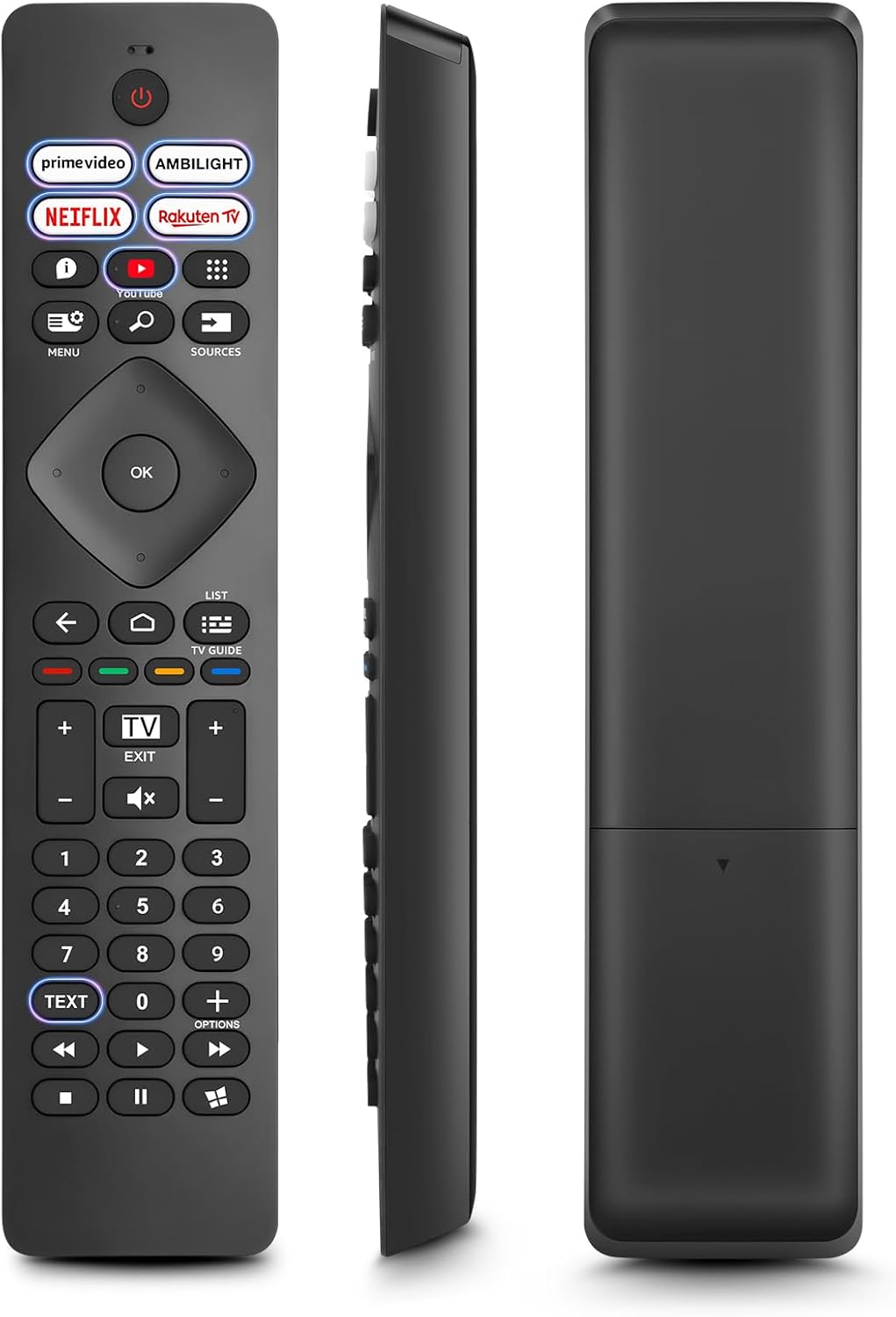
Şəkil: Ön, yan və arxa views of the Angrox Universal Replacement Remote Control. This image illustrates the physical design and battery compartment location.
2. Əməliyyat Təlimatları
2.1 Düymə funksiyaları bitdiview
Familiarize yourself with the remote control's buttons and their primary functions.
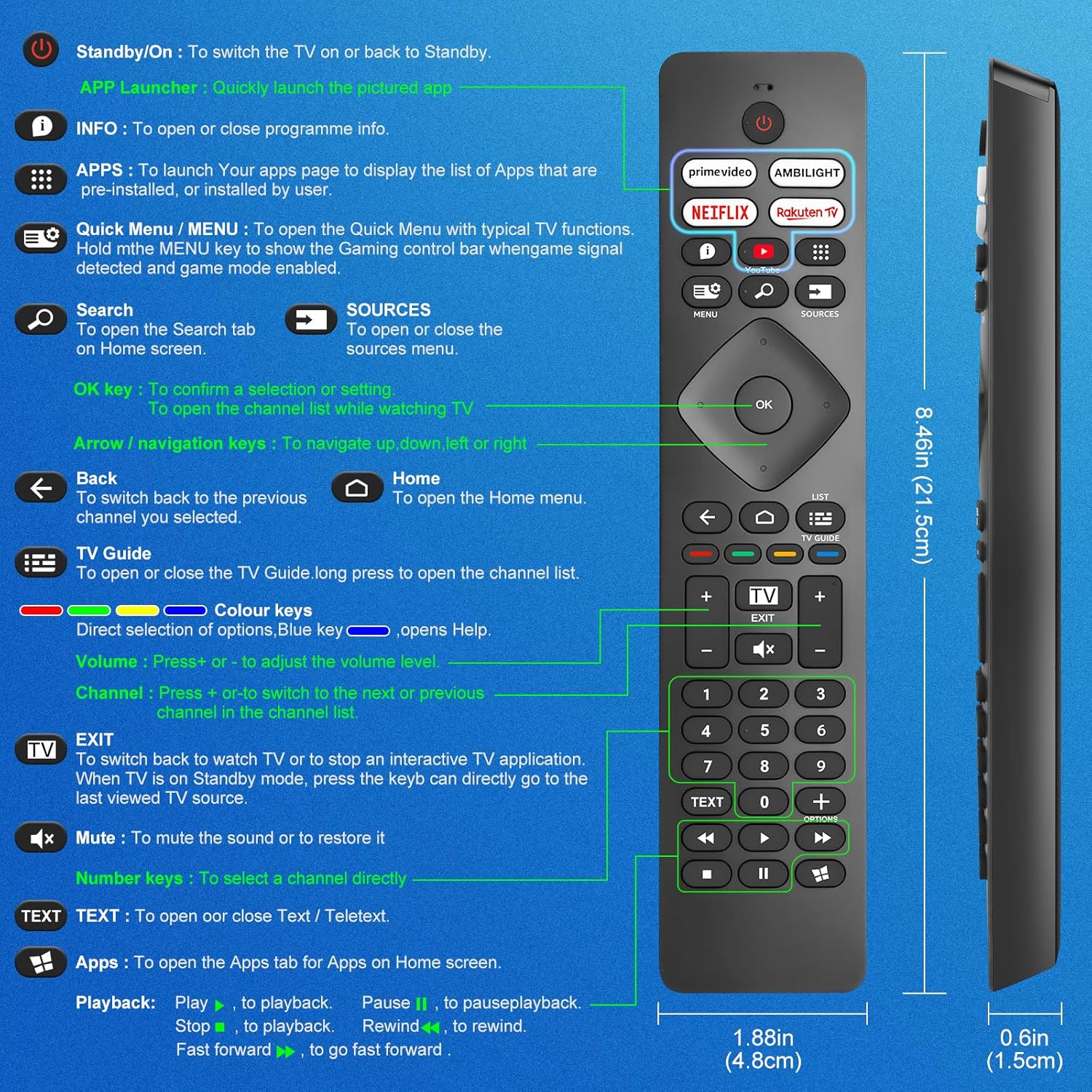
Image: A detailed diagram illustrating each button on the Angrox remote control and its corresponding function.
Detailed Button Descriptions:
- Standby/On (Power Button): Televizoru yandırmaq və ya yenidən Gözləmə rejiminə keçirmək üçün.
- APP Launcher: Quickly launch the pictured app.
- MƏLUMAT: To open or close programme info.
- TƏTBİQLƏR: To launch your apps page to display the list of apps that are pre-installed or installed by the user.
- Quick Menu / MENU: To open the Quick Menu with typical TV functions. Hold the MENU key to show the Gaming control bar when game signal detected and game mode enabled.
- Axtar: To open the Search tab on Home screen.
- MƏNBƏLƏR: To open or close the sources menu.
- OK düyməsi: To confirm a selection or setting. To open the channel list while watching TV.
- Arrow/Navigation keys: Yuxarı, aşağı, sola və ya sağa getmək üçün.
- Geri: Seçdiyiniz əvvəlki kanala qayıtmaq üçün.
- Ev: To open the Home menu.
- Televizor bələdçisi: To open or close the TV Guide. Long press to open the channel list.
- Colour keys (Red, Green, Yellow, Blue): Direct selection of options. Blue key opens Help.
- Həcm +/-: Səs səviyyəsini tənzimləmək üçün.
- Kanal +/-: Kanallar siyahısında növbəti və ya əvvəlki kanala keçmək üçün.
- Çıxış: To switch back to watch TV or to stop an interactive TV application. When TV is on Standby mode, press the key to directly go to the last viewed TV source.
- Səssiz: Səsi söndürmək və ya bərpa etmək üçün.
- Nömrə Düymələri (0-9): Birbaşa kanal seçmək üçün.
- MƏTN: To open or close Text / Teletext.
- Apps (Netflix, Prime Video, Rakuten TV, YouTube): Quick access to dedicated streaming applications.
- Oynatma İdarəetmələri (Oynat, Pauza, Dayandır, Geriyə, İrəli Sürətlə): Medianın oxudulması üçün.
2.2 Qısayol Düymələri
The remote features dedicated shortcut buttons for popular streaming services and Ambilight control.

Image: The Angrox remote control with highlighted shortcut buttons for Prime Video, Ambilight, Netflix, Rakuten TV, and YouTube.
- Prime Video: Direct access to Amazon Prime Video.
- Ambilight: Control Philips Ambilight features.
- Netflix: Direct access to Netflix.
- Rakuten TV: Direct access to Rakuten TV.
- YouTube: Direct access to YouTube.
3. Uyğunluq
This Angrox replacement remote control is universally compatible with a wide range of Philips Smart TVs, including:

Image: Visual representation of the Angrox remote's compatibility with Philips 4K Ambilight TV, 4K Ultra HD TV, LED 4K TV, and OLED 4K TV.
- 4K Ambilight TV
- 4K Ultra HD televizor
- LED 4K televizor
- OLED 4K televizor
It is designed to function with all Philips Smart TV models that utilize an infrared remote control.
4. Performans Xüsusiyyətləri

Image: Graphics indicating a 0.2-second fast response and a 10-meter transmitting distance for the remote control.
- Sürətli cavab: Enjoy a quick response time of approximately 0.2 seconds for button presses.
- Ötürmə məsafəsi: Effective operating range up to 10 meters (approximately 33 feet).
5. Baxım
- Təmizləmə: Pultu təmizləmək üçün yumşaq, quru parça istifadə edin. Maye təmizləyicilərdən və ya aşındırıcı materiallardan istifadə etməyin.
- Batareyaya qulluq: If the remote will not be used for an extended period, remove the batteries to prevent leakage and potential damage. Replace batteries when the remote's response becomes sluggish or inconsistent.
- Yaddaş: Pultu sərin, quru yerdə, birbaşa günəş işığından və həddindən artıq temperaturdan uzaq saxlayın.
6. Giderme
6.1 Uzaqdan İdarəetmə Cavab Vermir
- Batareyaları yoxlayın: Ensure batteries are inserted correctly with the correct polarity (+/-). Replace old or depleted batteries with new AAA alkaline batteries.
- Görmə xətti: Make sure there is a clear line of sight between the remote control and the TV's infrared sensor. Obstructions can block the signal.
- Uzaqdan Sensor: Ensure the TV's infrared sensor is not blocked or dirty.
6.2 Limited Functionality
- While this remote is broadly compatible, some specific advanced functions unique to certain original Philips remote models might not be replicated. Verify the button functions against the provided diagram.
6.3 Ambilight Functionality
Bəzi istifadəçilər yenidənviews indicate that Ambilight functionality might vary. If your Ambilight button does not work as expected, ensure your TV's Ambilight feature is enabled and configured correctly in your TV settings.
7. Spesifikasiyalar
| Xüsusiyyət | Detal |
|---|---|
| Brend | Anqroks |
| Model | pour Philips TV |
| Uyğun Cihazlar | Philips Smart TV (4K Ambilight, 4K UHD, LED 4K, OLED 4K) |
| Xüsusi Xüsusiyyət | Universal |
| Bağlayıcı növü | İnfraqırmızı |
| Batareya növü | 2 x AAA Alkaline (not included) |
| Element Ölçüləri | 22.7 x 6.2 x 2.4 sm |
| Maddə Çəkisi | 60 q |
| Rəng | Qara |
Qeyd: Spesifikasiyalar əvvəlcədən xəbərdarlıq edilmədən dəyişdirilə bilər.
8. Zəmanət və Dəstək
For product support or warranty inquiries, please contact your retailer or the manufacturer, Angrox, directly. Please refer to your purchase documentation for specific warranty terms and contact information.
İstehsalçı: Anqroks
ASIN: B0F83X2FQG