1. Giriş
The Hama WM-450 Multi-Device Wireless Mouse is an optical mouse designed for versatile use across multiple devices. It features 7 buttons, a scroll wheel, and supports wireless connectivity via Bluetooth (two channels) and a 2.4 GHz radio frequency (one channel) using a USB-A receiver. This allows simultaneous connection to up to three devices, with quick switching between them. An integrated AI Assist button enhances productivity by activating an inter-program AI assistant. The mouse is designed for comfortable and silent operation.

Şəkil 1.1: Bitdiview of the Hama WM-450 mouse highlighting its key features: Bluetooth connectivity, 10-meter wireless range, USB-A receiver, and battery power.
2. Quraşdırma
2.1 Batareyanın quraşdırılması
- Siçanın altındakı batareya bölməsini tapın.
- Batareya bölməsinin qapağını açın.
- Insert the two AAA batteries (included) according to the polarity markings (+/-) inside the compartment.
- Batareya bölməsinin qapağını etibarlı şəkildə bağlayın.
2.2 Yandırma/Söndürmə
Slide the ON/OFF switch, located on the underside of the mouse, to the 'ON' position to power on the mouse. Slide it to 'OFF' when not in use to conserve battery life.
2.3 Connecting via USB-A Receiver (2.4 GHz Radio)
- Remove the USB-A receiver from its storage slot on the underside of the mouse.
- Plug the USB-A receiver into an available USB-A port on your computer, laptop, or compatible device.
- The mouse should be automatically recognized and ready for use. This connection uses the 2.4 GHz radio channel.
2.4 Bluetooth vasitəsilə qoşulma
The mouse supports two Bluetooth channels for connecting to different devices.
- Siçanın işə salındığından əmin olun.
- Press the channel switch button (usually on the underside or top of the mouse) to select either Bluetooth Channel 1 or Bluetooth Channel 2. The corresponding indicator light will flash.
- Cihazınızda (PC, planşet, smartfon) Bluetooth parametrlərinə keçin və Bluetooth-u aktivləşdirin.
- axtarın new devices. The mouse should appear as 'Hama WM-450' or similar.
- Qoşmaq üçün siçanı seçin. Ekrandakı bütün təlimatları izləyin.
- Once paired, the indicator light will stop flashing and remain solid for a few seconds, indicating a successful connection.

Image 2.1: The underside of the Hama WM-450 mouse, illustrating the battery compartment, the ON/OFF switch, and the integrated storage for the USB-A receiver.
3. işlək
3.1 Əsas funksiyalar
- Sol Klik: İlkin seçim və aktivləşdirmə.
- Sağ klikləyin: Accesses context menus.
- Sürüşmə çarxı: Sənədləri vərəqləyir web pages. The high-quality aluminum scroll wheel provides precise control.
- Səssiz Klik Düymələri: The left and right click buttons are designed for silent operation, reducing noise in quiet environments.
3.2 Çox Cihazlı Kommutasiya
To switch between connected devices (USB-A, Bluetooth 1, Bluetooth 2), press the dedicated channel switch button on the mouse. The mouse will instantly connect to the selected device.
3.3 Side Navigation Buttons
The mouse features two practical side buttons. These buttons typically function as 'Back' and 'Forward' for easier navigation in web browsers, file explorers, and applications like Outlook.

Şəkil 3.1: Yaxın plan view of the two side navigation buttons on the Hama WM-450 mouse, used for 'Back' and 'Forward' functions.
3.4 DPI Tənzimlənməsi
The mouse includes a DPI switch button, usually located near the scroll wheel. Press this button to cycle through different sensitivity settings: 800, 1200, and 1600 DPI (Dots Per Inch). Choose the DPI setting that best suits your preference and task.
3.5 AI Assist Button
The dedicated AI Assist button activates an inter-program AI assistant, designed to enhance productivity. Refer to your device's software documentation for specific functionalities enabled by this feature.
4. Baxım
4.1 Təmizləmə
To clean the mouse, use a soft, dry, lint-free cloth. For stubborn dirt, slightly dampen the cloth with water or a mild cleaning solution. Avoid using harsh chemicals, abrasive cleaners, or excessive moisture, as these can damage the mouse.
4.2 Batareyanın dəyişdirilməsi
When the mouse performance degrades or the indicator light signals low battery, replace the two AAA batteries. Always use fresh batteries of the same type.
4.3 USB Receiver Storage
When transporting the mouse or not using the 2.4 GHz radio connection, store the USB-A receiver in its dedicated slot on the underside of the mouse to prevent loss.
5. Giderme
- Siçan cavab vermir:
- Siçanın işə salındığından əmin olun.
- Batareyanın səviyyəsini yoxlayın və lazım olduqda dəyişdirin.
- For USB-A connection, ensure the receiver is securely plugged into a working USB port. Try a different USB port.
- Bluetooth bağlantısı üçün cihazınızda Bluetooth-un aktiv olduğundan və siçanın qoşulduğundan əmin olun. Siçanı yenidən qoşmağa çalışın.
- Ensure the correct channel (USB-A, BT1, BT2) is selected on the mouse.
- Fasiləli əlaqə:
- Move the mouse closer to the receiver/device. The effective range is up to 10 meters, but obstacles can reduce this.
- Avoid using the mouse near other wireless devices that might cause interference.
- Kursorun hərəkəti qeyri-sabit və ya yavaşdır:
- Siçanın altındakı optik sensoru təmizləyin.
- Siçanı uyğun bir səthdə istifadə etdiyinizdən əmin olun. Yüksək əks etdirən və ya şəffaf səthlər performansa təsir göstərə bilər.
- Kursor çox yavaşdırsa, DPI parametrini daha yüksək bir dəyərə tənzimləyin.
- Side buttons or AI Assist button not working:
- Ensure your operating system or application supports these functions.
- Check for any specific software or driver requirements for your device.
6. Spesifikasiyalar
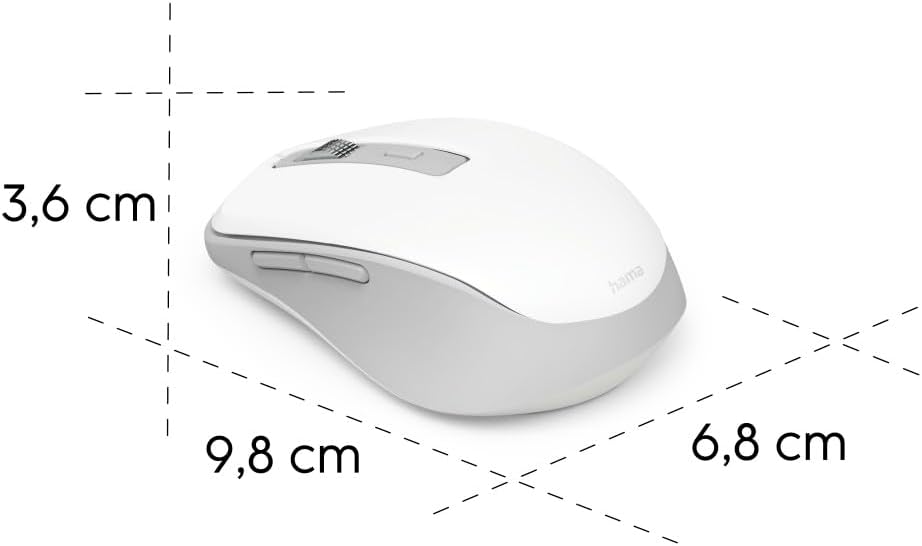
Image 6.1: Dimensional diagram of the Hama WM-450 mouse, indicating its length, width, and height.
| Brend | Hama |
| Model Adı | WM-450 |
| Model nömrəsi | 00173080 |
| Bağlantı texnologiyası | Bluetooth, 2.4 GHz Radio (USB-A) |
| Wireless Range | 10 metrə qədər |
| Sensor Technology | Optik |
| DPI parametrləri | 800, 1200, 1600 |
| Düymələrin sayı | 7 (sürüşdürmə çarxının kliklənməsi daxil olmaqla) |
| Güc mənbəyi | 2 x AAA Batareya (daxildir) |
| Ölçülər (U x G x Y) | 9.8 x 6.8 x 3.6 sm (təxminən) |
| Çəki | 140 qram |
| Uyğun Cihazlar | PC, Tablet, Laptop, Smartphone, iPad |
| Xüsusi Xüsusiyyətlər | Multi-device connectivity (3 devices), AI Assist button, Silent click buttons, Side navigation buttons, Retractable USB receiver, Polymer-coated mouse feet, High-quality aluminum scroll wheel. |
| Materialın tərkibi | At least 20% recycled materials |
| Qablaşdırma | 100% plastic-free |
7. Zəmanət və Dəstək
Zəmanət məlumatı, texniki dəstək və ya xidmət sorğuları üçün məhsulunuzla birlikdə verilən zəmanət kartına baxın və ya rəsmi Hama şirkətinə baş çəkin. website. Contact details for customer support are typically available on the manufacturer's websayt.


