1. Giriş
Thank you for choosing the UGREEN 100W 5-Port GaN Charger. This manual provides essential information for the safe and efficient use of your new charging device. Please read these instructions carefully before use and retain them for future reference.
2. Məhsul bitdiview
The UGREEN 100W 5-Port GaN Charger is a versatile and powerful charging solution designed to power multiple devices simultaneously. Featuring advanced GaN technology, a smart digital display with touch control, and comprehensive safety protections, it offers efficient and reliable charging for laptops, smartphones, tablets, and smartwatches.
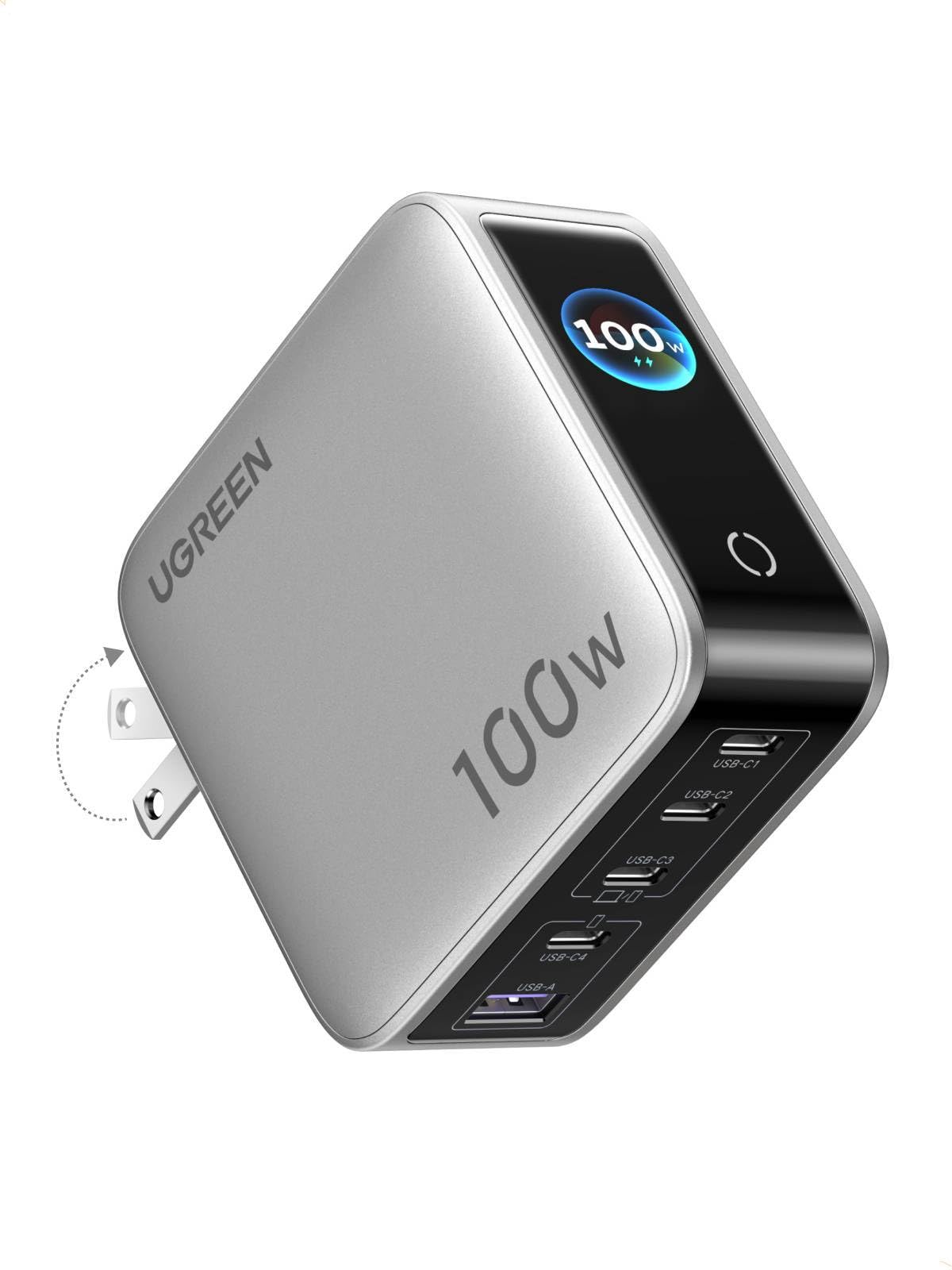
Image: UGREEN 100W 5-Port GaN Charger, showcasinKompakt dizaynı və rəqəmsal displeyi ilə.
Əsas Xüsusiyyətlər:
- Smart Digital Display with Touch Control: Monitor real-time charging data including total output power, individual port power, charging protocol (PD/QC), device battery level, and charger core temperature.
- 100W PD High-Speed Fast Charging: Delivers up to 100W max Power Delivery for rapid charging of laptops, smartphones, and tablets.
- 5-in-1 Multi-Port Charging: Equipped with 4 USB-C ports and 1 USB-A port for simultaneous charging of up to 5 devices.
- Ağıllı Enerji Paylanması: Automatically optimizes power delivery to connected devices, preventing power competition.
- Multi-Layer Safety Certified: Built-in protections against over-voltage, over-current, over-heat, short-circuit, and over-charge.
- Portable & Fire-Resistant Design: Features a foldable plug for easy travel and a 94-V0 fire-resistant PC material shell for durability.
3. Quraşdırma
3.1 Qutunun açılması və ilkin yoxlama
Upon opening the package, ensure all components are present and undamaged. The package typically includes the UGREEN 100W 5-Port GaN Charger and a user manual.
3.2 Şarj cihazının qoşulması
- AC dişlərini şarj cihazının gövdəsindən açın.
- Plug the charger firmly into a standard wall outlet.
- The digital display will illuminate, indicating the charger is ready for use.

Image: The UGREEN charger with its foldable plug extended, ready to be plugged into an outlet.
4. Əməliyyat Təlimatları
4.1 Cihazlarınızın doldurulması
- Connect your devices to the available USB-C or USB-A ports using appropriate charging cables.
- The charger will automatically detect the connected devices and begin charging.
- The intelligent power distribution system will optimize charging speeds across all connected devices.

Image: The UGREEN charger simultaneously charging a laptop, smartphone, and smartwatch, demonstrating its 5-in-1 capability.
4.2 Using the Smart Digital Display
The integrated digital display provides real-time charging information. Use the touch control button to cycle through different display modes:
- Ümumi çıxış gücü: Shows the combined wattage being delivered to all connected devices.
- Individual Port Power: Vat göstərirtage being delivered by each specific port (USB-C1, USB-C2, USB-C3, USB-A).
- Doldurma Protokolu: Indicates the active charging protocol (e.g., PD, QC) for each port.
- Real-time Device Battery Level: Cari batareya faizini göstərirtage of connected devices (if supported).
- Charger Core Temperature: Monitors the internal temperature of the charger for safety.
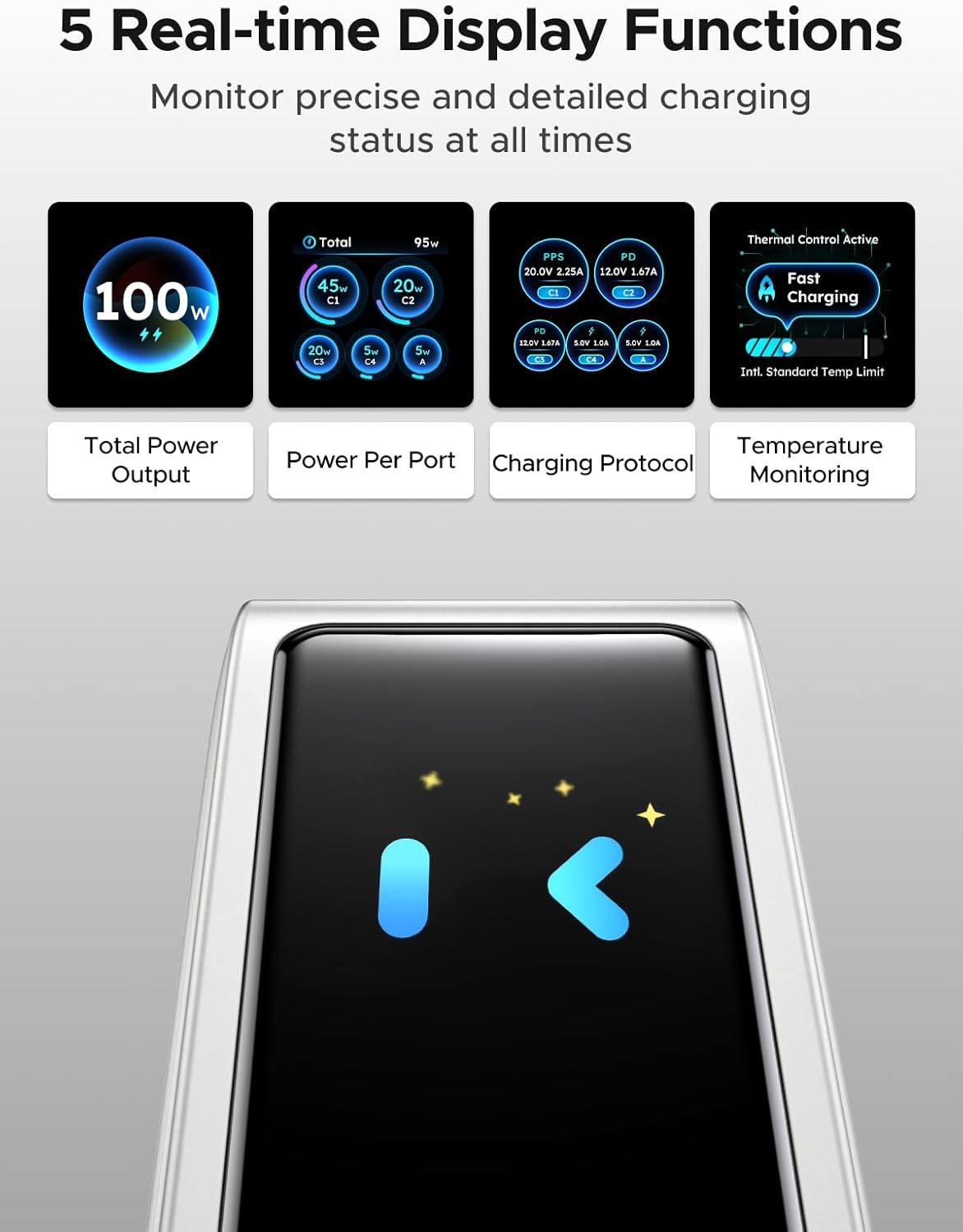
Image: The charger's digital display showing different real-time data points such as total power output, power per port, charging protocol, and temperature monitoring.
Note: The charger features an energy-saving function. The screen will automatically turn off after 2 minutes of inactivity.
5. Təhlükəsizlik Məlumatı
The UGREEN 100W 5-Port GaN Charger is designed with multiple safety features to protect your devices and ensure safe operation:
- Həcmi çoxtage Mühafizə: Həddindən artıq həcmdən yaranan zərərin qarşısını alırtage giriş.
- Həddindən artıq cərəyandan qorunma: Həddindən artıq cərəyan axınından qoruyur.
- Həddindən artıq istidən qorunma: Intelligent temperature control system automatically adjusts power to prevent overheating.
- Qısaqapanmadan Mühafizə: Protects against short-circuit damage.
- Həddindən artıq yükdən qorunma: Prevents devices from being overcharged.
- Fire-Resistant Design: Constructed with 94-V0 fire-resistant PC material for enhanced safety.

Image: A visual representation of the charger's internal components and various safety features, including over-temperature, over-voltage, həddindən artıq cərəyan və qısa qapanma qorunması.
Always use the charger in a well-ventilated area and avoid covering it during operation.
6. Baxım
6.1 Təmizləmə
To clean the charger, unplug it from the power outlet and disconnect all devices. Use a soft, dry cloth to wipe the surface. Do not use liquid cleaners or abrasive materials.
6.2 Saxlama
When not in use, store the charger in a cool, dry place away from direct sunlight and extreme temperatures. Ensure the foldable plug is retracted to prevent damage.
7. Giderme
7.1 Charger Not Powering On
- Ensure the charger is securely plugged into a functional wall outlet.
- Check if the wall outlet is receiving power by testing it with another device.
7.2 Cihazlar Doldurulmur və ya Yavaş Doldurulur
- Verify that the charging cables are properly connected to both the charger and your devices.
- Ensure your charging cables are in good condition and support fast charging if desired.
- Some devices may have specific charging requirements; refer to your device's manual.
- If multiple devices are connected, the charger intelligently distributes power. Charging speed may vary depending on the number and power requirements of connected devices.
7.3 Digital Display Not Working
- The display has an energy-saving function and turns off after 2 minutes of inactivity. Tap the touch control button to reactivate it.
- Ensure the charger is receiving power.
8. Spesifikasiyalar
| Xüsusiyyət | Detal |
|---|---|
| Brend | UGREEN |
| Model | X773 |
| Hissə nömrəsi | 65619 |
| Wattage | 100 vatt |
| Portların sayı | 5 (4 USB-C, 1 USB-A) |
| Xüsusi Xüsusiyyətlər | Fast Charging, Multi Device Charging, Smart Digital Display, Touch Control, Travel |
| Uyğun Cihazlar | Cellular Phones, Laptops, Smartwatches, Tablets |
| Uyğun Telefon Modelləri | Galaxy S25 Ultra, S24 Ultra, S24, S23 Ultra, S23+, S22, S22 Ultra, S22+, S21 Ultra, S21, S21 Plus, S20 Ultra, S10, S10 Plus, S10e, S9, S9 Plus, S8, S8 Plus; Galaxy Note 20, Note10, Note 9, Note 8; Pixel 10, 9, 8, 7, 6, 6 Pro, 5, 4A, 3a, 3XL, 3, 2 XL; MacBook Pro 16''/ 15'' / 13"; MacBook Air 13''(M2) / 13''; MacBook 12''; Dell XPS 15/ 13; Steam Deck; iPhone 17, 17 Pro, 17 Pro Max, 16, 16 Plus, 16 Pro, 16 Pro Max, 15, 15 Plus, 15 Pro, 15 Pro Max, 14, 14 Plus, 14 Pro, 14 Pro Max, 13 Pro, 13 Pro Max, 13 mini, 13, 12 Pro, 12 Pro Max, 12 mini, 12, 11 Pro, 11 Pro Max, 11, SE, XS, XS Max, XR, X, 8, 8 Plus |
| Parsel Ölçüləri | 11.6 x 11.5 x 4.6 sm; 440 q |
| İstehsalçı | Ugreen Group Limited |
| İlk Əlçatan Tarix | 5 fevral 2026-cü il |
9. Zəmanət və Dəstək
9.1 Zəmanət Məlumatı
UGREEN products typically come with a standard manufacturer's warranty. Please refer to the product packaging or the official UGREEN webxüsusi zəmanət şərtləri və şərtləri üçün sayt.
9.2 Müştəri dəstəyi
For technical support, troubleshooting assistance, or warranty claims, please contact UGREEN customer service through their official websayt və ya məhsulun qablaşdırmasında göstərilən əlaqə məlumatı.