1. Giriş
Welcome to the Ergomotion ErgoSportive Smart Adjustable Bed Frame user manual. This guide provides essential information for the safe and efficient operation, setup, and maintenance of your new adjustable bed frame. The ErgoSportive combines advanced sleep technology with customizable comfort to enhance your sleep experience.
Zəhmət olmasa, yığmadan və istifadədən əvvəl bu təlimatı diqqətlə oxuyun və gələcəkdə istifadə üçün saxlayın.
2. Əhəmiyyətli Təhlükəsizlik Məlumatı
Elektrik şoku, yanıqlar, yanğın və ya xəsarət riskini azaltmaq üçün həmişə bu əsas təhlükəsizlik tədbirlərinə əməl edin:
- Read all instructions before using the bed frame.
- Unplug the bed frame from the power outlet before cleaning or servicing.
- Elektrik kabelini qızdırılan səthlərdən uzaq tutun.
- Do not operate the bed frame if the cord or plug is damaged.
- Çöldə istifadə etməyin.
- Do not allow children or individuals with reduced physical, sensory, or mental capabilities to operate the bed frame without supervision.
- İstifadədən əvvəl bütün komponentlərin etibarlı şəkildə bağlandığından əmin olun.
3. Paketin məzmunu
Quraşdırmaya başlamazdan əvvəl bütün komponentlərin mövcud olduğunu yoxlayın:
- Adjustable Bed Frame (Platform Frame)
- Legs (Quantity: Varies by model, typically 6-9)
- Uzaqdan İdarəetmə
- Elektrik kabeli və adapter
- Mattress Retainer Bar(s)
- İstifadəçi Təlimatı (Bu sənəd)

Figure 1: Ergomotion ErgoSportive Smart Adjustable Bed Frame (Twin XL) in a partially elevated position. This image illustrates the main components of the bed frame.
4. Quraşdırma Təlimatları
Bu məhsul üçün montaj tələb olunur. Zəhmət olmasa, bu addımları diqqətlə izləyin:
- Komponentləri qablaşdırmadan çıxarın: Bütün əşyaları qablaşdırmadan diqqətlə çıxarın və təmiz, düz bir səthə qoyun.
- Ayaqları bağlayın: Screw the bed legs into the designated threaded holes on the underside of the bed frame. Ensure they are tightened securely.
- Döşək Saxlayıcı Çubuğunu Quraşdırın: Insert the mattress retainer bar(s) into the holes at the foot of the bed frame.
- Güc bağlayın: Plug the power cord into the control box on the bed frame, then plug the adapter into a grounded electrical outlet.
- İlkin Test: Use the remote control to test the head and foot articulation to ensure proper function.
- Döşək yeri: Carefully place your mattress onto the adjustable bed frame.
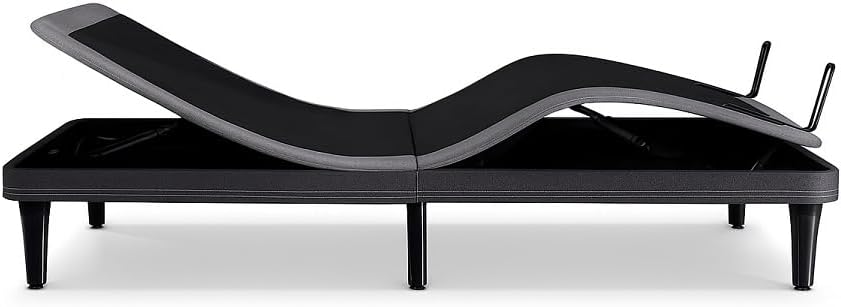
Şəkil 2: Yan view of the Ergomotion ErgoSportive bed frame demonstrating its adjustable articulation points. This view highlights the mechanical components responsible for head and foot elevation.
5. Əməliyyat Təlimatları
5.1. Uzaqdan idarəetmə funksiyaları
Your ErgoSportive bed frame comes with a wireless remote control for easy adjustment. Common functions include:
- Başınızı yuxarı/aşağı çevirin: Yatağın baş hissəsini tənzimləyir.
- Ayaq yuxarı/aşağı: Yatağın ayaq hissəsini tənzimləyir.
- Mənzil: Yatağı tamamilə düz vəziyyətə qaytarır.
- Zero-G: Activates the Zero Gravity preset position, designed to relieve pressure on the back and improve circulation.
- Yaddaş Əvvəlcədən Tənzimləmələri: Program and recall your favorite positions. (Refer to remote control manual for specific programming instructions).
- Masaj (əgər varsa): Activates and adjusts the intensity of the massage function.
- Under-bed Lighting (if applicable): Turns the dimmable LED lighting on/off.
5.2. Smart Sleep Tracking
The ErgoSportive features non-contact sensors to monitor your sleep. These sensors track sleep stages and various health metrics without requiring you to wear any device. Data is typically accessible via a dedicated mobile application.

Figure 3: A smartphone screen showing detailed sleep tracking data, including total sleep time, sleep scores, and anti-snore events. This illustrates the data provided by the bed's smart sensors.
5.3. Garmin Integration
For enhanced health insights, the ErgoSportive can seamlessly connect with Garmin wearables. This integration provides comprehensive recovery advice by combining data from your bed frame and your Garmin device.

Figure 4: A person adjusting a Garmin smartwatch on their wrist. This image represents the integration capability of the ErgoSportive bed frame with Garmin wearable devices for comprehensive health tracking.
5.4. Auto Anti-Snore Technology
The bed frame is equipped with technology that automatically detects snoring. Upon detection, it gently adjusts the head position to help reduce snoring, promoting a more peaceful sleep environment.

Figure 5: A man sleeping soundly in an adjustable bed, with the head section slightly elevated. This illustrates the potential benefit of the auto anti-snore feature.
5.5. Adjustable Comfort Features
Beyond the Zero-G mode, the bed offers multiple position settings to promote circulation and reduce joint pain. For Split King sizes, independent controls allow personalized comfort for each sleeper.

Figure 6: A man comfortably reclined in an adjustable bed, demonstrating an elevated head and foot position. This highlights the customizable comfort settings of the ErgoSportive.

Figure 7: A person comfortably working on a laptop while reclined in an adjustable bed. This illustrates the versatility of the adjustable positions for various activities.
5.6. Rahatlıq Xüsusiyyətləri
- USB Şarj Portları: Located on both sides of the bed frame for convenient device charging.
- Dimlənən LED İşıqlandırma: Under-bed lighting can be adjusted for ambiance or as a night light.
- Programmable Vibration: Two intensity levels for gentle wake-up or relaxation.

Figure 8: A woman sleeping in a bed with an illuminated headboard, showcasing the integrated LED lighting feature. This provides soft ambient light.
6. Baxım
Proper maintenance ensures the longevity and optimal performance of your ErgoSportive bed frame.
- Təmizləmə: Çərçivəni reklamla silinamp parça. Sərt kimyəvi maddələrdən və ya aşındırıcı təmizləyicilərdən çəkinin.
- Yoxlamalar: Periodically check all connections and fasteners to ensure they are secure.
- Elektrik kabeli: Elektrik kabelində hər hansı bir zədələnmə olub olmadığını yoxlayın. Zədələnərsə, istifadəni dayandırın və müştəri dəstəyi ilə əlaqə saxlayın.
- Yatağın köçürülməsi: When moving the bed, ensure it is in the flat position and unplugged. Lift, do not drag, to prevent damage to the legs or frame.
7. Giderme
If you encounter issues with your ErgoSportive bed frame, refer to the following common problems and solutions:
| Problem | Mümkün Səbəb | Həll |
|---|---|---|
| Yataq işləmir. | No power, loose connection, remote battery low. | Check power cord connection to outlet and bed. Ensure outlet is functional. Replace remote batteries. |
| Motor runs but bed does not move. | Obstruction under bed, mechanism jammed. | Inspect under the bed for obstructions. Ensure no bedding or objects are interfering with the moving parts. |
| Pult qoşulmur. | Pairing sequence not followed, interference. | Refer to the remote control pairing instructions in the separate remote manual or contact support. |
| Smart features not tracking/connecting. | App issue, Wi-Fi connectivity, sensor obstruction. | Ensure the mobile app is updated. Check Wi-Fi connection. Ensure nothing is obstructing the bed's sensors. |
If the problem persists after attempting these solutions, please contact Ergomotion customer support.
8. Spesifikasiyalar
| Xüsusiyyət | Detal |
|---|---|
| Model | ErgoSportive |
| Ölçü | Twin XL (80"L x 38"W x 12"H) |
| Xüsusi Xüsusiyyətlər | Anti-Snore, Smart Sensors, USB Charging Ports, Zero-G Positioning |
| Rəng | Qara |
| Döşəmə Parça Növü | Mikrofiber |
| Daxil olan komponentlər | Platforma çərçivəsi |
| Maddə Çəkisi | 217 funt sterlinq |
| Montaj Tələb olunur | Bəli |
| Yerdən Maddəyə Məsafə | 12 düym |
9. Zəmanət və Dəstək
For detailed warranty information, please refer to the warranty card included with your product or visit the official Ergomotion website. Ergomotion provides customer support for any questions, technical assistance, or service requests.
Əlaqə məlumatı:
- Websayt: www.ergomotion.com (Example link, lütfən rəsmi yoxlayın websayt)
- Telefon: Məhsulun qablaşdırmasına və ya webregional əlaqə nömrələri üçün sayt.
Please have your model number (ErgoSportive) and purchase date ready when contacting support.


