1. Giriş
Welcome to the user manual for your new DOOGEE Fire3Ultra Rugged Phone 16. This guide provides essential information to help you set up, operate, maintain, and troubleshoot your device. Please read thoroughly to ensure optimal performance and longevity of your rugged smartphone.
Qutuda nə var

Image: Contents of the DOOGEE Fire 3 Ultra retail package.
- 1 x DOOGEE Fire 3 Ultra Rugged Phone
- 1 x Type-C USB Kabel
- 1 x şarj cihazı
- 1 x Pre-applied Protective Film
- 1 x Card Slot Opener
- 1 x İstifadəçi Təlimatı
- 1 x Xidmət kartı
Qutudan Açılış Videosu
Video: A detailed unboxing of the DOOGEE Fire 3 Ultra, showing all included accessories.
2. Məhsul bitdiview
The DOOGEE Fire3Ultra is a rugged smartphone designed for durability and performance. It features a compact display, a large battery, and advanced camera capabilities, all powered by the latest Android operating system.
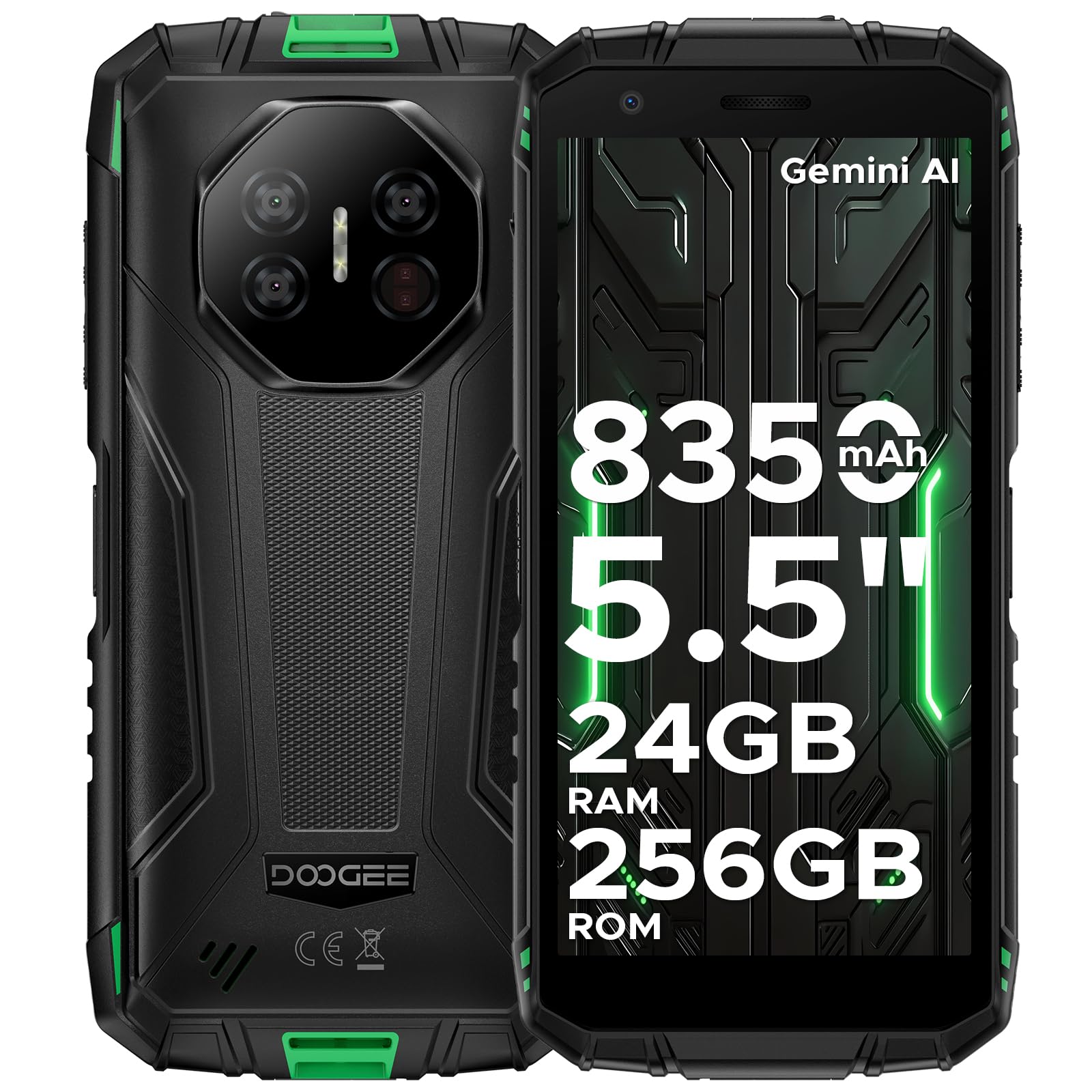
Image: The DOOGEE Fire 3 Ultra rugged phone held in hand, highlighting its compact design and key features.
Əsas Xüsusiyyətlər
- Möhkəm dizayn: IP68/IP69K and MIL-STD-810H certified for water, dust, and drop resistance.
- Ekran: 5.5-inch HD+ IPS display for clear visuals.
- Batareya: 8350mAh large battery with 18W fast charging and reverse charging support.
- Performans: Powered by Unisoc T7200 Octa-Core Processor.
- Yaddaş və Saxlama: Up to 24GB RAM (6GB basic + 18GB virtual) and 256GB internal storage, expandable up to 2TB.
- Kameralar: 16MP AI main camera, 8MP front camera, and 20MP night vision camera.
- Əməliyyat sistemi: Android 15 OS with built-in Gemini AI.
- Bağlantı: Supports Wi-Fi, 4G cellular technology, NFC, and accurate navigation systems.
Məhsul Bitdiview Video
Video: Bitdiview of the DOOGEE Fire 3 Ultra Rugged Phone, showcasing onun dizaynı və xüsusiyyətləri.
3. Quraşdırma
İlkin Güc Aktivdir
To power on your DOOGEE Fire3Ultra, press and hold the Power button located on the side of the device until the DOOGEE logo appears. Follow the on-screen prompts to complete the initial setup, including language selection and network connection.
SIM Card and MicroSD Card Installation
Locate the SIM card tray on the side of your phone. Use the provided card slot opener to eject the tray. Insert your Nano-SIM card(s) and/or MicroSD card into the designated slots. Ensure the cards are correctly oriented before reinserting the tray firmly into the phone.
Təhlükəsizlik Quraşdırılır
For enhanced security, set up a screen lock method. Navigate to Parametrlər > Təhlükəsizlik to choose from Pattern, PIN, Password, Fingerprint, or Face Unlock. Follow the on-screen instructions to register your chosen security method. The device supports both fingerprint and face unlock for convenient and secure access.
4. Əməliyyat Təlimatları
Ekran Xüsusiyyətləri

Image: The DOOGEE Fire 3 Ultra display showcasing eye care features for reduced strain during long use.
- Gözə Qulluq Rejimi: Reduces blue light emission to prevent eye strain during prolonged use. Activate this feature in Display Settings.
- Qaranlıq rejim: Changes the system's color scheme to a darker palette, which can reduce eye fatigue in low-light conditions and save battery.
Kamera Xüsusiyyətləri

Image: Graphic highlighting the 16MP AI Main Camera and 8MP Front Camera of the DOOGEE Fire 3 Ultra.
- 16MP süni intellekt əsas kamerası: Capture high-quality photos with AI enhancements.
- 8MP Ön Kamera: Aydın selfilər və video zənglər üçün.
- 20MP Night Vision Camera: See clearly even in complete darkness.
- AI səhnə tanınması: Müxtəlif səhnələr üçün kamera parametrlərini avtomatik olaraq optimallaşdırır.
- Multiple Photography Features: Includes Pro Mode, Anti-Flicker, Beauty Mode, Portrait Mode, Panoramic Photography, and Continuous Photography.
AI Features (Gemini AI)

Image: Visual representation of the DOOGEE Fire 3 Ultra's built-in Gemini AI capabilities, including content creation and image analysis.
The DOOGEE Fire3Ultra integrates Gemini AI to assist with various tasks, including content creation, image analysis, code development, language learning, and smart assistance. Access these features through the AI Agent application.
Android 15 OS Features

Image: Graphic illustrating various features of the Android 15 OS on the DOOGEE Fire 3 Ultra, such as App Cloning and Enhanced Privacy Protection.
Experience a smarter and more secure mobile experience with Android 15. Key features include App Cloning for multiple accounts, Smart Motion Sensing, Super Clipboard, Split Screen multitasking, Enhanced Privacy Protection, Screen Awareness, Live Caption (English only), Glove Mode for touch sensitivity with gloves, and Video Enhancement.
Connectivity & Digital Toolkit

Image: Features of the DOOGEE Fire 3 Ultra as a rugged partner, including Widevine L1 support, accurate navigation, and NFC.

Image: Icons representing the various tools available in the DOOGEE Fire 3 Ultra's Digital Toolkit, such as Compass and Sound Meter.
- Widevine L1 Dəstəyi: Enjoy high-definition streaming content from popular platforms.
- Accurate Navigation System: Reliable GPS for outdoor adventures.
- NFC dəstəyi: Təmassız ödənişlər və məlumat ötürülməsi üçün.
- Side Fingerprint & Face Unlock: Convenient and secure biometric authentication.
- Digital Toolkit: A suite of practical tools including Compass, Sound Meter, Pic Hanging, Magnifier, Protractor, Plumb Bob, Alarm Bell, Gradienter, and Height Measure.
Special Modes: Underwater Mode
The DOOGEE Fire3Ultra features an Underwater Mode, allowing you to capture photos and videos while submerged. In this mode, the touchscreen functionality is disabled to prevent accidental touches from water, and physical buttons are used for control. Ensure all ports are securely sealed before using the phone underwater.
Video: A demonstration of the Ulefone Armor X32 undergoing a durability test, showcasing its water and drop resistance. (Note: This video features a similar rugged phone model and is for demonstration of ruggedness features).
5. Baxım
Ruggedness and Durability

Image: Visuals demonstrating the IP68/IP69K and MIL-STD-810H certifications for the DOOGEE Fire 3 Ultra, highlighting its water, dust, and drop resistance.
The DOOGEE Fire3Ultra is built to withstand harsh environments, certified with IP68, IP69K, and MIL-STD-810H ratings. This means it is water-proof, drop-proof, and dust-proof. Always ensure all port covers are securely closed to maintain its water and dust resistance.
Batareyanın doldurulması və baxımı

Image: Graphic detailing the 8350mAh large battery of the DOOGEE Fire 3 Ultra, including fast charging and reverse charging capabilities.
The device is equipped with an 8350mAh large battery, providing extended usage times. It supports 18W fast charging for quick power-ups and also features reverse charging, allowing you to use your phone as a power bank for other devices like earbuds or smartwatches. Use only the provided charger and cable to ensure optimal charging and battery health.
Battery Features Video
Video: A video highlighting the large battery capacity and charging features of the DOOGEE Fire 3 Rugged Phone.
6. Giderme
If you encounter any issues with your DOOGEE Fire3Ultra, please refer to the following common troubleshooting steps:
- Cihaz işə düşmür: Batareyanın doldurulduğundan əmin olun. Telefonu şarj cihazına qoşun və yenidən yandırmağa cəhd etməzdən əvvəl bir neçə dəqiqə gözləyin.
- Şəbəkə Bağlantısı Problemləri: Verify that your SIM card is correctly inserted and activated. Check your network settings and ensure mobile data is enabled. The DOOGEE Fire3Ultra is unlocked for all carriers, but network compatibility may vary based on your region and carrier's bands.
- Toxunma ekranı cavab vermir: Restart the device. If the issue persists, perform a factory reset (note: this will erase all data).
- Proqramlar çökür/donur: Problemli tətbiqin keş yaddaşını təmizləyin və ya yenidən quraşdırın. Cihazınızın proqram təminatının yeniləndiyinə əmin olun.
- Water/Dust Damage Concerns: If the device has been exposed to water or dust, ensure all ports are dry and sealed. If functionality is affected, contact customer support.
7. Spesifikasiyalar
| Xüsusiyyət | Spesifikasiya |
|---|---|
| Maddə Çəkisi | 1.1 funt (499 qram) |
| ASIN | B0FFH3F761 |
| Element Model nömrəsi | Fire 3 Ultra |
| Batareyalar | 2 Litium Polimer batareya tələb olunur. (daxildir) |
| Əməliyyat sistemi | Android 15 |
| Bağlantı Texnologiyaları | Wi-Fi, 4G Mobil Texnologiya |
| GPS | False (Note: Accurate Navigation System is mentioned in A+ content, this might refer to a specific GPS chip or feature) |
| Digər Ekran Xüsusiyyətləri | Simsiz |
| Skaner Qətiyyəti | 720 x 1440 |
| Forma faktoru | Bar |
| Rəng | Ağ |
| Telefon danışıq vaxtı | 30 saat |
| İstehsalçı | DOOGEE |
| İlk Əlçatan Tarix | 25 iyun 2025-cü il |
| Yaddaş Saxlama Tutumu | 256 GB |
| Daimi Ekran Görünüşü Ölçüsü | 5.5 düym |
| Batareya Tutumu | 8350 milyonamp Saat |
| Ekran Ölçüsü | 5.5 düym |
| Qətnamə | 720 x 1440 |
| Yeniləmə dərəcəsi | 90 Hz |
| Model Adı | Fire3ultra |
| Simsiz Taşıyıcı | Bütün daşıyıcılar üçün kilidsizdir |
8. Zəmanət və Dəstək
Your DOOGEE Fire3Ultra Rugged Phone 16 comes with a limited warranty. Please refer to the 'Limited Warranty' card included in your package for specific terms and conditions. For technical support, service inquiries, or further assistance, please visit the official DOOGEE websaytına daxil olun və ya birbaşa müştəri xidmətləri ilə əlaqə saxlayın. Əlaqə məlumatlarını adətən istehsalçının saytında tapa bilərsiniz website or in the included service card.