1. Giriş
The FLSUN S1 Pro is an advanced FDM Delta 3D printer designed for high-speed and high-precision additive manufacturing. It features an ultra-fast printing speed of up to 1200mm/s and an acceleration of 40,000mm/s², significantly reducing print times. Equipped with Klipper firmware, a 7-inch smart touch screen, and a 350℃ all-metal hotend, the S1 Pro supports a wide range of filaments, including high-performance engineering materials. Its large build volume of Φ320*320*430 mm³ accommodates substantial projects. This manual provides essential information for setting up, operating, maintaining, and troubleshooting your FLSUN S1 Pro 3D Printer.
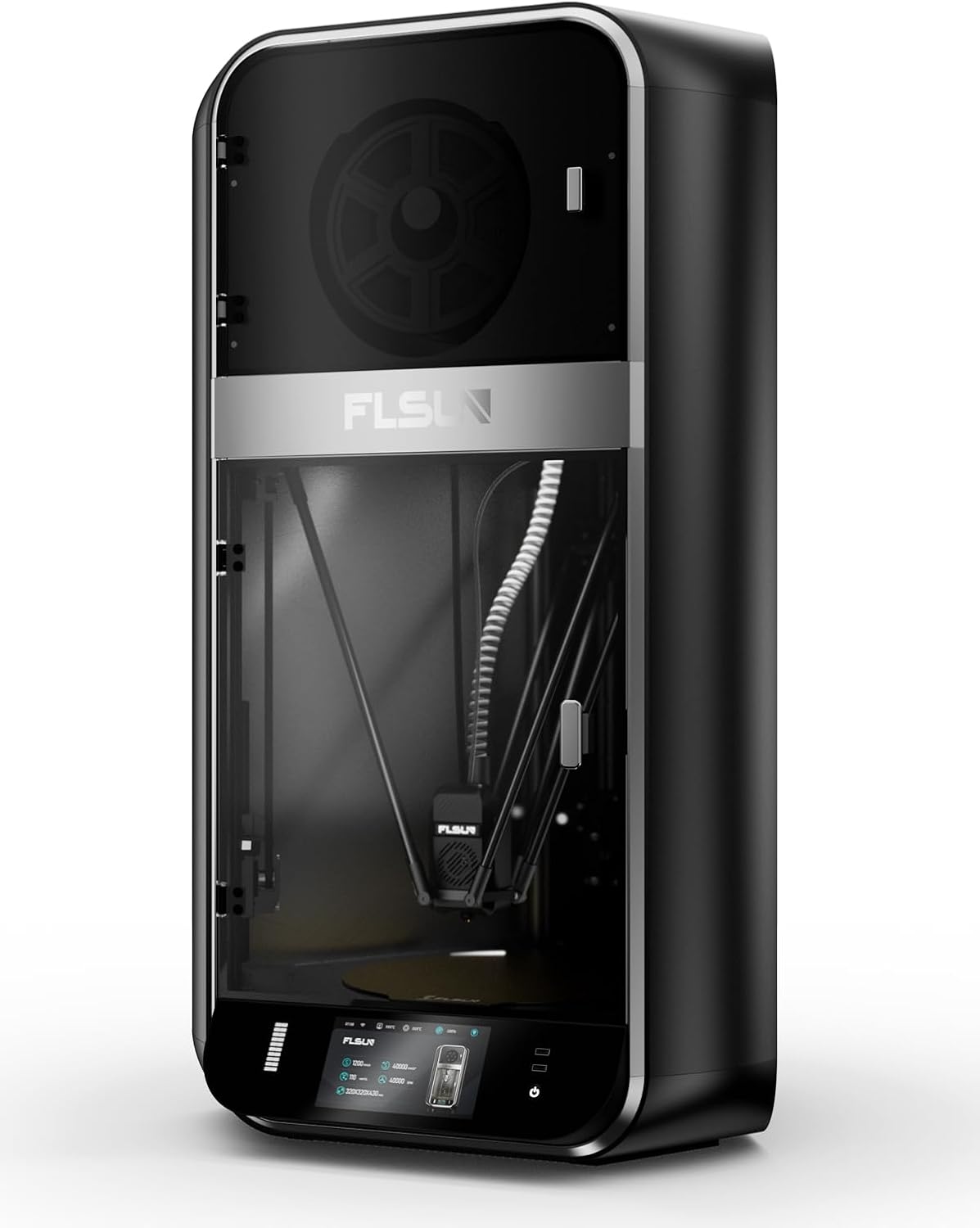
Şəkil 1.1: Ön view of the FLSUN S1 Pro 3D Printer, showcasing its sleek design and enclosed build chamber.
2. Qutuda nə var
Qablaşdırmadan çıxararkən, bütün komponentlərin mövcud olduğunu yoxlayın:
- FLSUN S1 Pro 3D Printer (main unit)
- Filamentli qurutma qutusu
- Elektrik kabeli
- USB kabel
- Alət dəsti (müxtəlif açarlar, tornavidalar və s.)
- SampFilament
- İstifadəçi Təlimatı (bu sənəd)
- Tez Başlanğıc Bələdçisi

Image 2.1: The FLSUN S1 Pro 3D Printer and its included accessories, demonstrating its 95% pre-assembled state.
3. Quraşdırma Təlimatları
The FLSUN S1 Pro is designed for quick setup, being 95% pre-assembled. The initial setup typically takes less than 10 minutes.
- Qablaşdırma: Printeri və bütün aksesuarları qablaşdırmadan diqqətlə çıxarın.
- Yerləşdirmə: Printeri sabit, düz bir səthə və yaxşı havalandırılan bir yerə qoyun.
- Yığıncaq: Install the door and glass panels as per the instructions in the detailed Quraşdırma təlimatı (PDF).
- Enerji bağlantısı: Connect the power cable to the printer and a suitable power outlet.
- İlkin işə salınma: Turn on the printer using the main power switch. The device will perform self-checks to ensure stability.
- Avtomatik səviyyələşdirmə: The printer features automatic leveling. Follow the on-screen prompts on the 7-inch touch screen to initiate and complete the leveling process. This ensures optimal print bed calibration.
- Filamentin yüklənməsi: Load your desired filament into the filament dryer box and then guide it into the extruder as instructed on the display.
- Şəbəkə bağlantısı: Connect the printer to your local Wi-Fi network via the touch screen interface for remote monitoring and control.
Ətraflı vizual təlimatlar üçün rəsmi şəxsə müraciət edin Quraşdırma təlimatı (PDF).
4. Əməliyyat Təlimatları
4.1 User Interface and Control
The FLSUN S1 Pro utilizes a 7-inch Klipper firmware smart touch screen for intuitive control. The visual operation interface allows for smart adjustment and monitoring directly from the printer. Additionally, with advanced Microtac radar control and Wi-Fi connectivity, you can monitor and control your printer in real-time from mobile phones and PCs.

Image 4.1: Remote control and monitoring capabilities via the FLSUN World app on a mobile device.
- Uzaqdan İdarəetmə: Manage your printers remotely from anywhere.
- Tap it, Print it, Like it: Start printing tasks with a quick tap on the FLSUN World app, utilizing cloud storage for G-code files.
- Monitor in Pocket: Real-time checking of your printing progress.
- Smart Reminder: Receive notifications when print errors occur.
4.2 Printing Process
- Prepare Model: Use compatible slicing software (FLSUN Slicer V2.0 or other slicers like PrusaSlicer, Cura) to prepare your 3D model. Ensure settings are optimized for the S1 Pro's capabilities, including its high speed and acceleration.
- Transfer File: Transfer the sliced G-code file to the printer via USB or Wi-Fi (FLSUN World app).
- Çap etməyə başlayın: seçin file on the touch screen or through the app and initiate the print.
- Monitorinq: Utilize the built-in camera for real-time monitoring and time-lapse recording. The printer's low noise level (55dB) ensures a quiet operating environment.
- Power-Off Resume: In case of power interruption, the printer supports power-off continuous printing, resuming from where it left off. Vibration compensation further ensures print quality.

Image 4.2: Illustration of the FLSUN S1 Pro's epic speed capabilities: 1200mm/s max printing speed, 40000mm/s² max acceleration, and 110mm³/s peak flow rate.

Image 4.3: Key features for smooth and consistent printing, including AI-powered functions, auto-leveling, spaghetti detection, and perfect first layer adhesion.

Image 4.4: Advanced features like the Air Filter, Filament Dryer, Built-in camera, Intelligent Zoned Heating, and 16GB EMMC storage.
5. Baxım
Regular maintenance ensures the longevity and optimal performance of your FLSUN S1 Pro 3D Printer.
- Təmizləmə: Regularly clean the print bed, nozzle, and internal components to prevent debris buildup. Use a soft cloth and appropriate cleaning solutions.
- Hava filtri: The printer is equipped with a combined HEPA + activated carbon air filter. Check and replace the filter periodically as needed to maintain air quality and prevent odors.
- Filament Dryer Box: Ensure the filament dryer box is functioning correctly to keep your filament dry, which is crucial for print quality.
- Nozzle Təftişi: Periodically inspect the 0.4mm hardened steel nozzle for wear or clogs. Replace if necessary. The all-metal hot end can reach up to 350°C, supporting various high-temperature filaments.
- Yağlama: Refer to the detailed manual for any lubrication requirements for moving parts.

Image 5.1: Diagram illustrating the 350°C hotend, 50°C chamber, and 120°C hot bed for optimal material handling.
6. Giderme
Bu bölmə əməliyyat zamanı qarşılaşa biləcəyiniz ümumi problemlərə toxunur.
| Problem | Mümkün Səbəb | Həll |
|---|---|---|
| Print Not Sticking to Bed | Improper bed leveling, dirty print surface, incorrect bed temperature. | Re-run auto-leveling. Clean the print surface with isopropyl alcohol. Adjust hot bed temperature according to filament type (Max 120°C). |
| Filament Clogging | Dust in filament, incorrect hotend temperature, worn nozzle, heat creep. | Ensure filament is dry (use filament dryer). Verify hotend temperature (Max 350°C). Clean or replace nozzle. Check cooling fan operation. |
| "Spaghetti" Prints | Poor bed adhesion, model detaching, extrusion issues. | The S1 Pro features Spagetti aşkarlanması. Ensure proper bed adhesion. Monitor print progress via the built-in camera. |
| Printer Cavab Vermir | Software glitch, loose connection, power issue. | Restart the printer. Check all cable connections. Ensure stable power supply. |
| Zəif Çap Keyfiyyəti | Incorrect slicing settings, worn nozzle, vibration, wet filament. | Optimize slicing parameters. Replace nozzle if worn. The printer has Vibrasiya Kompensasiyası; ensure it's active. Use filament dryer. |

Image 6.1: Features like the 55dB quiet fan and Power Off Resume Print (UPS) contribute to a reliable printing experience.
7. Texniki spesifikasiyalar
| Kateqoriya | Spesifikasiya | Təfərrüatlar |
|---|---|---|
| General | Maksimum Çap Sürəti | 1200 mm/s |
| Maksimum İvme | 40000mm/s² | |
| Maksimum axın dərəcəsi | 110mm³/s | |
| Quraşdırma Həcmi | Φ320*320*430 mm³ (Maximum height of the cylinder: 383mm) | |
| Palata | bağlıdır | |
| Səs-küy Səviyyəsi | 55dB | |
| Alət başlığı | Nozzle | 0.4mm Hardened Steel Nozzle (supports various nozzle sizes) |
| Max Hot End Temp | 350 ℃ | |
| Filament diametri | 1.75 mm | |
| Filament | Dəstəklənən Filament | Ideal: PLA, PETG, TPU. Satisfactory: ABS, ASA, PA, PC, PET. Capable: Carbon/Glass Fiber Reinforced PLA, PPS-CF, PPA-CF/GF. |
| Active Heating Dry Box | Bəli | |
| Filament tıxanmasının aşkarlanması | Bəli | |
| İstilik yatağı | Plitə düzəldin | Teksturalı PEI Plitəsi |
| Max Build Plate Temp | 120 ℃ | |
| Smart Zona İstilik | Inner Circle Ø220mm, Outer Ring 220-320mm | |
| Elektronika | Ekran | 7" Color Touch Screen |
| Saxlama | 16GB EMMC, 32GB USB Flash | |
| Enerji təchizatı | 110-240V, 50/60Hz | |
| Rejimdə güc istehlakı | 400 vatt | |
| Proqram təminatı | Mikroproqramın təkmilləşdirilməsi | OTA (Havadan) |
| Dilimləmə Proqramı | FLSUN Slicer V2.0, Other Slicers | |
| Dəstəklənən ƏS | MacOS, Windows | |
| Xüsusiyyətlər | Monitorinq kamerası | Realtime, Timelapse |
| Filament aşkarlanması | Bəli | |
| Vibrasiya Kompensasiyası | Bəli | |
| Dağıntıların aşkarlanması | Bəli | |
| Spagetti aşkarlanması | Bəli | |
| Screen Auto Sleep | Bəli | |
| Printer Auto Power Off | Bəli | |
| Avtomatik Düzləşdirmə | Bəli | |
| Enerji itkisinin bərpası | Yes (Z lift, Backup Battery) | |
| Hava filtri | HEPA + Activated Carbon | |
| Fiziki Ölçülər | Məhsulun Ölçüləri (D x G x Y) | 23.62"D x 34.25"W x 9.45"H (600mm x 870mm x 240mm təqribən) |
| Physical Dimension (Printer) | 550*596*1030mm | |
| Maddə Çəkisi | 113 funt (təqribən 51.2 kq) | |
| Rəng | Qara |

Image 7.1: Comprehensive technical specifications for the FLSUN S1 Pro 3D Printer.
8. Zəmanət və Dəstək
FLSUN is committed to providing reliable products and excellent customer service.
- Qaytarır: The product is eligible for 30-day easy returns. Please refer to the retailer's return policy for specific details.
- Müştəri Dəstəyi: For technical assistance, troubleshooting, or warranty inquiries, please contact FLSUN Customer Support. You can often find support resources and contact information on the official FLSUN websayt və ya məhsulun alındığı pərakəndə satıcı vasitəsilə.
- Qoruma Planları: Extended protection plans, such as a 4-Year Protection Plan, may be available for purchase separately to provide additional coverage beyond the standard warranty.
- Onlayn Resurslar: ziyarət edin FLSUN Store on Amazon əlavə məhsul məlumatı, tez-tez verilən suallar və dəstək üçün.