1. Giriş
Bu təlimat qara dərililər üçün ətraflı təlimatlar təqdim edirview Wave9C SIM-free smartphone. The Wave9C combines a sleek design with powerful performance, running on the latest Android 15 with Doke AI integration. It features a 6.56-inch high-definition display, a long-lasting 5000mAh battery, and IP54 dust and water resistance, making it suitable for various environments. This guide will help you understand its features, set up your device, and troubleshoot common issues.
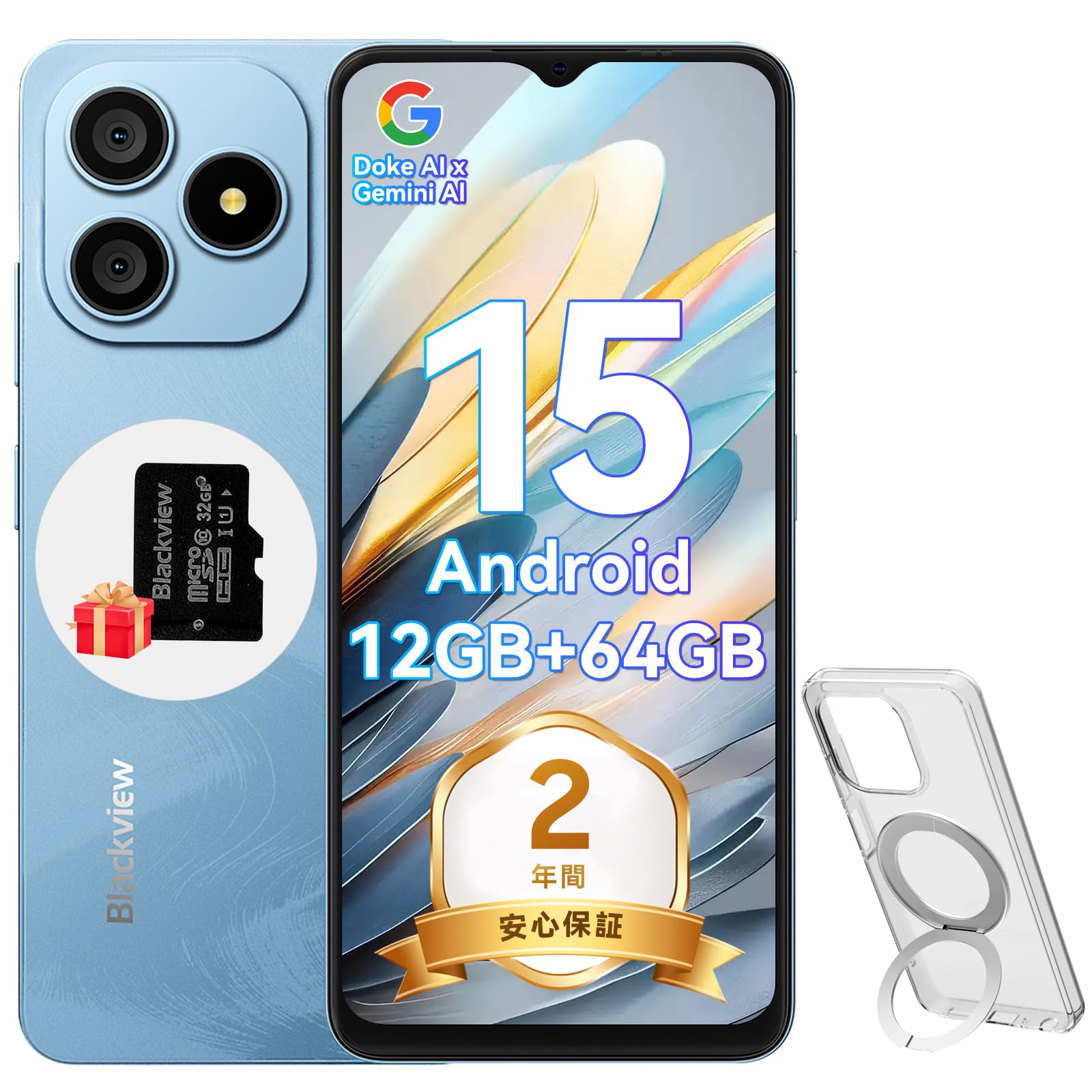
Figure 1.1: Blackview Wave9C Smartphone
2. Paketin məzmunu
Zəhmət olmasa aşağıdakı elementlər üçün qutuyu yoxlayın:
- Qaraview Wave9C Smartphone Body
- Ekran qoruyucusu (əvvəlcədən tətbiq olunmuş və ya daxil edilmişdir)
- Protective Phone Case (with stand)
- TF Kart (32GB)
- Güc adapteri
- USB kabel
- Təlimat kitabçası
- SİM ejektor pin

Şəkil 2.1: Daxil edilən aksesuarlar
3. Quraşdırma
3.1. SİM kart və TF kartın quraşdırılması
Qaraview Wave9C supports dual SIM cards and a TF card for expandable storage. Before inserting, ensure your SIM card's frequency bands are compatible with the device (2G: B2/B3/B5/B8; 3G: B1/B2/B; 4G: B1/B3/B7/B8/B19/B20/B40/B41). After insertion, you may need to configure APN settings for mobile data.
- Cihazın yan tərəfindəki SİM tepsisini tapın.
- SIM kart çıxarıcı sancağı qabı açmaq üçün onun yanındakı kiçik dəliyə taxın.
- Place your Nano-SIM cards and the TF card into the designated slots on the tray. Ensure they are correctly oriented.
- Tencereyi diqqətlə cihazın içərisinə sıxın.

Figure 3.1: SIM and TF Card Tray
3.2. İlkin işə salın
Press and hold the Power button located on the side of the device until the Blackview logo appears. Follow the on-screen prompts to complete the initial setup, including language selection, Wi-Fi connection, and Google account setup.
4. Əməliyyat Təlimatları
4.1. Cihaz bitdiview və Əsas Xüsusiyyətlər
Video 4.1: Blackview Wave9C Product Overview. This video demonstrates key features such as face unlock, AI applications, the integrated kickstand case, AI live photo functionality, and the smile shutter camera feature.
4.2. Ekran Xüsusiyyətləri
The Wave9C features a 6.56-inch HD+ display with a high screen-to-body ratio of 94.94% and 600 nits brightness for clear visibility even in bright conditions. The 720x1612 resolution ensures a smooth visual experience for games and videos.

Şəkil 4.2: Ekranın Xüsusiyyətləri
To reduce eye strain during prolonged use, the device offers three eye-friendly modes:
- Gecə rejimi: Adjusts the display to warmer colors for comfortable viewzəif işıqda.
- Qaranlıq rejim: Changes the system interface to a dark theme, reducing glare.
- Oxu rejimi: Optimizes the screen for reading, similar to an e-reader.

Figure 4.3: Eye Protection Modes
4.3. Performans və Saxlama
Qaraview Wave9C is powered by an Unisoc T603 Octa-core CPU, ensuring smooth multitasking and gaming. It comes with 12GB RAM (4GB physical + 8GB expandable virtual RAM) and 64GB of internal storage, which can be expanded up to 2TB using a TF card. This ample storage allows for saving numerous photos, videos, and applications.

Figure 4.4: Processor and Memory

Figure 4.5: Storage and RAM Expansion
4.4. Batareyanın idarə edilməsi
Equipped with a 5000mAh large-capacity battery, the Wave9C provides extended usage, supporting up to 21 hours of talk time or 5 hours of video playback/gaming. It features 10W fast charging via a convenient Type-C port, allowing for quick recharges. Advanced battery features include AI night charge protection and AI power-saving modes to optimize battery life. The device also supports OTG reverse charging, allowing it to charge other devices.

Şəkil 4.6: Batareya Ömrü və Doldurma
4.5. AI Features and DokeOS 4.2
Qaraview Wave9C runs on DokeOS 4.2, based on Android 15, offering a seamless and personalized user experience with enhanced privacy and convenience. It integrates Doke AI, featuring ChatGPT for various smart functions:
- Voice Activation & Recognition: Enhanced privacy and hands-free operation.
- Smart QA: Quick answers to your questions.
- Global Smart Control: Control various device functions with voice commands.
- Screen Content Support: Get instant solutions and information based on what's displayed on your screen.

Figure 4.7: Doke AI Capabilities
DokeOS 4.2 also includes several system-level optimizations:
- Atomlaşdırılmış Yaddaş 2.0: Improves memory utilization for smoother performance.
- EasyShare: Facilitates quick and easy file paylaşma.
- Smart Preload: Anticipates app usage for faster launching.
- Clipboard Auto-Clear: Enhances privacy by automatically clearing clipboard content.
- Private Space & App Lock: Secure your personal data and applications.

Figure 4.8: DokeOS 4.2 System Features
4.6. Integrated AI Applications
The Wave9C comes with several pre-installed AI-powered applications to enhance your daily experience:
- Hi Doki App: Integrates top AI models for AI chat, image generation, and online search.
- ImageX App: Offers AI photo editing features like AI photo animation, background replacement, and skin correction.
- VidGen App: Enables AI video editing, allowing you to create videos from text or images.
- Soundle App: Assists with AI music creation, offering playlist management and supporting 11 music styles, including text-to-music conversion.

Figure 4.9: Hi Doki App

Figure 4.10: ImageX App

Figure 4.11: VidGen App

Figure 4.12: Soundle App
4.7. Kamera Xüsusiyyətləri
Capture every moment with the Wave9C's camera system. It features a 13MP rear camera and an 8MP front camera, capable of recording 1080P Full HD videos.
- Portret rejimi: Creates a depth effect, blurring the background to highlight the subject.
- Doldurma işığı: Enhances lighting for selfies and portraits.
- Gülümsəmə: Automatically captures photos when a smile is detected.
- Smart Camera Control: Use the volume keys as a shutter button or to zoom.

Şəkil 4.13: Kameranın Üstüview

Figure 4.14: Camera Modes

Figure 4.15: Smart Camera Controls
4.8. Təhlükəsizlik Xüsusiyyətləri
Qaraview Wave9C offers convenient and secure access with its face recognition feature. Simply look at your device to unlock it quickly, eliminating the need for passwords and adding speed to your daily life.

Figure 4.16: Face Recognition
4.9. Bağlantı
The Wave9C supports multiple global positioning systems, including GPS, GLONASS, Galileo, and BeiDou, ensuring accurate and stable navigation. It also features Bluetooth, USB, and Wi-Fi connectivity for seamless communication and data transfer.

Figure 4.17: Multi-System GPS Support
4.10. Xüsusi Xüsusiyyətlər
- Uşaq rejimi: Set usage time limits to manage screen time for children.
- Senior Mode: Features large icons and text for easier readability and simplified operation, ideal for elderly users.
- IP54 toza və suya davamlılıq: Enjoy reliable performance without worrying about dust or splashes.
- Yaş Toxunuş Texnologiyası: Operate the screen comfortably even with wet hands.
- Integrated Stand Case: The included protective case features a built-in stand for hands-free viewing.
- Google Lens: Utilize Google Lens for instant information retrieval, text translation, product identification, and exploring nearby places by simply pointing your camera.
- Smart-K Speaker: Delivers crystal-clear audio and rich sound for streaming podcasts, games, and music.

Figure 4.18: Kids Mode and Senior Mode

Figure 4.19: IP54 Water Resistance and Wet Touch

Figure 4.20: Google Lens Integration

Figure 4.21: Smart-K Speaker
5. Baxım
To ensure the longevity and optimal performance of your Blackview Wave9C, follow these maintenance guidelines:
- Təmizləmə: Regularly wipe the screen and body with a soft, lint-free cloth. Avoid using harsh chemicals or abrasive materials.
- Temperatur: Avoid exposing the device to extreme temperatures (hot or cold) or direct sunlight for extended periods.
- Yaddaş: Cihazı uzun müddət istifadə etmədikdə, onu sərin və quru yerdə saxlayın.
- Proqram təminatı yeniləmələri: Keep your device's software updated to benefit from the latest features, security patches, and performance improvements.
6. Giderme
If you encounter any issues with your Blackview Wave9C, try the following basic troubleshooting steps:
- Cihaz cavab vermir: Yenidən başlamağa məcbur etmək üçün Güc düyməsini təxminən 10-15 saniyə basıb saxlayın.
- Proqram qəzası: Problemli tətbiqin keş yaddaşını və məlumatlarını Parametrlər > Tətbiqlər bölməsindən təmizləyin. Problem davam edərsə, tətbiqi silin və yenidən quraşdırın.
- Batareyanın tez tükənməsi: Check battery usage in Settings > Battery to identify power-hungry apps. Adjust screen brightness and use power-saving modes.
- Bağlantı Problemləri (Wi-Fi/Bluetooth): Toggle Wi-Fi or Bluetooth off and on. Restart your device or the router/paired device.
- Network Issues (SIM): Ensure the SIM card is correctly inserted. Check your APN settings. Contact your mobile carrier if necessary.
- Zavod Sıfırlama: Son çarə olaraq, zavod parametrlərinə yenidən qura bilərsiniz (Parametrlər > Sistem > Sıfırlama seçimləri > Bütün məlumatları sil). Xəbərdarlıq: Bu, cihazınızda olan bütün məlumatları siləcək. Davam etməzdən əvvəl vacib məlumatların ehtiyat nüsxəsini çıxarın.
Bu addımlar problemi həll etmirsə, əlavə yardım üçün Zəmanət və Dəstək bölməsinə baxın.
7. Spesifikasiyalar
| Xüsusiyyət | Spesifikasiya |
|---|---|
| Model nömrəsi | WAVE9C |
| Ekran Ölçüsü | 6.56 düym |
| Qətnamə | 720 x 1612 |
| Parlaqlıq | 600 nit |
| Əməliyyat sistemi | Android 15 (DokeOS 4.2) |
| Prosessor | Unisoc T603 Octa-core CPU |
| RAM | 12GB (4GB physical + 8GB expandable) |
| Daxili yaddaş | 64 GB |
| Genişləndirilə bilən yaddaş | TF kartı vasitəsilə 2TB-ə qədər |
| Batareya Tutumu | 5000 mAh |
| Doldurulur | 10W Fast Charging (Type-C) |
| Arxa Kamera | 13 MP |
| Ön kamera | 8 MP |
| Su/toza davamlılıq | IP54 |
| Bağlantı | Bluetooth, USB, Wi-Fi |
| Naviqasiya | GPS, QLONASS, Galileo, BeiDou |
| Ölçülər | 17.8 x 9 x 5.7 sm |
| Çəki | 440 q |
8. Zəmanət və Dəstək
Qaraview təmin edir a 2 il zəmanət for the Wave9C smartphone. In case of any product issues, our customer service team is available online 24 hours a day and aims to provide support within 12 hours, including return and exchange services.
Əlaqə üsulları:
- On the product page, click the store name "PTablet" below the "Add to Cart" button, then click "Ask a question" in the upper right corner to send an email.
- Alternatively, go to your Amazon account > Order History > Problem with order > Contact Seller.

Figure 8.1: Blackview Müştəri dəstəyi


