1. Giriş
Welcome to the user manual for the MARSTEK 63A 110V Automatic/Manual Transfer Switch. This device is engineered to provide seamless power management by automatically or manually switching between primary (L1) and backup (L2) power sources. It features an LED display for real-time monitoring and incorporates comprehensive protection features to ensure the safety and reliability of your electrical system.
This manual provides essential information for the safe and efficient installation, operation, and maintenance of your transfer switch. Please read it thoroughly before installation and use.
2. Əhəmiyyətli Təhlükəsizlik Məlumatı
Always follow basic safety precautions when installing, operating, and maintaining this product to reduce the risk of fire, electric shock, and injury to persons.
- Quraşdırma bütün yerli və milli elektrik kodlarına uyğun olaraq ixtisaslı elektrikçi tərəfindən aparılmalıdır.
- Disconnect all power sources before performing any installation, wiring, or maintenance.
- Zədələnmiş görünürsə, açarı işə salmayın.
- Elektrik şokunun qarşısını almaq üçün düzgün torpaqlama təmin edin.
- This device is designed for indoor use in a dry environment.
- Keep children away from electrical equipment.
3. Paketin məzmunu
- 1 x MARSTEK 63A 110V Automatic/Manual Transfer Switch
- 1 x DIN Rail
- 1 x İstifadəçi Təlimatı (bu sənəd)
4. Məhsul bitdiview
The MARSTEK 63A 110V Automatic/Manual Transfer Switch is a compact device designed for reliable power source switching. It features an LED display for real-time voltage and operational status, and offers both automatic and manual control options.
Əsas Xüsusiyyətlər
- Automatic or Manual Switching: Seamless transfer between primary (L1) and backup (L2) power sources.
- Kompleks Mühafizə: Overvol daxildirtagetage, və həddindən artıq cərəyandan qorunma.
- Real vaxtda monitorinq: High-definition LED display shows voltage və status.
- Asan Quraşdırma: DIN rail mountable design.
- Geniş tətbiq: Suitable for commercial, industrial, and residential backup power systems.
Məhsul diaqramı

This image displays the main unit of the transfer switch, highlighting its compact design and the integrated LED display. The DIN rail is also shown, indicating its mounting method.
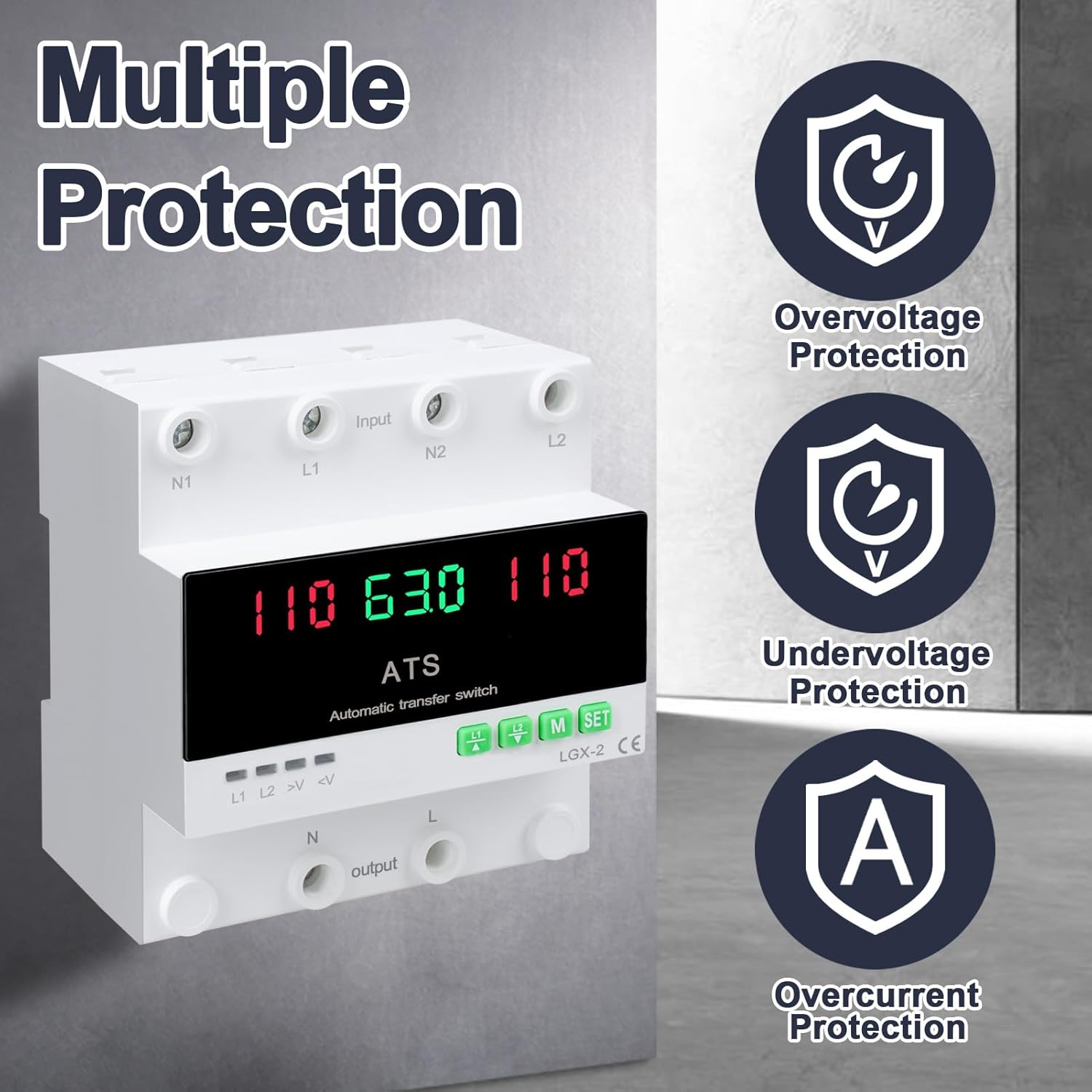
This image illustrates the built-in safety mechanisms of the transfer switch, emphasizing its capability to protect connected devices from electrical instability through overvoltagetage, and overcurrent safeguards.
5. Spesifikasiyalar
| Parametr | Dəyər |
|---|---|
| Model | Dual Power 63A |
| Cari Reytinq | 63 Amps |
| Əməliyyat Voltage | 120 volt |
| Əməliyyat rejimi | ON-AUTO-MANUAL |
| Məhsulun Ölçüləri (U x G x Y) | 4.3 x 3.5 x 3.3 düym |
| Çəki | 13.12 unsiya |
| Əlaqə Növü | Normalda Bağlıdır |
| Bağlayıcı növü | Qoşun |
| Terminal | Vida |
| Dövrə Növü | 2 tərəfli |
| Əlaqə materialı | Mis |
| Nominal Tezlik | 50/60Hz |
| Overvoltage Qoruma həddi | AC140V |
| Undervolvoltage Qoruma həddi | AC90V |
6. Quraşdırma və Quraşdırma
Proper installation is crucial for the safe and reliable operation of the transfer switch. This device is designed for DIN rail mounting.
Quraşdırmadan əvvəl
- Ensure all power sources are disconnected at the main breaker before beginning installation.
- Cild olduğunu təsdiq edintage and current ratings of the transfer switch match your electrical system requirements.
- Prepare the installation location, ensuring it is dry, well-ventilated, and easily accessible.
Naqil diaqramı

This diagram illustrates the correct wiring connections for the transfer switch. It shows the input terminals for primary power (N1, L1) and backup power (N2, L2), and the output terminals (N, L) to the load. The diagram also labels the LED indicators for L1 output, L2 output, overvoltage, və undervoltage, as well as the menu/reset and manual ON/OFF buttons.
Quraşdırma addımları
- Mount the DIN rail securely in your electrical panel or enclosure.
- Attach the transfer switch onto the DIN rail.
- Connect the primary power source (N1, L1) to the designated input terminals.
- Connect the backup power source (N2, L2) to the designated input terminals.
- Connect the load (N, L) to the output terminals.
- Bütün əlaqələri möhkəmlik və düzgünlük üçün iki dəfə yoxlayın.
- Bütün naqillər tamamlandıqdan və yoxlanıldıqdan sonra sistemə enerjini bərpa edin.
7. Əməliyyat
The MARSTEK transfer switch offers both automatic and manual operation modes.
Avtomatik rejim

In automatic mode, the switch prioritizes the primary power source (L1). If L1 fails or experiences voltage fluctuations (undervoltage və ya həddindən artıqtage), the switch will automatically transfer the load to the backup power source (L2). When L1 is restored and stable, the switch will automatically transfer the load back to L1.
Əl rejimi

The transfer switch can be manually operated using the buttons on the front panel.
- To close L1: Press the button labeled "L1" (often indicated by an up arrow or similar icon). Press again to open L1.
- To close L2: Press the button labeled "L2" (often indicated by a down arrow or similar icon). Press again to open L2.
In manual mode, the automatic transfer function is overridden. Ensure you understand the implications of manual switching before use.
LED Display and Indicators
The LED display provides real-time information about the system status.
- The main display shows voltage readings for the active power source.
- L1: Indicates L1 output is active.
- L2: Indicates L2 output is active.
- >V: Overvoltage göstərici işığı.
- <V: Undervolvoltage göstərici işığı.
- M: Menu selection/Reset button.
- Dəst: Manual ON/OFF button.
8. Baxım
The MARSTEK transfer switch requires minimal maintenance.
- Periodically inspect the wiring connections to ensure they are secure and free from corrosion.
- Cihazı təmiz, toz və zibildən təmiz saxlayın. Təmizləmək üçün quru, yumşaq bir parça istifadə edin.
- Aşındırıcı təmizləyicilərdən və ya həlledicilərdən istifadə etməyin.
- Həddindən artıq istiləşmənin qarşısını almaq üçün cihazın ətrafında adekvat havalandırma təmin edin.
Warning: Always disconnect all power sources before performing any maintenance.
9. Giderme
Bu bölmə qarşılaşa biləcəyiniz ümumi problemlərin həllini təqdim edir.
| Problem | Mümkün Səbəb | Həll |
|---|---|---|
| Cihaz açılmır. | Giriş gücü yoxdur; səhv naqillər; daxili nasazlıq. | Check main breakers and power sources. Verify all wiring connections. If the problem persists, contact support. |
| Avtomatik köçürmə yoxdur. | Device in manual mode; power source within acceptable limits; fault in L1 or L2 detection. | Ensure the device is set to automatic mode. Check voltage levels of both L1 and L2. Contact support if automatic transfer fails despite correct settings. |
| Overvoltage (>V) or Undervoltage (<V) indicator lit. | Giriş həcmitage outside specified range. | Cildi yoxlayıntage of the active power source. The device will automatically switch if the voltage is outside the set parameters (AC140V overvoltage, AC90V undervoltage). Address the power source issue. |
| Həddindən artıq cərəyandan qorunma işə salındı. | Load exceeds the 63A current rating. | Reduce the connected load. Ensure total current draw does not exceed 63 Amps. |
10. Zəmanət və Dəstək
For warranty information and technical support, please refer to the MARSTEK official websayta daxil olun və ya satıcınızla əlaqə saxlayın. Satınalma qəbzini alışın sübutu olaraq saxlayın.
Manufacturer: JUXIANG
Brend: MARSTEK


