1. Giriş
This manual provides essential information for setting up, operating, and maintaining your NIMO 17.3" IPS FHD Gaming Laptop. Designed for both productivity and entertainment, this laptop features an AMD Ryzen 7 8745HS processor, 64GB DDR5 RAM, and a 2TB PCIe 4.0 SSD, ensuring a responsive and powerful user experience.
Image 1.1: NIMO 17.3" FHD Gaming Laptop overview, əsas xüsusiyyətləri vurğulayır.
2. Qutuda nə var
Lütfən, qutudan çıxanda bütün elementlərin mövcud olduğunu yoxlayın:
- 1 x NIMO N177 Laptop
- 1 x Type-C 100W PD Fast Charger
- 1 x İstifadəçi Təlimatı
- Windows 11 Home (Pre-installed)
3. İlkin Quraşdırma
3.1 Yandırma və Doldurma
- Connect the provided 100W Type-C PD Fast Charger to the laptop's USB-C port and a power outlet.
- Laptopun qapağını açın. Laptop avtomatik olaraq işə düşə bilər və ya güc düyməsini sıxmağınız lazım ola bilər.
- Allow the battery to charge fully before initial use. A 15-minute charge can provide approximately 2 hours of use.

Image 3.1: Illustration of the laptop charging process and battery life.
3.2 Windows 11 Configuration
Follow the on-screen prompts to complete the Windows 11 setup process. This includes selecting your region, connecting to a Wi-Fi network, and creating a user account.
3.3 Barmaq İzi Oxuyucusunun Qurulması
Təkmilləşdirilmiş təhlükəsizlik və sürətli giriş üçün inteqrasiya olunmuş barmaq izi oxuyucusunu quraşdırın:
- Windows Parametrləri > Hesablar > Giriş Seçimləri bölməsinə keçin.
- Select 'Fingerprint recognition (Windows Hello)' and follow the instructions to register your fingerprint.

Image 3.2: The backlit keyboard and fingerprint sensor for secure login.
4. Noutbukunuzun işlədilməsi
4.1 Performans və Multitasking
Your NIMO laptop is equipped with an AMD Ryzen 7 8745HS processor (8-core/16-thread, up to 4.9GHz) and 64GB DDR5 RAM, providing robust performance for demanding applications, gaming, and seamless multitasking. The 2TB PCIe 4.0 SSD ensures fast boot times and rapid data access.

Image 4.1: Details of the AMD Ryzen 7 8745HS processor.

Image 4.2: Laptop demonstrating seamless multitasking with ample storage and RAM.
4.2 Ekran
The 17.3" FHD (1920x1080) IPS anti-glare display offers immersive visuals with vibrant colors and wide viewing angles. The ultra-thin bezel design provides an 85% screen-to-body ratio for an expansive viewtəcrübə.

Image 4.3: The 17.3" FHD IPS display for visual clarity.
4.3 Klaviatura və toxunma paneli
The full-size keyboard includes a numeric keypad and features backlighting for comfortable typing in various lighting conditions. The precision gesture touchpad allows for intuitive navigation and supports multi-touch gestures.
4.4 Webcam
İnteqrasiya edilmiş 2MP webcam is suitable for video calls and online meetings. For privacy, the laptop includes a physical privacy switch to disable the webistifadə edilmədikdə kamera.

Image 4.4: Privacy-focused camera convenience with a built-in switch.
5. Bağlantı
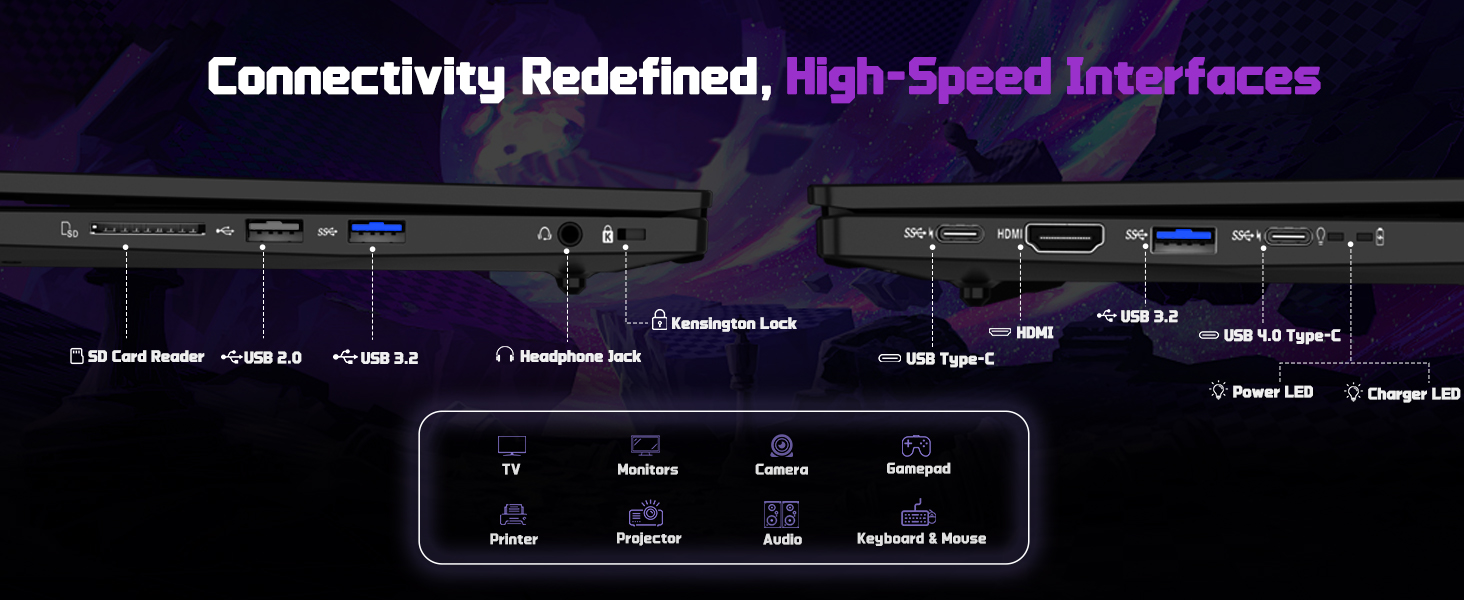
5.1 Portlar və İnterfeyslər
The NIMO N177 laptop offers a variety of ports for connecting peripherals and external displays:
- 1 x USB 2.0 portu
- 3 x USB 3.0 Portu
- 1 x USB 4.0 Type-C Port (supports 100W PD charging, data transfer, and display output)
- 1 x HDMI portu
- 1 x Qulaqlıq girişi
- 1 x SD kart oxuyucusu
- 1 x Kensington Kilidi Yuvası

Image 5.1: Detailed diagram of the laptop's high-speed interfaces.
5.2 Simsiz Bağlantı
The laptop supports 802.11a/b/g/n/ac Wi-Fi for reliable wireless internet access and Bluetooth for connecting wireless accessories.
6. Baxım
6.1 Təmizləmə
- Ekranı və xarici səthləri təmizləmək üçün yumşaq, tüysüz parça istifadə edin.
- Sərt kimyəvi maddələrdən və ya aşındırıcı materiallardan istifadə etməyin.
- For the screen, use a specialized screen cleaner and a microfiber cloth.
6.2 Proqram Yeniləmələri
Regularly check for and install Windows updates and driver updates to ensure optimal performance and security. You can find driver updates on the NIMO official websayt.
6.3 Saxlama və İstifadə
Store the laptop in a cool, dry place. Avoid exposing it to extreme temperatures, direct sunlight, or excessive moisture. Handle the laptop with care to prevent physical damage.
7. Giderme
If you encounter issues with your NIMO laptop, try the following common troubleshooting steps:
- Güc yoxdur: Ensure the charger is securely connected to both the laptop and a working power outlet. Check if the power adapter's LED indicator is on.
- Ekran Problemləri: If the screen is blank, try connecting an external monitor to verify if the laptop is functioning. Adjust display settings in Windows.
- Yavaş Performans: Close unnecessary applications, check for background processes, and ensure sufficient free storage space.
- Bağlantı Problemləri: For Wi-Fi issues, restart your router and the laptop. For peripheral issues, ensure drivers are updated and connections are secure.
- Sistem cavab vermir: Press and hold the power button for 10-15 seconds to force a shutdown, then restart the laptop.
For persistent issues, refer to the support section or contact NIMO customer service.
8. Spesifikasiyalar
| Xüsusiyyət | Spesifikasiya |
|---|---|
| Brend | NIMO |
| Model Adı | NIMO N177L |
| Ekran Ölçüsü | 17.3 düym |
| Ekran həlli | 1920 x 1080 Pixels (FHD IPS) |
| Prosessor | AMD Ryzen 7 8745HS (8 Cores, up to 4.9 GHz) |
| RAM | 64 GB DDR5 (4800 MHz) |
| Sərt Disk | 2 TB SSD (PCIe 4.0) |
| Qrafik koprosessor | AMD Radeon 780M (İnteqrasiya olunmuş) |
| Əməliyyat sistemi | Windows 11 Home |
| Simsiz Tip | 802.11a/b/g/n/ac |
| USB Portları | 1 x USB 2.0, 3 x USB 3.0, 1 x USB 4.0 Type-C |
| Xüsusi Xüsusiyyətlər | Arxa işıqlı klaviatura, barmaq izi oxuyucusu, HD audio, rəqəmsal klaviatura |
| Orta Batareya Ömrü | 15.5 Saat (75Wh) |
| Maddə Çəkisi | 3.84 funt sterlinq |
| Məhsul Ölçüləri | 15.66 x 9.99 x 0.74 düym |
| Rəng | Qara |
9. Zəmanət və Dəstək
9.1 Zəmanət Məlumatı
Your NIMO laptop is backed by a 2 il zəmanət. This warranty covers manufacturing defects and ensures your satisfaction. The product also includes partial U.S. assembly.
9.2 Qaytarma Siyasəti
NIMO offers hassle-free 90 günlük qaytarma from the date of purchase. Please refer to your purchase documentation for detailed return instructions.
9.3 Müştəri dəstəyi
Our dedicated support team is available to assist you with any questions or issues. You can contact us via:
- E-poçt: service@nimopc.com
- Bizim məmur website or product page (for contact details).
We aim to provide quick solutions and a worry-free experience.
Şəkil 9.1: Bitdiview of NIMO's customer commitment and support.


