1. Giriş
This manual provides essential information for the proper setup, operation, and maintenance of your NIMO 15.6 inch Laptop Computer. Please read this manual thoroughly before using your device to ensure optimal performance and longevity. Keep this manual for future reference.
2. Məhsul bitdiview
2.1. Laptop Components
The NIMO 15.6 inch Laptop features a Full HD display, a backlit keyboard, and an integrated fingerprint reader for secure access. It is powered by an AMD Ryzen 5 3500U processor and runs on Windows 11.

Şəkil 2.1: Ön view of the NIMO 15.6 inch Laptop, showcasing onun ekranı və klaviatura düzülüşü.
2.2. Portlar və Konnektorlar
Your NIMO laptop is equipped with various ports for comprehensive connectivity, allowing you to connect peripherals and external devices.

Figure 2.2: Expanded Connectivity Options. This image illustrates the location and type of ports available on the laptop, including Type-C (Charge Only), USB 3.0, HDMI, Type-C (Full Function), Charge LED, Micro SD Reader, USB 2.0, USB 3.0, Headphone Combo, and Kensington Lock.
- Type-C (Charge Only): Güc girişi üçün.
- USB 3.0: Yüksək sürətli məlumat ötürülməsi üçün.
- HDMI: Xarici displeylərə qoşulmaq üçün.
- Type-C (Full Function): Supports Power Delivery (PD), DisplayPort (DP), and data transfer.
- Şarj LED: Doldurma vəziyyətini göstərir.
- Micro SD Reader: For reading Micro SD cards.
- USB 2.0: Standart USB cihazları üçün.
- USB 3.0: Yüksək sürətli məlumat ötürülməsi üçün.
- Headphone Combo: Audio çıxış və mikrofon girişi üçün.
- Kensington Kilidi: Fiziki təhlükəsizlik üçün.
3. Quraşdırma
3.1. İlkin Doldurma
Before first use, connect the laptop to a power outlet using the provided 65W PD Type-C charger. The Charge LED indicator will illuminate. Allow the battery to charge fully.

Figure 3.1: Type-C 65W PD Charger. This image highlights the versatility of the 65W Power Delivery charger, capable of charging the laptop, tablets, and smartphones, reducing cable clutter.
3.2. Yandırılır
Open the laptop lid. Press the power button located on the keyboard deck. The laptop will boot up, and you will be guided through the Windows 11 initial setup process.
3.3. Windows 11 Quraşdırması
Follow the on-screen instructions to configure your Windows 11 operating system. This includes selecting your region, language, connecting to a Wi-Fi network, and setting up your user account.
4. Əməliyyat Təlimatları
4.1. Keyboard and Input
The laptop features a backlit keyboard for comfortable typing in various lighting conditions, a responsive touchpad, and a numeric keypad for data entry.

Figure 4.1: Effortless Typing in Any Environment. This image demonstrates the backlit keyboard, touchpad, fingerprint reader, and numeric keypad, enhancing user experience and productivity.
- Arxa işıqlı klaviatura: düyməsini basın Fn key and the appropriate function key (usually F3 or F4, indicated by a keyboard icon) to adjust the backlight brightness or turn it on/off.
- Sensor paneli: Use the touchpad for navigation. Supports multi-touch gestures for scrolling, zooming, and other functions.
- Rəqəmsal Klaviatura: Provides dedicated number keys for efficient data entry.
4.2. Barmaq izinin tanınması
The integrated fingerprint reader allows for secure and quick login. Set up your fingerprint in Windows Settings under 'Sign-in options'.
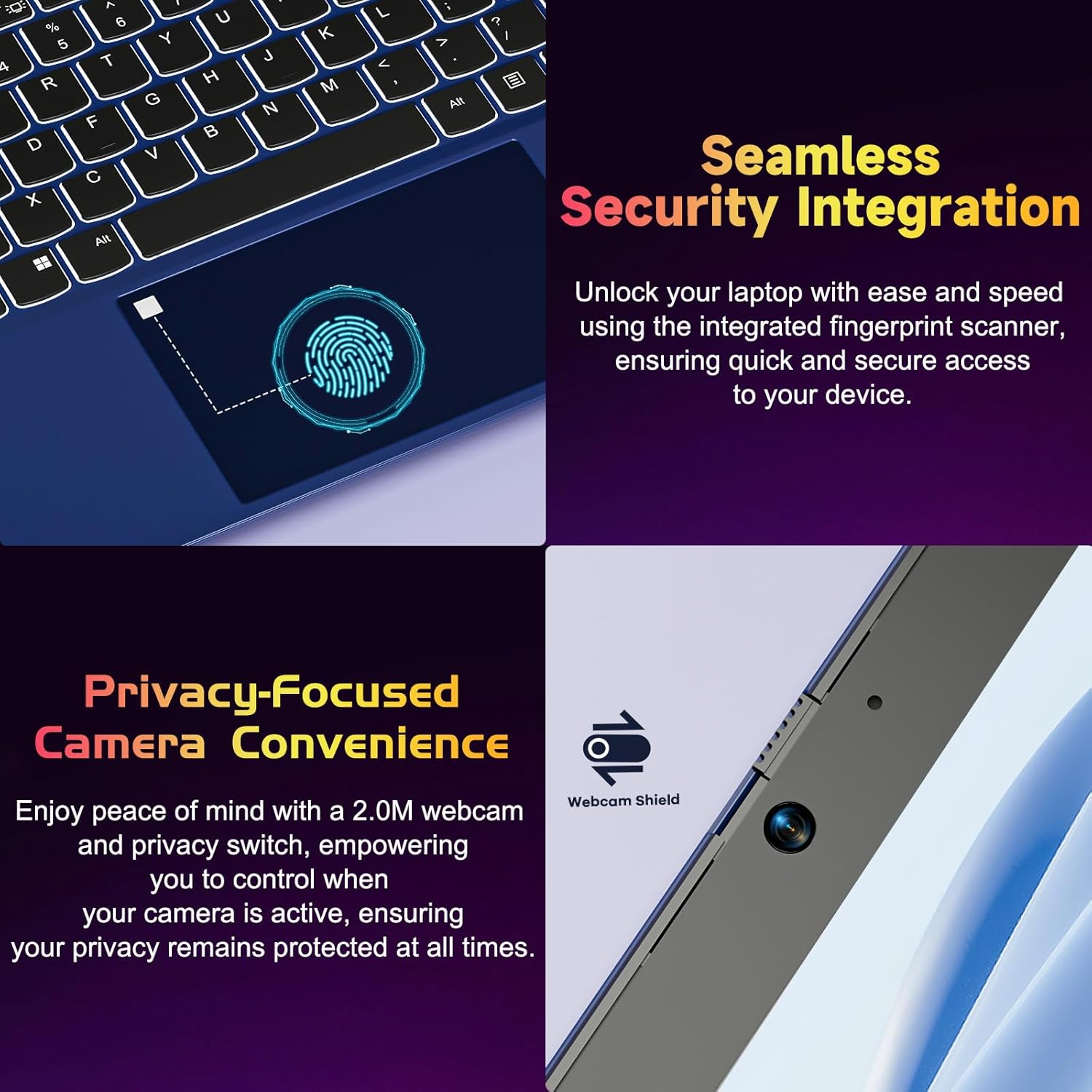
Figure 4.2: Seamless Security Integration and Privacy-Focused Camera. This image highlights the fingerprint scanner for quick and secure access, and the 2.0MP webcam with a physical privacy switch for enhanced user privacy.
4.3. Ekran Xüsusiyyətləri
The 15.6 inch Full HD (1920 x 1080 Pixel) IPS display offers vivid visuals and a wide viewing angle. The 180° lay-flat hinge allows for flexible screen positioning, ideal for sharing content.

Figure 4.3: Vivid Full HD Display. This image emphasizes the laptop's 15.6-inch Full HD (1920x1080) IPS display, offering bright visuals and eye protection.

Figure 4.4: 180° Lay-Flat Hinge. This image illustrates the laptop's ability to lay flat, expanding usage scenarios and facilitating content sharing.
4.4. Webcam Privacy
The laptop includes a 2.0MP webcam with a physical privacy switch (Webcam Shield). Slide the switch to cover the camera lens when not in use to ensure your privacy.
5. Baxım
- Təmizləmə: Ekranı və xarici hissəni təmizləmək üçün yumşaq, tüksüz bir parça istifadə edin. İnadkar ləkələr üçün bir az təmizləyin.ampparçanı su və ya ekran təmizləyicisi ilə örtün. Sərt kimyəvi maddələrdən çəkinin.
- Batareyaya qulluq: Batareyanın ömrünü uzatmaq üçün batareyanı tez-tez tam boşaltmaqdan çəkinin. Noutbuku uzun müddət istifadə edilmədikdə sərin və quru yerdə saxlayın.
- Proqram təminatı yeniləmələri: Optimal performans və təhlükəsizliyi təmin etmək üçün Windows əməliyyat sisteminizi və drayverlərinizi mütəmadi olaraq yeniləyin.
- Yaddaş genişləndirilməsi: The laptop supports dual DDR4 SO-DIMM slots and M.2 NVMe SSD for memory and storage expansion. Consult a qualified technician for upgrades.
6. Giderme
6.1. Enerji Məsələləri
- Laptop açılmır: Ensure the laptop is charged. Connect the charger and wait a few minutes before attempting to power on again.
- Batareya doldurulmur: Verify the charger is properly connected to both the laptop and the power outlet. Try a different outlet.
6.2. Problemləri göstərin
- Ekran boşdur: Check if the laptop is powered on. Try adjusting screen brightness using the function keys. If an external monitor is connected, ensure it is properly configured.
6.3. Performans Məsələləri
- Laptop yavaşlayır: Close unnecessary applications. Check for background processes consuming high resources. Ensure sufficient free storage space. Consider performing a system scan for malware.
6.4. Bağlantı Problemləri
- Wi-Fi qoşulmur: Ensure Wi-Fi is enabled. Restart your router and the laptop. Check network settings in Windows.
7. Spesifikasiyalar
| Xüsusiyyət | Detal |
|---|---|
| Brend | NIMO |
| Model Adı | NIMO N152R |
| Ekran Ölçüsü | 15.6 düym |
| Ekran həlli | 1920 x 1080 Piksel (Full HD) |
| Prosessor | AMD Ryzen 5 3500U (3.7 GHz, 4 Cores, 8 Threads) |
| RAM | 8 GB DDR4 (Upgradable) |
| Yaddaş sürəti | 3200 MHz |
| Sərt Disk | 256 GB SSD (Upgradable M.2 NVMe) |
| Qrafik koprosessor | AMD Integrated graphics (Vega) |
| Əməliyyat sistemi | Windows 11 |
| Simsiz Tip | 802.11abg |
| USB Portları | 1x USB 2.0, 2x USB 3.0, 2x USB-C (1x Charge Only, 1x Full Function) |
| HDMI portu | Bəli |
| Micro SD Reader | Bəli |
| Orta Batareya Ömrü | 5 saat |
| Maddə Çəkisi | 3.8 funt (1.72 kq) |
| Məhsul Ölçüləri | 14.07 x 8.98 x 0.76 düym |
| Rəng | Gül |
| Arxa Webkamera həlli | 2 MP |
8. Zəmanət və Dəstək
Your NIMO laptop comes with a 2-year warranty, covering manufacturing defects and hardware malfunctions under normal use. Additionally, a 90-day free return policy is provided.

Figure 8.1: After-Sales Support. This image outlines the 2-year warranty, 90-day return policy, and professional customer service available for NIMO products.
8.1. Dəstək ilə əlaqə
For technical assistance, warranty claims, or product-related questions, please contact the NIMO U.S.-based support team. Contact information can typically be found on the official NIMO websayt və ya məhsulun qablaşdırılması.
9. Təhlükəsizlik Məlumatı
Cihazınızın zədələnməsinin və ya zədələnməsinin qarşısını almaq üçün aşağıdakı təhlükəsizlik tədbirlərinə əməl edin:
- Noutbuku həddindən artıq temperatura, birbaşa günəş işığına və ya yüksək rütubətə məruz qoymayın.
- Noutbukun üzərinə ağır əşyalar qoymaqdan çəkinin.
- Use only the provided charger or a compatible 65W PD Type-C charger.
- Noutbuku özünüz sökməyə və ya təmir etməyə çalışmayın. İxtisaslı xidmət personalına müraciət edin.
- Elektrik şoku və ya zədələnmənin qarşısını almaq üçün mayeləri noutbukdan uzaq tutun.
- Ensure proper ventilation when using the laptop to prevent overheating.


