Giriş
Thank you for choosing the EUQQ YYK-Q10 AI Translator Earbuds. These earbuds are designed to provide seamless real-time language translation, high-quality audio, and effective noise cancellation, making them ideal for communication across language barriers, business meetings, and everyday use. This manual will guide you through the setup, operation, and maintenance of your new device to ensure optimal performance and user experience. Please read this manual thoroughly before using the product.
Paketin məzmunu
Zəhmət olmasa paketi aşağıdakı maddələr üçün yoxlayın:
- EUQQ YYK-Q10 AI Translator Earbuds (L/R)
- Doldurma qutusu
- USB şarj kabeli
- Qulaq uclarının çoxlu ölçüləri
- İstifadəçi təlimatı
Hər hansı bir element əskik və ya zədələnmişsə, müştəri dəstəyi ilə əlaqə saxlayın.
Məhsul Bitdiview
The EUQQ YYK-Q10 features a compact design with intuitive controls and a smart charging case. Familiarize yourself with the components below.
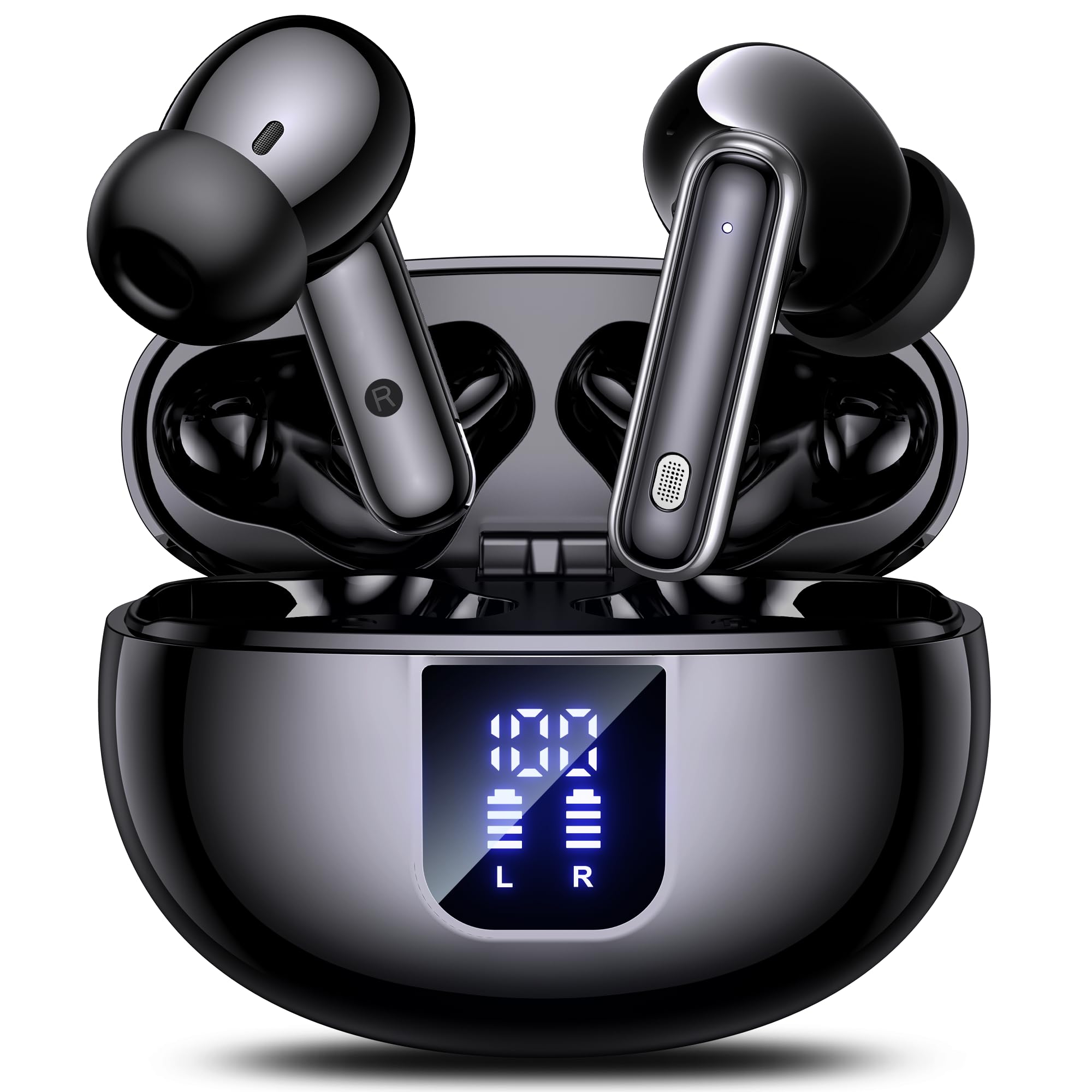
Image: The EUQQ YYK-Q10 AI Translator Earbuds are shown inside their open charging case. The case is black and features a digital display on the front, indicating battery levels for both the case and individual earbuds (L and R). The earbuds themselves are black with silver accents.
Əsas komponentlər:
- Qulaqlıqlar: Left (L) and Right (R) earbuds with touch control areas and microphones.
- Şarj qutusu: Stores and charges the earbuds. Features a digital display for battery status.
- Doldurma Portu: USB-C port on the charging case for power input.
- LED göstəriciləri: On earbuds and case to show charging status and connection.
Quraşdırma
1. İlkin Doldurma
- Hər iki qulaqlığı şarj qutusuna yerləşdirin.
- USB şarj kabelini korpusdakı şarj portuna və enerji mənbəyinə qoşun.
- The digital display on the case will show the charging status. Ensure both earbuds and the case are fully charged before first use (approximately 1-2 hours).
2. Bluetooth Cütləşdirmə
- Open the charging case. The earbuds will automatically enter pairing mode, indicated by flashing LED lights.
- Smartfon və ya cihazınızda Bluetooth-u aktiv edin və mövcud cihazları axtarın.
- Select "EUQQ YYK-Q10" from the list of devices.
- Once connected, the earbud LEDs will stop flashing, and a voice prompt will confirm the connection.
3. Tətbiqin Quraşdırılması (Tərcümə Xüsusiyyətləri üçün)
To utilize the real-time translation features, download the dedicated EUQQ translation app from your device's app store (iOS App Store or Google Play Store). Follow the in-app instructions to connect your earbuds and configure language settings.
Əməliyyat Təlimatları
Gücü yandırın/söndürün
- Güc Aktivdir: Şarj qutusunu açın və ya qulaqcıqları qutudan çıxarın. Onlar avtomatik olaraq işə düşəcəklər.
- Söndürmək: Qulaqlıqları yenidən doldurma qutusuna qoyun və qapağı bağlayın. Onlar avtomatik olaraq sönəcək.
Music Playback Controls (Touch Controls)
- Oynat/Pauza: Hər iki qulaqcığa bir dəfə toxunun.
- Növbəti trek: Sağ qulaqcığa iki dəfə toxunun.
- Əvvəlki Track: Sol qulaqcığa iki dəfə toxunun.
- Həcmi artır: Sağ qulaqcığa üç dəfə toxunun.
- Səs azaldı: Sol qulaqcığa üç dəfə toxunun.
Call Management (Touch Controls)
- Zəngə Cavab Vermək/Bitirmək: Hər iki qulaqcığa bir dəfə toxunun.
- Zəngi rədd edin: İstənilən qulaqcığı 2 saniyə basıb saxlayın.
Translation Mode
Activate translation mode through the dedicated EUQQ app. The app will guide you through selecting source and target languages. Depending on the app's features, you may use different modes:
- Söhbət Rejimi: Speak into your earbud's microphone, and the translation will be played through the other person's earbud or your phone's speaker.
- Interpreter Mode: One person wears an earbud, the other speaks into the phone.
- Touch-to-Speak Mode: Tap an earbud to speak, release to translate.
Refer to the EUQQ app's help section for detailed instructions on specific translation modes and features.
Səs-küyün ləğvi
The earbuds feature dual-mic noise cancelling. This feature is typically active by default or can be toggled via the companion app. It helps reduce ambient noise during calls and translation sessions for clearer communication.
Baxım
- Təmizləmə: Qulaqcıqları və şarj qutusunu mütəmadi olaraq yumşaq, quru və tüksüz bir parça ilə təmizləyin. Sərt kimyəvi maddələrdən və ya aşındırıcı materiallardan istifadə etməyin.
- Qulaq məsləhətləri: Qulaq uclarını vaxtaşırı çıxarın və su və yumşaq sabunla təmizləyin. Yenidən taxmazdan əvvəl onların tamamilə quru olduğundan əmin olun.
- Doldurma kontaktları: Düzgün doldurulmasını təmin etmək üçün həm qulaqcıqlardakı, həm də qutudakı doldurma kontaktlarını quru pambıq çubuqla yumşaq bir şəkildə təmizləyin.
- Yaddaş: İstifadə edilmədikdə, qulaqcıqları qorumaq və doldurulmuş vəziyyətdə saxlamaq üçün onları şarj qutusunda saxlayın. Həddindən artıq temperatur və rütubətdən çəkinin.
Problemlərin aradan qaldırılması
| Problem | Həll |
|---|---|
| Qulaqlıqlar birləşdirilmir |
|
| Səs və ya aşağı səs yoxdur |
|
| Doldurma problemləri |
|
| Tərcümə işləmir |
|
Spesifikasiyalar
| Xüsusiyyət | Detal |
|---|---|
| Brend | EUQQ |
| Model Adı | YYK-Q10 |
| Bağlantı texnologiyası | Simsiz |
| Qulaqlıq Forma Faktoru | Qulaqdaxili |
| Rəng | Qara |
| Daxil olan komponentlər | Instruction Manual (and other standard accessories like earbuds, case, cable, ear tips) |
| Maddələrin sayı | 1 (product unit) |
| Batareyalar Tələb olunur | No (built-in rechargeable) |
| İstehsalçı Model Nömrəsi | YYK-Q10 |
| Paket Ölçüləri | 0.1 x 0.1 x 0.1 sm; 45.36 q |
| ASIN | B0FN3WC8LW |
Zəmanət Məlumatı
The EUQQ YYK-Q10 AI Translator Earbuds come with a standard manufacturer's warranty. For detailed information regarding warranty coverage, terms, and conditions, please refer to the warranty card included in your package or visit the official EUQQ websayt. Zəmanət iddiaları üçün satınalma sübutunuzu özündə saxlayın.
Müştəri dəstəyi
If you encounter any issues or have questions regarding your EUQQ YYK-Q10 AI Translator Earbuds, please do not hesitate to contact our customer support team. You can find contact information on the official EUQQ website or through the support section of the EUQQ translation app.
Onlayn Resurslar:
- Official EUQQ Websayt: Visit EUQQ Store on Amazon
- EUQQ Translation App (for in-app support)


