Giriş
This manual provides detailed instructions for the proper setup, operation, and maintenance of your FEELWORLD FW759 PRO 7-inch 1280x800 IPS Touch Screen Camera Field Video Monitor. Please read this manual thoroughly before using the product to ensure optimal performance and to prevent damage.
The FW759 PRO is designed to provide precise monitoring for professional video and photography applications. It features a 7-inch 1280x800 IPS display, 4K HDMI input, and a touch screen interface for intuitive control.
Paketin məzmunu
Aşağıda sadalanan bütün elementlərin paketinizə daxil olduğunu yoxlayın. Əgər hər hansı bir əşya əskik və ya zədələnmişsə, lütfən, pərakəndə satıcınızla əlaqə saxlayın.

Şəkil 1: Daxil edilən aksesuarlar
- FEELWORLD FW759 PRO Monitor (1x)
- HDMI Cable (1x)
- Micro HDMI Cable (1x)
- Mini Hot Shoe Mount + Hex Wrench (1x)
- USB-A to USB-C Adapter (1x)
- Sun Shade + Frame (1x)
- Cable Management Tie (1x)
- Tez Başlanğıc Təlimatı (1x)
Məhsul Bitdiview
The FW759 PRO monitor features a slim and lightweight design, making it suitable for mobile shooting environments. It incorporates multiple ports for connectivity and versatile power options.

Şəkil 2: Ön və Yan Views with Ports
Front and Side Features:
- 7 düymlük IPS Sensorlu Ekran: High-resolution display for clear monitoring and intuitive control.
- F1, F2, F3 Buttons: Customizable shortcut keys for quick access to frequently used functions.
- Güc düyməsi: For turning the monitor on and off.
- Type-C 5V Port: Güc girişi üçün.
- AV portu: Analoq video girişi üçün.
- HDMI portu: Supports 4K 30Hz signal input.
- DC IN 12V Port: For external power supply.
- 3.5 mm qulaqlıq girişi: For audio monitoring.

Şəkil 3: Arxa View with Battery Plate
Arxa Xüsusiyyətlər:
- NP-F Battery Plate: Compatible with NP-F series batteries for portable power.
- 1/4" Mounting Points: Multiple mounting points for flexible attachment to cameras or rigs.
Quraşdırma
1. Monitorun quraşdırılması
The FW759 PRO features multiple 1/4" mounting points on its sides and bottom, allowing for flexible attachment to various camera setups or rigs using the included Mini Hot Shoe Mount or other compatible accessories.

Figure 4: Monitor Mounting Options
- Attach the Mini Hot Shoe Mount to your camera's hot shoe or a compatible rig.
- Secure the monitor to the Mini Hot Shoe Mount using one of the 1/4" screw threads. Ensure it is tightened securely with the hex wrench.
2. Monitoru işə salmaq
The FW759 PRO offers versatile power options:
- NP-F Seriyası Batareya: Insert a charged NP-F series battery into the battery plate on the back of the monitor.
- DC IN 12V: Connect an external 12V DC power adapter (not included) to the DC IN port.
- Type-C 5V: Connect a 5V Type-C power source (e.g., power bank, USB adapter) to the Type-C port.
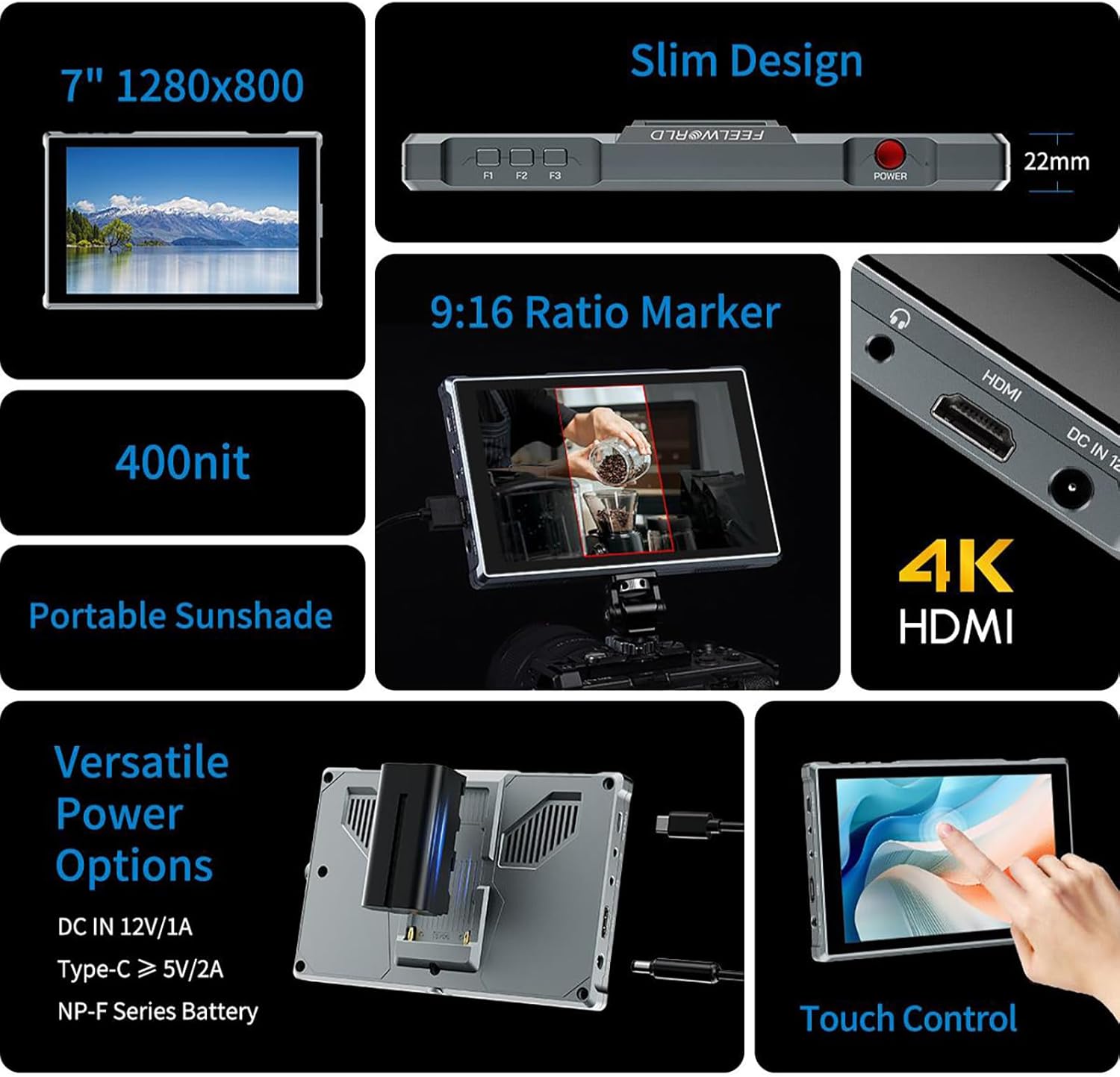
Figure 5: Power Options and Connectivity
3. Connecting Video Input
Connect your camera or video source to the monitor using the appropriate cable:
- HDMI Giriş: Use the provided HDMI or Micro HDMI cable to connect your camera's HDMI output to the monitor's HDMI input port. The monitor supports 4K 30Hz signals.
- AV Girişi: For devices with analog video output, connect to the AV port.
4. Attaching the Sun Shade
For improved visibility in bright outdoor conditions, attach the included sun shade:
- Assemble the sun shade frame.
- Slide the sun shade onto the monitor's frame until it clicks into place.
Əməliyyat Təlimatları
1. Gücü yandırın/söndürün
basın və saxlayın Güc düyməsi located on the top right side of the monitor to turn it on or off.
2. Toxunma ekranının işləməsi
The FW759 PRO features an intuitive touch screen for quick adjustments:

Figure 6: Touch Screen Gestures
- Swipe from the left edge: Arxa işığın parlaqlığını tənzimləyin.
- Swipe from the right edge: Səs səviyyəsini tənzimləyin.
- Swipe up from the bottom edge: Access the shortcut menu for quick settings.
- Klikləyin: Select menu items or confirm settings.
3. Customizable Shortcut Keys (F1, F2, F3)
The three customizable function buttons (F1, F2, F3) allow you to assign frequently used features for quick access. To assign a function:
- Access the main menu (via touch screen or a long press on a function button).
- Navigate to the 'Function Key Settings' or similar option.
- Select F1, F2, or F3 and choose the desired function (e.g., Peaking Focus, False Color, Aspect Marker).
4. Menyu Naviqasiyası və Parametrlər
The monitor's menu system allows for comprehensive control over display settings, auxiliary functions, and system configurations.
- Main Menu Access: Tap the screen to bring up the main menu interface.
- Naviqasiya: Use touch gestures to navigate through menu options.
- Köməkçi funksiyalar: Access features like Peaking Focus Assist, False Color, Exposure, Histogram, Aspect Markers (including 9:16 vertical marker for social media content), and more.
- Dil Parametrləri: The FW759 PRO supports up to 12 languages. Adjust this in the system settings.
- Menu Setting Saving: The monitor supports saving up to 4 groups of menu settings. After configuring your desired settings, select a group (1-4) to save them automatically. These can be recalled or switched as needed for different shooting scenarios.
5. Audio Monitoring
Connect headphones to the 3.5mm headphone jack to monitor audio from your HDMI or AV input source.
Baxım
Monitorun təmizlənməsi
- Monitorun ekranını və gövdəsini yumşaq, tüksüz bir parça ilə yumşaq bir şəkildə silin.
- İnadkar ləkələr üçün, yüngülcə dampen the cloth with water or a screen-cleaning solution specifically designed for electronics.
- Avoid using harsh chemicals, abrasive cleaners, or solvents, as these can damage the screen and finish.
Saxlama
- When not in use, store the monitor in a dry, cool place away from direct sunlight and extreme temperatures.
- Use a protective case or pouch to prevent scratches and impacts during transport.
- Sızmanın qarşısını almaq üçün uzun müddət saxlasanız, batareyaları çıxarın.
Problemlərin aradan qaldırılması
If you encounter issues with your FW759 PRO monitor, refer to the following common solutions:
- Güc yoxdur: Ensure the battery is charged and correctly inserted, or that the external power adapter is properly connected and supplying adequate power. Check the power button.
- Siqnal yoxdur: Verify that the HDMI or AV cable is securely connected to both the monitor and the video source. Confirm that the video source is outputting a signal and that the monitor's input source is correctly selected in the menu.
- Image Distortion/Poor Quality: Check the resolution and frame rate settings on your camera or video source to ensure compatibility with the monitor (up to 4K 30Hz). Inspect cables for damage.
- Toxunma ekranı cavab vermir: Try restarting the monitor. Ensure the screen is clean and free of debris.
- Düymələr İşləmir: Restart the monitor. If the issue persists, contact support.
For further assistance, please refer to the official FEELWORLD support resources.
Spesifikasiyalar
| Xüsusiyyət | Spesifikasiya |
|---|---|
| Model | FW759 PRO |
| Ekran Ölçüsü | 7 düym |
| Qətnamə | 1280x800 |
| Panel növü | IPS |
| Viewaçı | 178° (Eni) |
| Giriş Portları | HDMI (4K 30Hz support), AV, Type-C (5V power) |
| Çıxış Portları | 3.5 mm qulaqlıq yuvası |
| Güc Seçimləri | DC IN 12V, Type-C 5V, NP-F Series Battery |
| Enerji istehlakı | 9W |
| Məhsul Ölçüləri | 4.53 x 7.17 x 0.87 düym (11.5 x 18.2 x 2.2 sm) |
| Maddə Çəkisi | 1.76 funt (0.8 kq) |
| Dəstəklənən Dillər | Up to 12 languages |
Zəmanət və Dəstək
FEELWORLD products are manufactured to high-quality standards. For warranty information, please refer to the warranty card included with your product or visit the official FEELWORLD websayt. Satınalma qəbzinizi zəmanət iddiaları üçün satınalmanın sübutu kimi saxlayın.
For technical support, product inquiries, or service, please contact FEELWORLD customer service through their official channels. You can often find support information on the manufacturer's websaytında və ya səlahiyyətli dileriniz vasitəsilə.
ziyarət edin FEELWORLD Store əlavə məlumat və məhsul yeniləmələri üçün.


