1. Məhsul bitdiview
The Keychron M6 Silent Wireless Gaming Mouse is designed for optimal comfort and performance across various tasks, from gaming to productivity. It features a lightweight, ergonomic design, versatile connectivity options, and a high-precision optical sensor. This manual provides detailed instructions for setup, operation, and maintenance.

Image: Keychron M6 Silent Wireless Gaming Mouse, showcasing its ergonomic shape and main buttons.
2. Əsas Xüsusiyyətlər
- Ultra-Ergonomic & Lightweight Design: The M6 mouse combines a compact, ergonomic shape with a lightweight 86g body for extended comfort. It includes over ten customizable buttons and an infinite metal scroll wheel.
- Stable Wireless with Ultra-Low Latency: Experience reliable 2.4GHz wireless performance with a 1000Hz polling rate. The M6 also supports Bluetooth 5.3 for multi-device use and flexible switching.
- High-Precision PixArt 3395 Sensor: Equipped with the advanced PixArt 3395 optical sensor, the M6 provides up to 26,000 DPI, 650 IPS tracking speed, and pinpoint accuracy.
- Infinite Scroll & Premium Metal Wheel: Features dual scrolling modes: smooth, infinite scroll for fast navigation and tactile mode for precision. The solid metal wheel offers a quiet, premium feel.
- Fully Programmable via Keychron Engine Software: Customize every button with Keychron Engine software on macOS and Windows. Create shortcuts, set macros, adjust DPI, polling rate, and LOD.
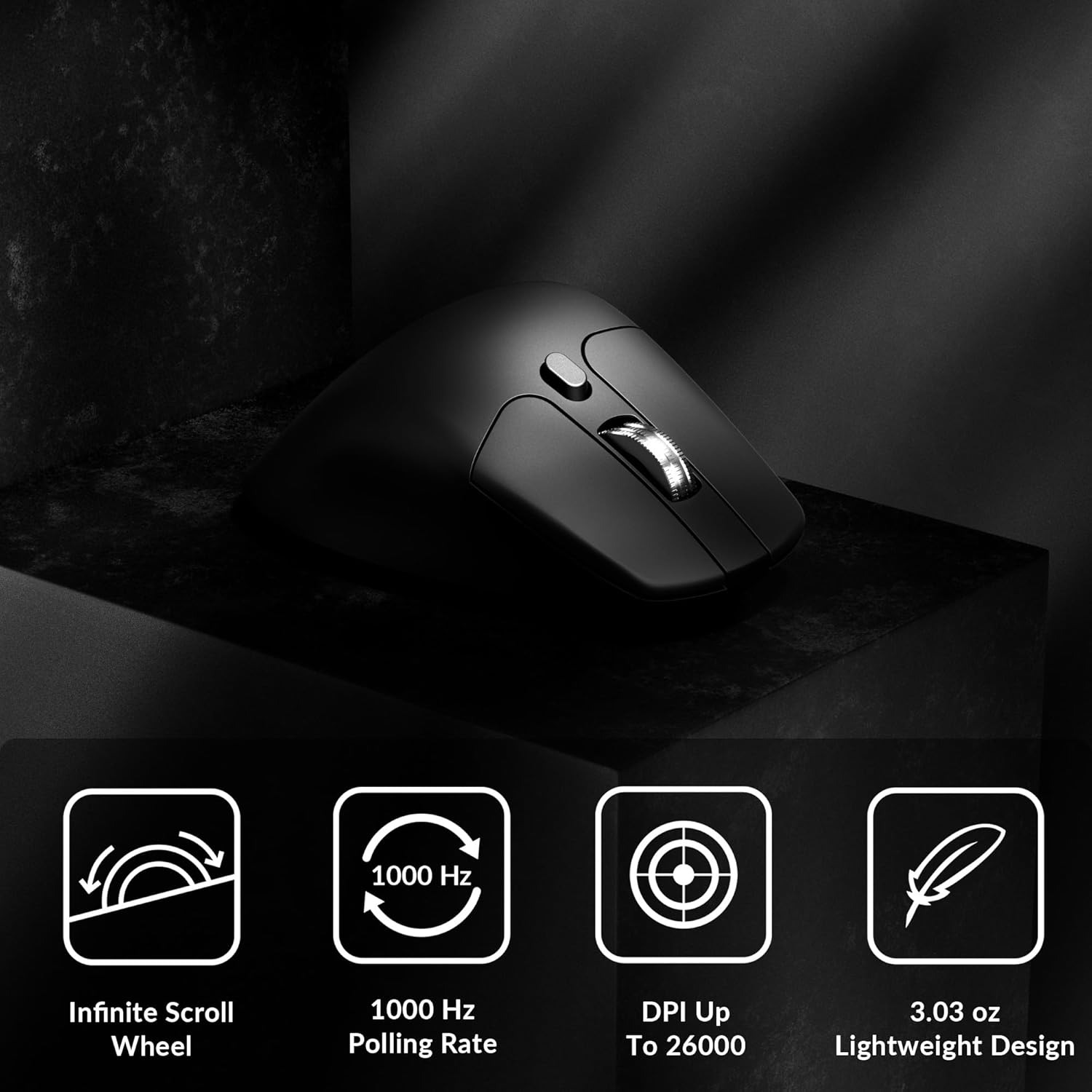
Image: Icons illustrating key features: Infinite Scroll Wheel, 1000 Hz Polling Rate, DPI Up To 26000, and Lightweight Design.
3. Quraşdırma
3.1 Paketin məzmunu
Bütün əşyaların paketdə olduğunu yoxlayın:
- 1x Keychron M6 Mouse
- 1x Type-C - Type-C Kabel
- 1x Type-A-dan Type-C Adapterinə
- Qəbuledici üçün 1x Uzatma Adapteri
- 1x Type-C 2.4 GHz Receiver
- 1x Type-A 2.4 GHz qəbuledicisi
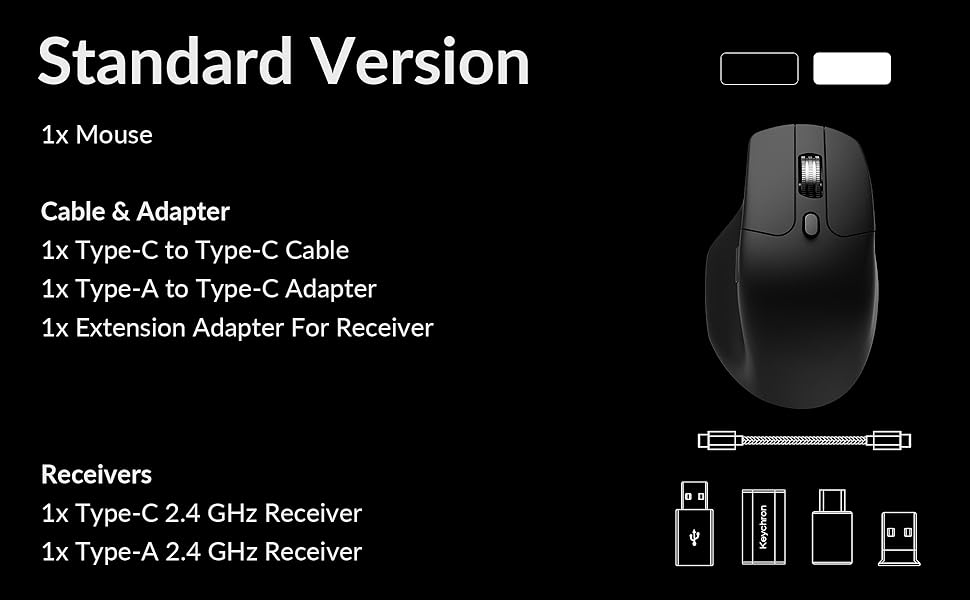
Image: Diagram showing the contents of the Keychron M6 mouse package.
3.2 İlkin Doldurma
Before first use, it is recommended to fully charge the mouse. Connect the mouse to your computer using the provided Type-C cable. The LED indicator will show charging status.
3.3 Siçanın qoşulması
The Keychron M6 supports three connection modes: 2.4GHz wireless, Bluetooth 5.3, and wired.
- 2.4GHz Simsiz: Insert the 2.4GHz receiver (Type-A or Type-C) into your computer's USB port. Switch the mode switch on the bottom of the mouse to 'G' (Gaming) mode. The mouse should connect automatically.
- Bluetooth 5.3: Switch the mode switch on the bottom of the mouse to 'B' (Bluetooth) mode. On your computer, search for Bluetooth devices and select 'Keychron M6' to pair.
- simli: Connect the mouse directly to your computer using the provided Type-C cable. The mouse will function in wired mode and charge simultaneously.

Image: Keychron M6 mouse connected to a laptop via 2.4GHz receiver, with Bluetooth 5.3 icon.
4. Əməliyyat Təlimatları
4.1 Əsas funksiyalar
- Sol/Sağ Klik: Standart siçan düymələri funksiyaları.
- Sürüşmə çarxı: Used for vertical scrolling.
- Yan Düymələr: Default to Forward/Backward navigation. Customizable via software.
- Baş barmaq çarxı: Located on the side, used for horizontal scrolling.
4.2 DPI Tənzimlənməsi
The DPI (Dots Per Inch) button on the bottom of the mouse allows you to cycle through preset sensitivity levels. Each level is indicated by a specific LED color. You can customize these DPI levels using the Keychron Engine software.
4.3 Səsvermə nisbətinin tənzimlənməsi
The polling rate button on the bottom of the mouse allows you to switch between different polling rates (125Hz, 500Hz, 1000Hz). A higher polling rate provides more responsive tracking, ideal for gaming. The LED indicator will change color to reflect the current polling rate.

Image: Close-up of the polling rate switch and indicator light on the mouse's underside.
4.4 Infinite Scroll Mode
The M6 features a button near the main scroll wheel to toggle between infinite scroll mode and tactile (notched) scroll mode. Infinite scroll allows for rapid navigation through long documents or web səhifələr.

Image: Diagram showing the infinite scroll button and the horizontal scrolling function of the thumb wheel.
5. Customization with Keychron Engine Software
The Keychron Engine software allows for comprehensive customization of your M6 mouse. It is compatible with macOS and Windows and can be accessed online, eliminating the need for a download.
- Düymə Təyinatı: Remap any of the mouse buttons to perform different functions, including keyboard shortcuts, multimedia keys, or macros.
- Makro Yaradılması: Record and assign complex sequences of commands to a single button.
- DPI/Polling Rate/LOD Adjustment: Fine-tune sensor settings to match your preferences.
Rəsmi Keychron-u ziyarət edin website to access the Keychron Engine software.

Image: Screenshot of the Keychron Engine software interface, showing button customization options for the M6 mouse.
6. Qoşulma Rejimləri
The M6 mouse offers flexible connectivity to suit various setups:
- 2.4GHz Simsiz: Provides a stable, low-latency connection with a 1000Hz polling rate, ideal for gaming and demanding tasks. Uses a dedicated USB receiver.
- Bluetooth 5.3: Offers seamless connection to multiple devices, allowing for quick switching between systems. Suitable for general use and productivity.
- Simli (USB-C): Connects directly via the USB-C cable, providing a reliable connection and simultaneously charging the mouse.
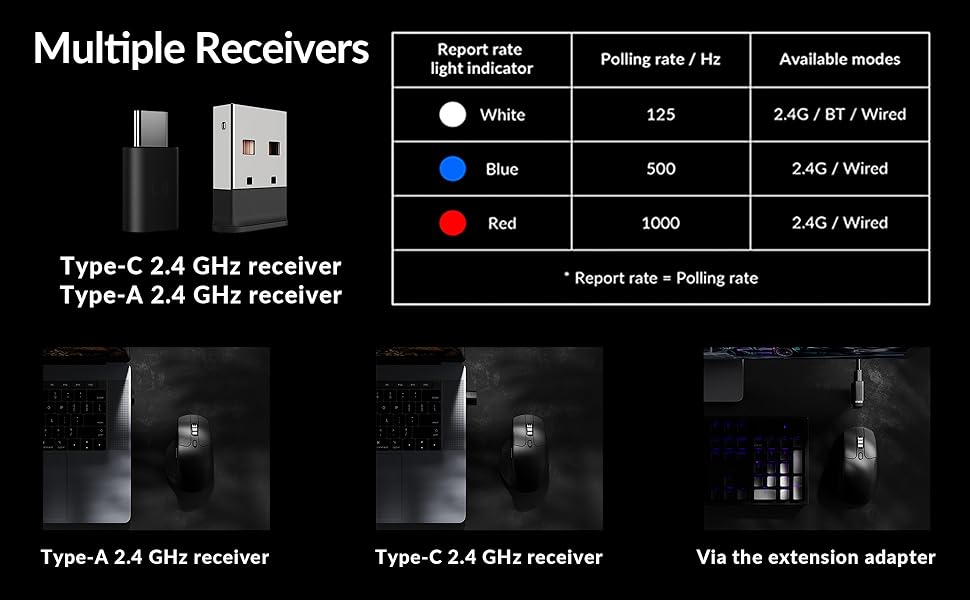
Image: Illustration of the Type-C and Type-A 2.4 GHz receivers, along with a table detailing polling rates and available modes.
7. Spesifikasiyalar
| Model nömrəsi | M6S |
| Sensor | PixArt 3395 Optik Sensor |
| DPI | 26,000-a qədər |
| IPS Tracking Speed | 650 |
| Səsvermə dərəcəsi | 1000Hz (2.4GHz/Wired), 125Hz (Bluetooth) |
| Bağlantı | 2.4GHz Simsiz, Bluetooth 5.3, USB-C Simli |
| Çəki | 86 q (3.03 unsiya) |
| Batareya | 800 mAh (80 saata qədər) |
| Keçidlər | Huano 20M Silent Micro Switch |
| Uyğunluq | Windows, macOS, Linux |
| Ölçülər | 4.82 x 2.97 x 1.97 düym (122.5 x 75.4 x 50 mm) |
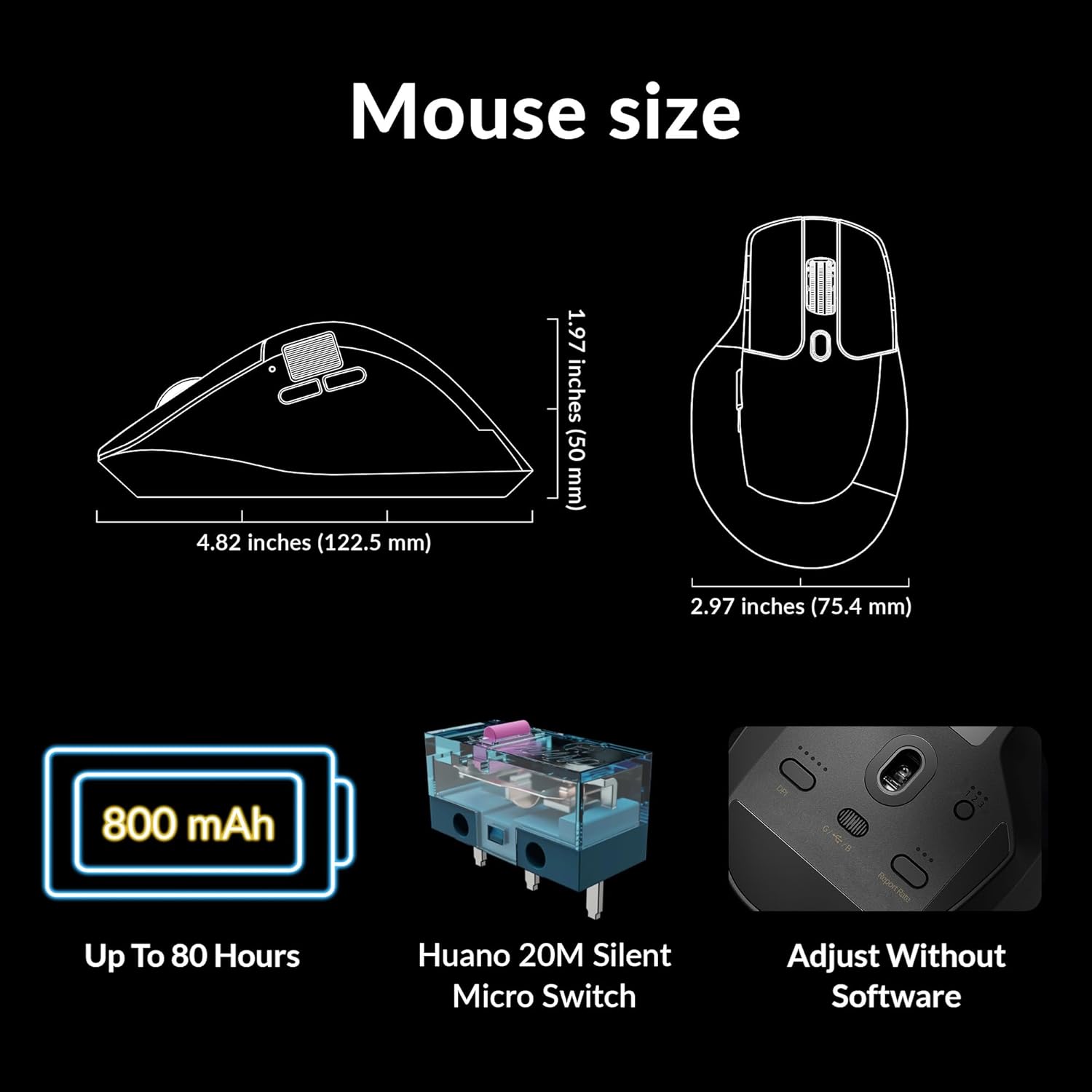
Image: Diagram showing the dimensions of the Keychron M6 mouse, its 800 mAh battery, and Huano 20M Silent Micro Switches.
8. Baxım
To ensure the longevity and optimal performance of your Keychron M6 mouse, follow these maintenance guidelines:
- Təmizləmə: Siçanın səthini yumşaq, quru bir parça ilə silin. İnadkar çirk üçün bir az təmizləyin.ampparçanı su və ya yumşaq təmizləyici məhlul ilə örtün. Sərt kimyəvi maddələrdən çəkinin.
- Sensor Baxımı: Dəqiq izləməni təmin etmək üçün siçanın altındakı optik sensoru təmiz və toz və ya zibildən təmiz saxlayın.
- Batareyaya qulluq: Avoid fully discharging the battery frequently. For long-term storage, charge the mouse to about 50% and store it in a cool, dry place.
- Yaddaş: When not in use, store the mouse in a safe place to prevent physical damage.
9. Giderme
If you encounter issues with your Keychron M6 mouse, refer to the following common solutions:
- Siçan cavab vermir:
- Siçanın doldurulduğundan əmin olun.
- Check the connection mode switch (2.4GHz, Bluetooth, Wired) is set correctly.
- For 2.4GHz, ensure the receiver is properly inserted and try a different USB port.
- For Bluetooth, re-pair the device in your computer's Bluetooth settings.
- Simsiz problemləri istisna etmək üçün USB-C kabeli ilə qoşulmağa çalışın.
- Uyğunsuz İzləmə:
- Siçanın altındakı optik sensoru təmizləyin.
- Siçanı uyğun bir səthdə (məsələn, siçan altlığı) istifadə etdiyinizə əmin olun.
- Adjust the DPI settings to a comfortable level.
- Düymələr İşləmir:
- Check Keychron Engine software for custom button assignments that might be interfering.
- Siçan proqram təminatının yeniləndiyinə əmin olun.
- Sürüşdürmə Təkərindəki Problemlər:
- Toggle the infinite scroll button to ensure it's in the desired mode.
- Sürüşdürmə çarxının ətrafındakı hər hansı bir zibili təmizləyin.
10. Rəsmi Məhsul Videosu
Video: Məmur bitdiview of the Keychron M6 Silent Wireless Optical Gaming Mouse, highlighting its features and design.
11. Zəmanət və Dəstək
Keychron products come with a limited warranty. For detailed warranty information, technical support, and frequently asked questions, please visit the official Keychron websaytına daxil olun və ya müştəri xidmətləri ilə əlaqə saxlayın. Zəmanət iddiaları üçün satınalma sübutunuzu saxlayın.


