1. Giriş
Welcome to the user manual for your new TCL 55C6K 55-inch 4K QLED Mini LED Smart Google TV. This television combines advanced display technologies like 4K resolution, QLED, and Mini LED with a high 144Hz refresh rate for exceptional visual clarity and smoothness. Enjoy immersive audio with the integrated Onkyo 2.1 Hi-Fi sound system and Dolby Atmos. Powered by Google TV, it offers a smart and intuitive user experience with access to a wide range of applications and voice control capabilities. This manual provides essential information for setup, operation, maintenance, and troubleshooting to ensure you get the most out of your television.
2. Təhlükəsizlik Məlumatı
Before operating your television, please read all instructions carefully. Keep this manual for future reference. Adhere to all warnings and instructions marked on the product.
- Güc mənbəyi: Only use the power cord supplied with the TV. Ensure the voltage yerli enerji təchizatınıza uyğun gəlir.
- Havalandırma: Havalandırma deliklərini bağlamayın. Həddindən artıq istiləşmənin qarşısını almaq üçün düzgün hava axını üçün televizorun ətrafında kifayət qədər boş yerə icazə verin.
- Su və nəm: Televizoru yağışa və ya nəmə məruz qoymayın. Vaza kimi maye ilə dolu əşyaları televizora qoymayın.
- Təmizləmə: Təmizləməzdən əvvəl televizoru elektrik şəbəkəsindən ayırın. Yumşaq, quru bir parça istifadə edin. Maye təmizləyicilərdən və ya aerozol təmizləyicilərdən istifadə etməyin.
- Yerləşdirmə: Televizoru sabit, düz bir səthə qoyun. Onu birbaşa günəş işığı altında və ya istilik mənbələrinin yaxınlığında yerləşdirməyin.
- Uşaqlar: Uşaqların televizora və ya dayağa dırmaşmasının qarşısını almaq üçün onlara nəzarət edin.
- Xidmət: Bu məhsula özünüz xidmət göstərməyə çalışmayın. Bütün xidmətlər üçün ixtisaslı xidmət personalına müraciət edin.
3. Paketin məzmunu
Bütün əşyaların paketdə olduğunu yoxlayın:
- TCL 55C6K 55-inch 4K QLED Mini LED Smart Google TV
- Uzaqdan İdarəetmə
- Elektrik kabeli
- İstifadəçi Təlimatı (bu sənəd)
- Zəmanət kartı
- Televizor stendinin komponentləri (əgər varsa)
4. Quraşdırma
4.1 Qabın açılması
Carefully remove the TV from its packaging. It is recommended to have two people for this process due to the size and weight of the unit. Retain the packaging materials for future transport or servicing.
4.2 Stendin quraşdırılması / Divara montaj
Stendin quraşdırılması:
- Place the TV screen-down on a soft, flat surface (e.g., a blanket or foam) to prevent damage.
- Təqdim olunan vintlərdən istifadə edərək stend komponentlərini televizorun altındakı təyin olunmuş yuvalara bağlayın. Onların etibarlı şəkildə bağlandığından əmin olun.
Divar montajı:
If you plan to wall mount your TV, please refer to the separate wall mount instruction manual provided with your wall mount kit. Ensure you use a VESA-compatible mount and follow all safety guidelines. Professional installation is recommended.

Figure 4.2.1: TCL 55C6K TV Dimensions
4.3 Qurğuların birləşdirilməsi
Your TCL 55C6K TV offers various connectivity options. Refer to the image below for port locations.

Şəkil 4.3.1: Yan View Portlarla
- HDMI Portları (x4): Connect Blu-ray players, gaming consoles, soundbars, and other HDMI-enabled devices. Supports ARC/eARC on one port and VRR 2.1 for enhanced gaming.
- USB Portu (x1): Connect USB storage devices for media playback. Supports VRR 3.0.
- RF In (x1): Connect an antenna or cable for digital broadcast reception (DVB-T/T2/S/S2).
- LAN Port (x1): Simli internet bağlantısı üçün Ethernet kabelini qoşun.
- Digital Audio Out (Optical) (x1): Connect to an external audio receiver or sound system for high-quality digital audio.
- Wi-Fi: Built-in 5G Wi-Fi for wireless internet connectivity.
- Bluetooth: Version 5.4 for connecting wireless headphones, speakers, or other Bluetooth devices.
4.4 İlkin işə salınma
- Elektrik kabelini televizora, sonra isə elektrik prizinə qoşun.
- Pultdakı və ya televizorun özündəki güc düyməsini basın.
- Dil seçimi, şəbəkə bağlantısı və Google TV hesabının qurulması da daxil olmaqla, ilkin quraşdırmanı tamamlamaq üçün ekrandakı təlimatları izləyin.
5. Əməliyyat Təlimatları
5.1 Uzaqdan idarəetmə üzərindəview
The remote control allows you to navigate the TV's features. Familiarize yourself with the buttons for power, volume, channel, input selection, and smart TV functions.
5.2 Google TV Interface and Smart Features
Your TCL 55C6K runs on Google TV, providing a personalized and intuitive smart TV experience.
- Naviqasiya: Use the directional pad and OK button on your remote to browse content and settings.
- Proqramlar: Access pre-installed apps like Netflix, YouTube, and Amazon Prime Video. Download more apps from the Google Play Store.
- Səslə Nəzarət: Use the built-in Google Assistant for voice commands. The TV supports Far Field Voice Control, allowing you to use voice commands without the remote.
- Chromecast Daxili və AirPlay 2: Məzmunu birbaşa smartfonunuzdan və ya planşetinizdən televizora yayımlayın.
- Other Smart Features: Time Shift, EPG (Electronic Program Guide), Recording, Sleep Timer, OSD Multi-language, Favorite Channel List, Channel Editor, PVR (Personal Video Recorder), Parental Control.
5.3 Şəkil Ayarları
Özünüzü optimallaşdırın viewMüxtəlif şəkil parametrləri ilə təcrübə.
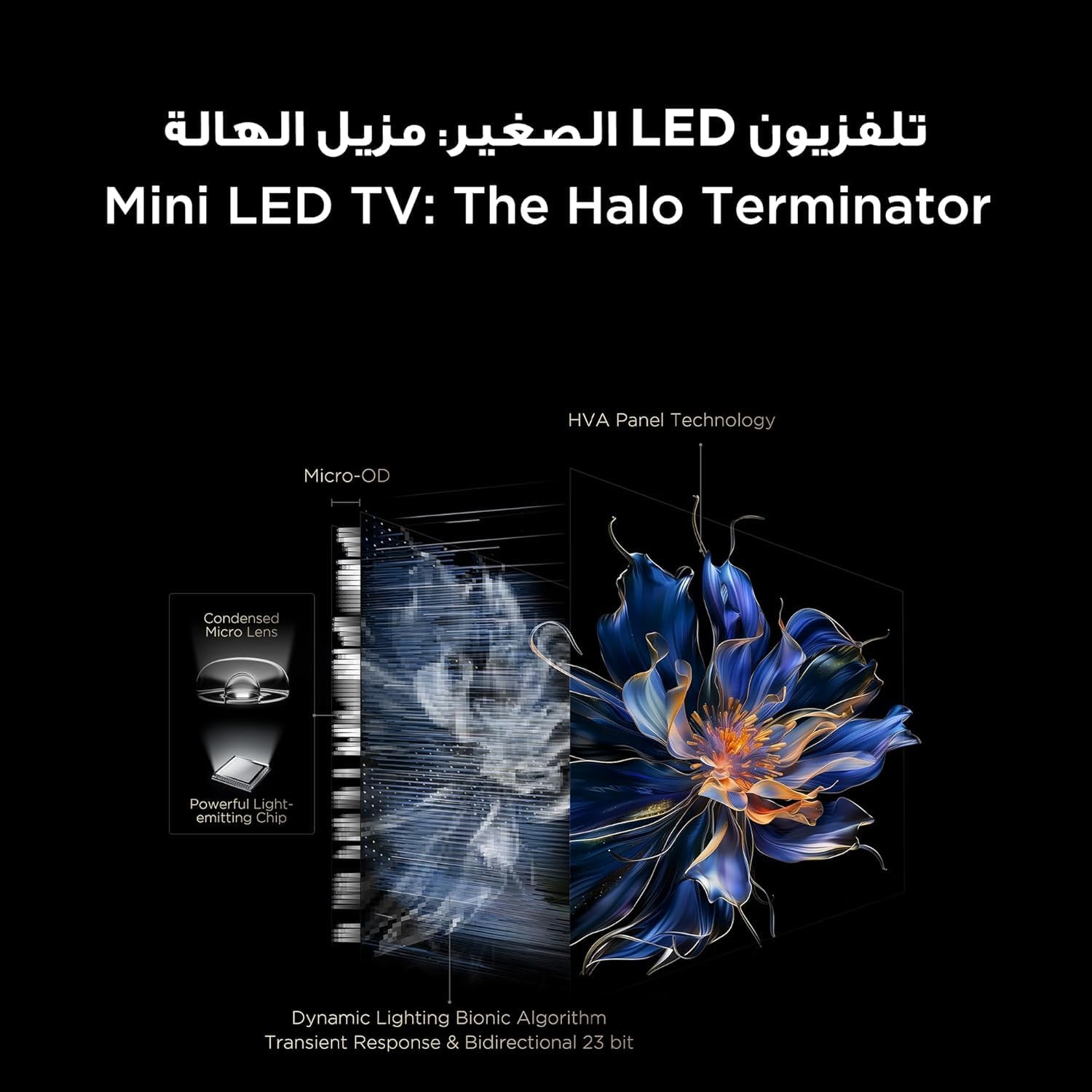
Figure 5.3.1: TV Feature Overview
- Şəkil rejimləri: Standard, Sports, Filmmaker Mode, Film, Game, Smart Game.
- HDR Texnologiyası: Supports Dolby Vision IQ, HDR 10+, and HLG for enhanced contrast and color.
- QLED Ekran: Enjoy over a billion hues of vivid color with 93% DCI-P3 color space.
- Mini LED Backlight: Precise dimming zones for deep blacks and high brightness.
- MEMC: Motion Estimation, Motion Compensation for smoother fast-moving scenes.
- iMax Contrast Enhancer: Improves contrast for a more dynamic picture.
- Rəng temperaturu: Adjust between Normal, Cool, and Warm settings.

Figure 5.3.2: QLED Color Technology

Figure 5.3.3: Mini LED Technology
5.4 Səs Parametrləri
Experience rich and immersive audio with your TV's advanced sound system.
- Audio Texnologiya: Features Dolby Atmos and DTS Virtual X for multi-dimensional sound.
- Onkyo 2.1 Hi-Fi Audio: Integrated Onkyo sound system with 10W x 2 speakers and a 20W subwoofer for powerful and clear audio.
- Səs rejimləri: Dynamic, Standard, Film, Music, Voice, Game, Sports.

Figure 5.4.1: Onkyo 2.1 Sound System
5.5 Oyun Xüsusiyyətləri
The TCL 55C6K is designed for an enhanced gaming experience.
- 144Hz Native Refresh Rate: Enjoy ultra-smooth motion for fast-paced games.
- VRR (Dəyişən Yeniləmə Tezliyi): Synchronizes the display's refresh rate with the game's frame rate to eliminate screen tearing and stuttering.
- FreeSync Premium Pro: Provides fluid, tear-free gameplay at peak performance.
- ALLM (Avtomatik Aşağı Gecikmə Rejimi): Oyun konsolu aşkar edildikdə televizoru avtomatik olaraq aşağı gecikmə rejiminə keçirərək daxiletmə gecikməsini azaldır.
- Oyun ustası: A dedicated suite of gaming features for optimal performance.

Figure 5.5.1: 144Hz Native Refresh Rate
6. Baxım
6.1 Televizorunuzun təmizlənməsi
- Ekran: Ekranı yumşaq, tüysüz bir parça ilə yumşaq bir şəkildə silin. İnadkar izlər üçün bir az dampen the cloth with water or a specialized screen cleaner (ensure it's safe for TV screens) and wipe gently. Never spray liquid directly onto the screen.
- Çərçivə: Televizor çərçivəsini və dayağını yumşaq, quru bir parça ilə silin.
- Təmizləməzdən əvvəl həmişə televizoru elektrik rozetkasından ayırın.
6.2 Proqram Yeniləmələri
Your TV may receive software updates to improve performance and add new features. It is recommended to keep your TV connected to the internet to receive these updates automatically. You can also manually check for updates in the TV's settings menu.
7. Giderme
Televizorunuzla bağlı problemlərlə qarşılaşsanız, aşağıdakı ümumi problemlərə və həll yollarına müraciət edin:
| Problem | Mümkün Həll |
|---|---|
| Güc yoxdur | Check if the power cable is securely connected to the TV and the power outlet. Ensure the power outlet is working. Try a different outlet. |
| Şəkil yoxdur, amma səs var | Giriş mənbəyini yoxlayın. Qoşulmuş cihazın işə salındığından və düzgün işləməsindən əmin olun. Fərqli HDMI kabelini sınayın. |
| Səs yoxdur, amma şəkil var | Check the volume level and mute status. Ensure external audio devices are connected correctly and powered on. Check audio output settings on the TV. |
| Pult işləmir | Batareyaları dəyişdirin. Pultla televizorun IR sensoru arasında heç bir maneə olmadığından əmin olun. |
| Şəbəkə bağlantısı problemləri | Restart your router and modem. Check Wi-Fi password. Try a wired Ethernet connection if available. |
| Şəkil keyfiyyəti problemləri (məsələn, bulanıq, təhrif olunmuş) | Check the source resolution. Adjust picture settings (brightness, contrast, sharpness). Ensure the TV's software is up to date. |
If the problem persists after trying these solutions, please contact TCL customer support or your retailer for further assistance.
8. Spesifikasiyalar
Detailed technical specifications for the TCL 55C6K TV:
| Xüsusiyyət | Spesifikasiya |
|---|---|
| Ekran Ölçüsü | 55 düym |
| Qətnamə | 3840 x 2160 (4K Ultra HD) |
| Ekran Texnologiyası | QLED Mini LED |
| Aspekt nisbəti | 16:9 |
| Viewaçı | 178 dərəcə |
| Yeniləmə dərəcəsi | 144Hz (Yerli) |
| VRR Support | 144Hz, FreeSync Premium Pro |
| HDR dəstəyi | Dolby Vision IQ, HDR 10+, HLG |
| Daxili Yaddaş | 32 GB |
| Əməliyyat sistemi | Google TV |
| Audio sistemi | Onkyo 2.1 Hi-Fi Audio |
| Audio Çıxış Gücü | 2 x 10W (speakers) + 20W (subwoofer) |
| Audio Texnologiya | Dolby Atmos, DTS Virtual X |
| HDMI Portları | 4 (ARC/eARC, VRR 2.1 compatible) |
| USB Portları | 1 (VRR 3.0 compatible) |
| Bağlantı | Wi-Fi 5G, Bluetooth 5.4, LAN, RF In, Digital Audio Out (Optical) |
| Enerji təchizatı | 220-240V / 50-60Hz |
| Enerji istehlakı (işləmə) | 220W |
| Enerji sərfiyyatı (Gözləmə rejimi) | 0.5W |
| Dimensions (without stand, WxHxD) | 1229 x 713 x 55.9 mm |
| Dimensions (with stand, WxHxD) | 1229 x 776 x 297 mm |
| Xalis Çəki | 12.4 kq |
| Ümumi çəki | 16.3 kq |
| Mənşə ölkəsi | Misir |
9. Zəmanət və Dəstək
9.1 Zəmanət Məlumatı
Your TCL 55C6K television comes with a 2-year full free warranty from the date of purchase. Please refer to the warranty card included in your package for detailed terms and conditions. Keep your proof of purchase for warranty claims.
9.2 Müştəri dəstəyi
For technical assistance, troubleshooting beyond this manual, or warranty service, please contact TCL customer support. You can find contact information on the warranty card or the official TCL website for your region. When contacting support, please have your TV model number (55C6K) and serial number ready.


