1. Giriş
Thank you for choosing the pTron KWM-2 Type C Wireless Microphone System. This manual provides detailed instructions for setting up, operating, and maintaining your new wireless microphone system. Please read this manual carefully before use to ensure optimal performance and longevity of your device.
The pTron KWM-2 offers stable 2.4GHz wireless transmission, DSP noise cancellation, and a long battery life, making it ideal for vlogging, interviews, streaming, and online meetings.

Image 1: The pTron KWM-2 Wireless Microphone System, including two microphones, a Type-C receiver, and a portable charging case.
2. Paketin məzmunu
Zəhmət olmasa, paketinizdə bütün əşyaların olduğunu yoxlayın:
- 2 x Wireless Microphones (Transmitters)
- 1 x Type-C Qəbuledici
- 1 x Portativ Doldurma Çantası
- 1 x USB Type-C Şarj Kabeli
- 2 x Furry Wind Muff Filters
3. Quraşdırma Bələdçisi
3.1 Cihazın doldurulması
Before first use, fully charge the microphones and the charging case.
- Place the microphones into their respective slots in the charging case.
- Connect the provided USB Type-C charging cable to the charging port on the case and to a standard USB power adapter (not included).
- The LED indicator on the charging case will show charging status. A full charge provides up to 48 hours of recording time with the case.

Image 2: The pTron KWM-2 charging case with microphones, highlighting the 48 hours of recording time available with the case.
3.2 Qəbuledicinin qoşulması
The KWM-2 features a plug-and-play design for easy connection.
- Identify the Type-C receiver.
- Plug the Type-C receiver directly into the Type-C port of your smartphone, tablet, or other compatible recording device.
- The receiver's indicator light will illuminate, indicating it is powered on and ready to pair.
3.3 Mikrofonların qoşulması
The microphones and receiver are designed to pair automatically.
- Once the receiver is connected to your device, take the microphones out of the charging case.
- The microphones will automatically power on and attempt to connect to the receiver.
- A solid indicator light on both the microphone and receiver signifies a successful connection.

Image 3: A visual overview of the pTron KWM-2's key features, including its compact size, reverberation mode, collar clip design, plug-and-play functionality, dual charging options, and Type-C charging port.
4. Əməliyyat Təlimatları
4.1 Yandırma/Söndürmə
- Güc Aktivdir: The microphones power on automatically when removed from the charging case.
- Söndürmək: Place the microphones back into the charging case to power them off and begin charging.
4.2 Səs-küyün ləğvindən istifadə
The KWM-2 features DSP (Digital Signal Processing) noise cancellation technology to reduce ambient background noise.
- This feature is typically active by default, optimizing audio clarity.
- For best results, ensure the microphone is positioned correctly, close to the sound source.
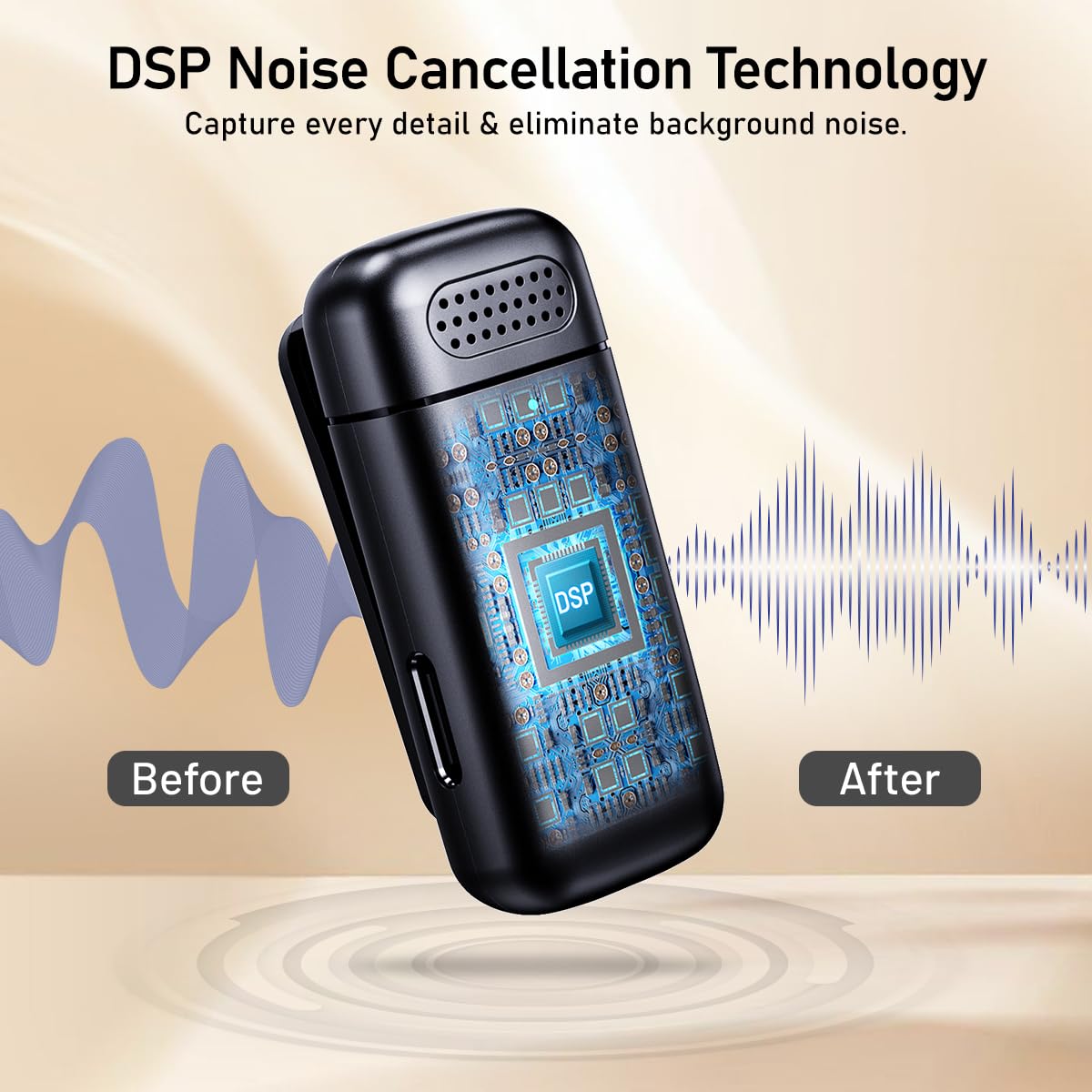
Image 4: The pTron KWM-2 microphone showcasing its DSP Noise Cancellation Technology, with visual representations of sound waves before and after noise reduction.
4.3 Reverberation Mode
The microphone includes a reverberation mode for adding an echo effect to your audio. Refer to the device's specific button functions for activation. (Specific button details are not provided in the source data, please refer to product packaging or quick start guide for exact button press sequence).
4.4 Attaching the Furry Wind Muff Filters
For outdoor recording or in windy conditions, attach the included furry wind muff filters to the microphones to minimize wind noise and improve audio quality.

Image 5: A woman taking a selfie while wearing the pTron KWM-2 microphone, demonstrating how the furry mic filter helps to reduce wind and environmental noise for clear audio.
4.5 Recording with Phone Charging
The Type-C receiver allows you to charge your connected device (smartphone/tablet) while recording, ensuring uninterrupted sessions.
- Connect a Type-C charging cable to the charging port on the receiver.
- Doldurma kabelinin digər ucunu enerji mənbəyinə qoşun.

Image 6: The pTron KWM-2 Type-C receiver connected to a smartphone, illustrating the capability to charge the phone simultaneously while recording audio.
4.6 Simsiz diapazon
The KWM-2 system provides a seamless wireless range of 20 to 25 meters, offering flexibility for various recording scenarios.

Image 7: A couple walking outdoors, with a smartphone recording using the pTron KWM-2 microphone system, illustrating the effective 20 to 25-meter wireless transmission range.
5. Baxım
5.1 Təmizləmə
- Wipe the microphones and charging case with a soft, dry cloth.
- Aşındırıcı təmizləyicilər və ya kimyəvi maddələrdən istifadə etməyin.
- Şarj portlarının toz və zibildən təmiz olduğundan əmin olun.
5.2 Saxlama
- Cihazı birbaşa günəş işığından və həddindən artıq temperaturdan uzaq sərin, quru yerdə saxlayın.
- Keep the microphones in the charging case when not in use to protect them and maintain battery life.
5.3 Batareya Baxımı
- Charge the device regularly, even if not in frequent use, to prolong battery lifespan.
- Avoid fully discharging the batteries for extended periods.
6. Giderme
If you encounter issues with your pTron KWM-2, please refer to the following common solutions:
| Problem | Mümkün Həll |
|---|---|
| Səs çıxışı yoxdur |
|
| Zəif səs keyfiyyəti / Həddindən artıq səs-küy |
|
| Microphones not pairing |
|
| Doldurma problemləri |
|
7. Texniki spesifikasiyalar
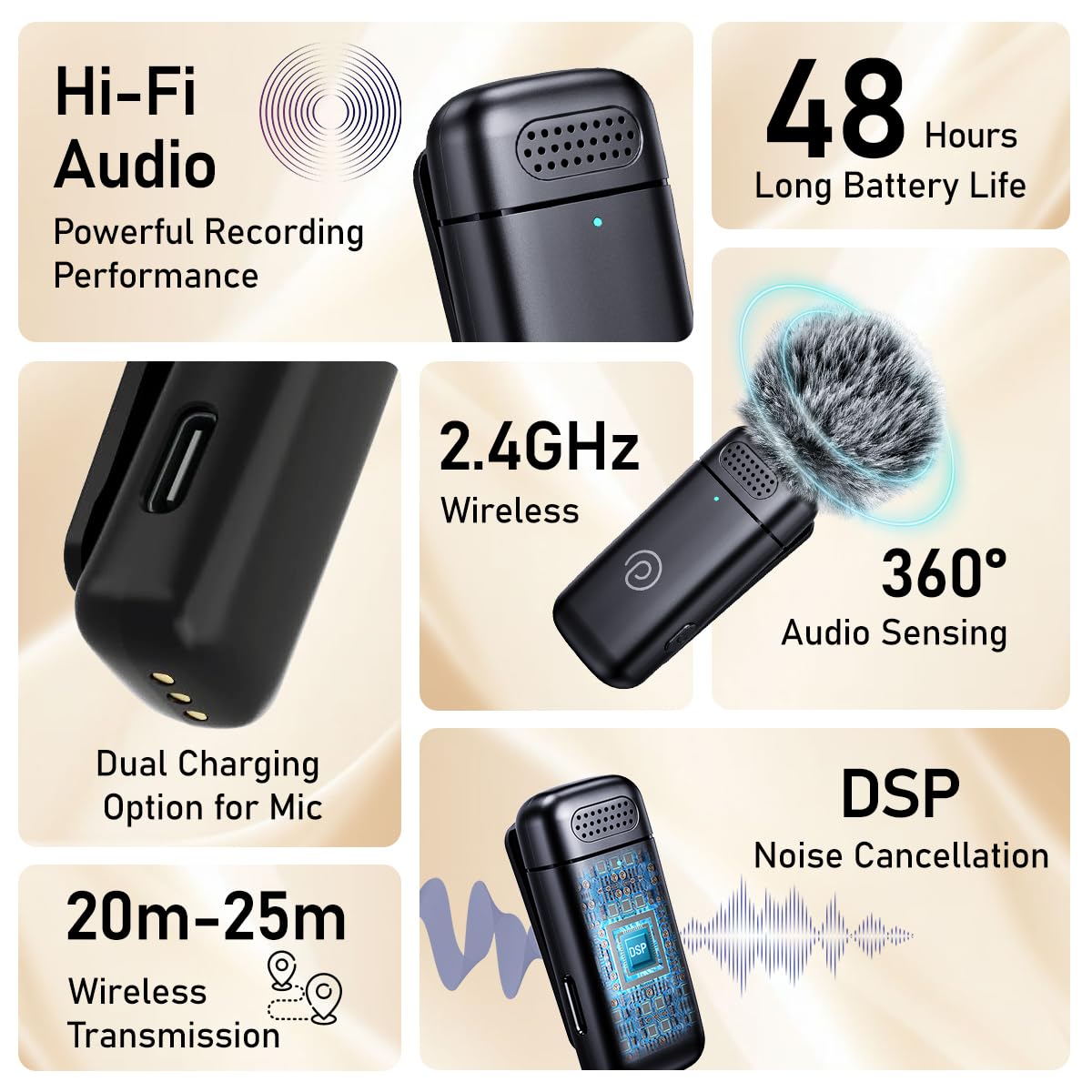
Image 8: An infographic detailing the pTron KWM-2's core features, including high-fidelity audio, 48-hour battery life, 2.4GHz wireless technology, 360-degree audio sensing, dual charging, 20-25 meter wireless range, and DSP noise cancellation.
| Xüsusiyyət | Detal |
|---|---|
| Model Adı | KWM-2 |
| Bağlantı texnologiyası | RF (2.4GHz Wireless) |
| Bağlayıcı növü | USB Type-C |
| Uyğun Cihazlar | Smartfon, Planşet |
| Mikrofon Forma Faktoru | Lavalier (Collar Clip) |
| Qütb nümunəsi | Omnidirectional (360° Audio Sensing) |
| Xüsusi Xüsusiyyətlər | Battery Indicator Light, Clip, DSP Noise Reduction, Reverberation Mode |
| Wireless Range | 20-25 metr |
| Batareya Ömrü (şarj qutusu ilə) | 48 saata qədər |
| Güc mənbəyi | Batareya ilə işləyən (Litium Polimer) |
| Daxil olan komponentlər | 2N Microphones, 1N Receiver, 1N Charging Case, 1N Charging Cable, 2N Filters |
| Maddə Çəkisi | 77 qram |
| Məhsul Ölçüləri (UxGxY) | 8.6 x 6.2 x 2.9 Santimetre |
| Material | Akrilonitril Butadien stirolu |
| Rəng | Jet Qara |
8. Zəmanət Məlumatı
The pTron KWM-2 Wireless Microphone System comes with a 1 illik istehsalçı zəmanəti. This warranty covers manufacturing defects only. Please retain your purchase receipt as proof of purchase for warranty claims.
The warranty does not cover damages resulting from misuse, accidents, unauthorized modifications, or normal wear and tear.
9. Müştəri dəstəyi
For any queries, technical assistance, or warranty claims, please contact pTron customer support:
- Telefon: 040-67138888
- E-poçt: support@ptron.in
Manufacturer Address: PALRED ELECTRONICS PVT. LTD., SY.NO. 56, 1ST FLOOR, GUNDLAPOCHAMPALLY VILLAGE, TECH PARK MTP, TSIIC-IALA NACHARAM, HYDERABAD - 500076, TELANGANA, INDIA.


