1. Giriş
The Audizio Desio is a versatile digital radio that combines classic aesthetics with modern audio technology. It features DAB, DAB+, and FM tuning for clear radio reception, along with Bluetooth 5.0 for wireless streaming, a USB port for media playback, and a 3.5mm AUX input for wired connections. The radio is equipped with a 2.4-inch color LCD display and integrated stereo speakers, making it suitable for various environments such as living rooms, kitchens, or bedrooms.
This manual provides detailed instructions for setting up, operating, and maintaining your Audizio Desio radio. Please read it thoroughly before use to ensure proper functionality and to maximize your listening experience.
2. Təhlükəsizlik Məlumatı
- Güc adapterinin səsini təmin edintage qoşulmazdan əvvəl yerli enerji təchizatınızla uyğunlaşır.
- Cihazı yağışa, nəmə və ya həddindən artıq temperatura məruz qoymayın.
- Cihazı istilik mənbələrinin yaxınlığında və ya birbaşa günəş işığı altında yerləşdirməyin.
- c açmayınasing; bütün xidməti ixtisaslı işçilərə yönləndirin.
- Cihazı güclü maqnit sahələrindən uzaq tutun.
- Cihazı yalnız yumşaq, quru parça ilə təmizləyin.
3. Paketin məzmunu
Qablaşdırmanı açarkən bütün əşyaların mövcudluğunu yoxlayın:
- Audizio Desio DAB/DAB+/FM Radio
- Enerji Adapteri (DC 5V)
- Uzaqdan İdarəetmə
- İstifadəçi təlimatı
4. Nəzarət və əlaqələr
Ön Panel İdarəetmələri
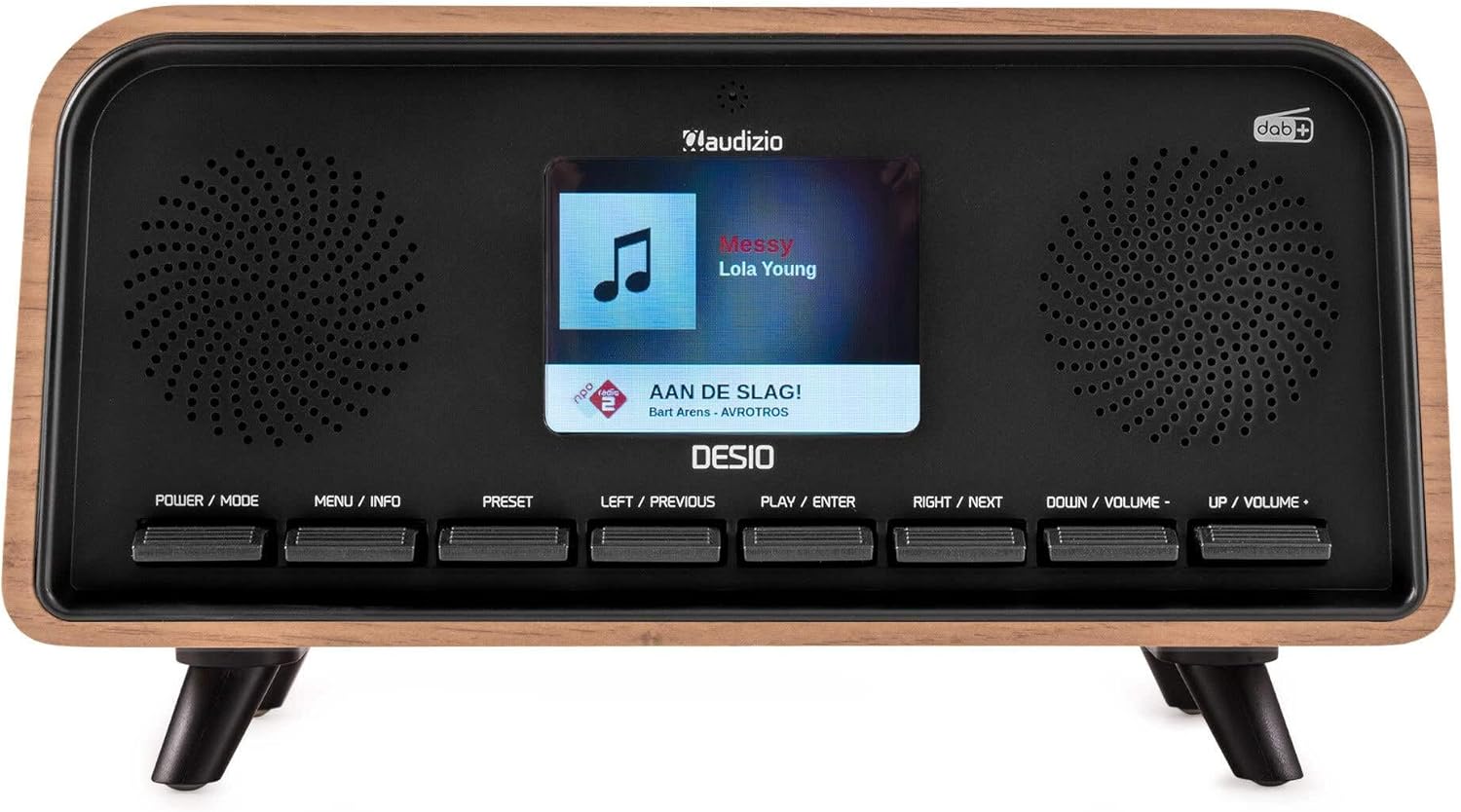
Ön view of the Audizio Desio radio, showing the display playing music with artist and track information. The control buttons are visible below the screen.
- POWER / MODE: Press to turn on/off. Press and hold to switch between DAB, FM, Bluetooth, USB, and AUX modes.
- MENU / INFO: Press to access menu options. In playback mode, press to cycle through information display.
- Əvvəlcədən: Press to recall saved stations. Press and hold to save current station.
- LEFT / PREVIOUS: Navigate left in menus, or skip to previous track/station.
- PLAY / ENTER: Confirm selection in menus, or play/pause media.
- RIGHT / NEXT: Navigate right in menus, or skip to next track/station.
- DOWN / VOLUME -: Decrease volume, or navigate down in menus.
- UP / VOLUME +: Increase volume, or navigate up in menus.
Arxa Panel Əlaqələri
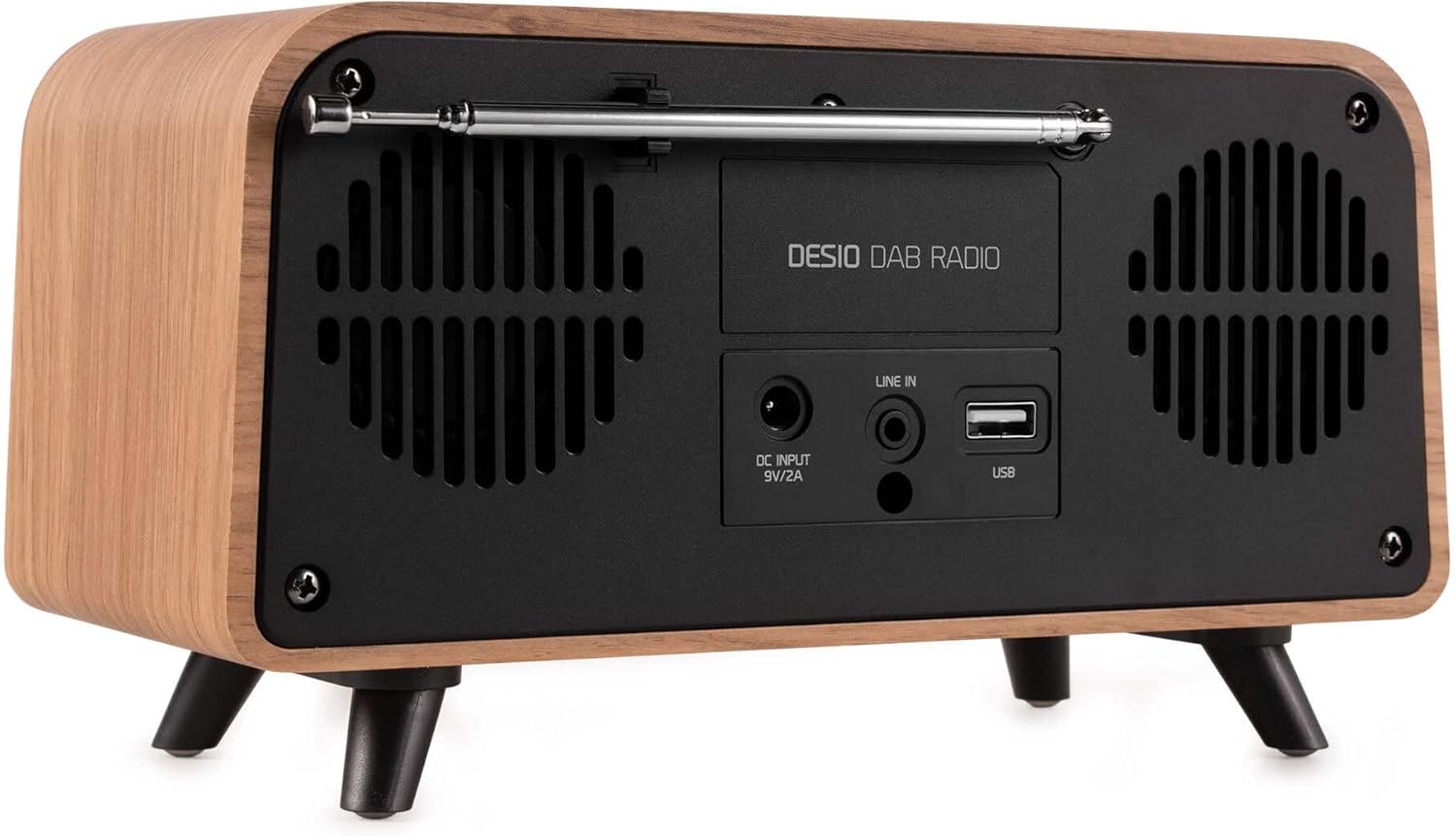
Arxa view of the Audizio Desio radio, highlighting the DC INPUT 9V/2A, LINE IN (3.5mm AUX), and USB ports. The telescopic antenna is extended.
- DC INPUT 9V/2A: Təqdim olunan güc adapterini buraya qoşun.
- LINE IN (3.5mm AUX): 3.5 mm audio kabeldən istifadə edərək xarici audio cihazlarını birləşdirin.
- USB: MP3 oxutmaq üçün USB flash sürücüsünü daxil edin.
- Teleskopik antena: Extend fully for optimal DAB/DAB+ and FM reception.
5. İlkin Quraşdırma
- Güc bağlayın: Plug the provided DC 5V power adapter into the DC INPUT port on the rear of the radio, then plug the adapter into a wall outlet.
- Antenanı genişləndirin: Fully extend the telescopic antenna located on the rear of the unit for best reception.
- Güc Aktivdir: düyməsini basın GÜÇ / MODE radionu yandırmaq üçün düymə.
- First-time DAB Scan: Upon first power-on, the radio will automatically perform a full scan for DAB/DAB+ stations. This may take a few minutes. The display will show the scanning progress.
- Vaxt/Tarixi təyin edin: The time and date will usually be set automatically via DAB signal. If not, you can manually set them via the menu.
6. Əməliyyat Təlimatları
6.1 DAB/DAB+ Radio Əməliyyatı

Ön view of the Audizio Desio radio, displaying a DAB radio station ('NPO Klassiek') and current time.
- Select DAB Mode: düyməsini basın GÜÇ / MODE button repeatedly until 'DAB' is displayed.
- Stansiyaları axtarın: If no stations are found or you wish to rescan, press MENU / MƏLUMAT, sonra istifadə edin LEFT / PREVIOUS or SAĞ / SONRAKİ to select 'Full Scan' and press PLAY / ENTER.
- Select Station: istifadə edin LEFT / PREVIOUS or SAĞ / SONRAKİ buttons to browse available stations. Press PLAY / ENTER stansiya seçmək.
- Əvvəlcədən qeyd edin: Stansiyanı saxlamaq üçün düyməni basıb saxlayın ÖNCƏDƏN AYARLA düyməsi. istifadə edin LEFT / PREVIOUS or SAĞ / SONRAKİ to choose a preset number (1-50), then press PLAY / ENTER təsdiq etmək.
- Əvvəlcədən geri çağırın: Yadda saxlanılan stansiyanı geri çağırmaq üçün düyməni basın ÖNCƏDƏN AYARLA button (do not hold). Use LEFT / PREVIOUS or SAĞ / SONRAKİ to select the desired preset, then press PLAY / ENTER.

Ön view of the Audizio Desio radio, showing the 'Preset Recall' menu on the display, indicating empty preset slots.
6.2 FM Radio Əməliyyatı
- FM Rejimini Seçin: düyməsini basın GÜÇ / MODE button repeatedly until 'FM' is displayed.
- Avtomatik Tarama: Basın və saxlayın PLAY / ENTER to automatically scan for and save available FM stations.
- Əl ilə tənzimləmə: istifadə edin LEFT / PREVIOUS or SAĞ / SONRAKİ to fine-tune the frequency.
- Save/Recall Presets: Follow the same procedure as for DAB radio (Section 6.1).
6.3 Bluetooth (BT) Operation

Ön view of the Audizio Desio radio, with the display showing 'BT' (Bluetooth) mode and 'Connected' status.
- Select BT Mode: düyməsini basın GÜÇ / MODE button repeatedly until 'BT' is displayed. The radio will enter pairing mode, indicated by a flashing Bluetooth icon.
- Cihazı cütləşdirin: On your smartphone, tablet, or laptop, enable Bluetooth and search for available devices. Select 'Audizio Desio' from the list.
- Qoşulun: Once paired, the display will show 'Connected'. You can now stream audio from your device to the radio.
- Oxumağa Nəzarət: Use your connected device or the radio's PLAY / ENTER, LEFT / PREVIOUS, və SAĞ / SONRAKİ oxutmanı idarə etmək üçün düymələr.
6.4 USB Oynatma

Ön view of the Audizio Desio radio, with the display showing 'USB' mode, current time, and details of an MP3 file oynanılır.
- USB Sürücüsünü Qoşun: MP3 faylı olan USB flash sürücüsünü (FAT32 formatında) daxil edin fileradionun arxasındakı USB portuna qoşun.
- USB Rejimini Seçin: düyməsini basın GÜÇ / MODE button repeatedly until 'USB' is displayed. The radio will automatically start playing the first compatible audio file.
- Naviqasiya edin Files: istifadə edin LEFT / PREVIOUS or SAĞ / SONRAKİ to skip tracks. Press PLAY / ENTER oxutmanı dayandırmaq/davam etmək.
6.5 AUX Girişi
- Cihazı birləşdirin: Connect an external audio device (e.g., MP3 player, smartphone) to the 'LINE IN' (3.5mm AUX) port on the rear of the radio using a 3.5mm audio cable (not included).
- Select AUX Mode: düyməsini basın GÜÇ / MODE button repeatedly until 'AUX' is displayed.
- Oxumağa nəzarət: Playback is controlled directly from your connected external device. Adjust volume using the radio's volume controls.
6.6 Siqnalizasiya və Taymer Funksiyaları
- Siqnalların qurulması: Access the alarm settings via the MENU / MƏLUMAT button. You can set multiple alarms with customizable sources (DAB, FM, Buzzer), volume, and recurrence (daily, weekdays, weekends).
- Yuxu Taymeri: The sleep timer allows the radio to turn off automatically after a set period. Access this function via the MENU / MƏLUMAT button and select the desired duration.
- Mürgüləmə funksiyası: When an alarm sounds, press any button (except Power) to activate the snooze function for a short period.
7. Baxım
- Təmizləmə: Radionun səthini təmizləmək üçün yumşaq, quru və tüksüz bir parça istifadə edin. Aşındırıcı təmizləyicilərdən, mumlardan və ya həlledicilərdən istifadə etməyin.
- Antena Baxımı: Teleskopik antenanı əyilməmək və ya qırılmamaq üçün diqqətlə idarə edin.
- Yaddaş: If storing the radio for an extended period, disconnect it from the power supply and store it in a cool, dry place.
8. Giderme
| Problem | Mümkün Səbəb | Həll |
|---|---|---|
| Güc yoxdur | Enerji adapteri qoşulmayıb və ya nasaz çıxış. | Güc adapterinin bağlantısını yoxlayın və fərqli bir rozetkaya qoşun. |
| Zəif DAB/FM qəbulu | Antenna not fully extended or poor signal area. | Fully extend the antenna. Try repositioning the radio. Perform a full scan. |
| Bluetooth qoşulmur | Radio not in BT mode, device not in pairing mode, or too far away. | Ensure radio is in BT mode. Put your device in pairing mode. Move device closer to the radio (within 10m). |
| USB oxutma işləmir | USB drive not inserted correctly, unsupported file format, or drive not FAT32. | Reinsert USB drive. Ensure files are MP3. Check USB drive format (FAT32). |
| No sound from AUX | Radio not in AUX mode, cable faulty, or external device volume low. | Select AUX mode. Check 3.5mm cable. Increase volume on both radio and external device. |
9. Texniki spesifikasiyalar
- Brend: Audizio
- Model: Desio
- Tuner Texnologiyası: FM, DAB+
- Bluetooth: Version 5.0 (Range: 10m)
- Oxutma Seçimləri: Bluetooth, USB, 3.5mm AUX input
- Əvvəlcədən təyin edilmiş stansiyalar: 50
- Ekran: 2.4 düymlük Rəngli LCD
- Funksiyalar: Alarm, Sleep Timer, Snooze, Dimming, Week/Weekend Alarm
- Max Speaker Power: 30 Vt
- Enerji təchizatı: DC 5V (Power Adapter)
- Məhsulun Ölçüləri (Y x G x D): 32 x 16 x 18 sm
- Çəki: 1.66 kq
10. Zəmanət və Dəstək
This product comes with a standard manufacturer's warranty. For detailed warranty terms and conditions, please refer to the documentation provided at the time of purchase or contact your retailer.
For technical support, troubleshooting assistance, or service inquiries, please contact the Audizio customer support team or your local dealer. Please have your product model number (Desio) and purchase information ready when contacting support.


